Manual.ly Logo

Turtle Beach Stealth 600 Gen 3 Bedienungsanleitung

0,0 · 0 Bewertungen

PDF-Handbuch · 1 Seiten

Deutsch

M: QW-35-FL
Seite

/ 1

Loading...
f5b932a4c668d4e16d179327a38e8fa438a4 page 1
Regulatory Compliance Statements for the STEALTH 600 GEN 3
(Wireless Gaming Headset – Headset Model: HWAA0001 & Dongle Model: HWAA0010)
Federal Communications Commission (FCC) Compliance Notices
Class B Interference Statement
This equipment has been tested and found to comply with the limits for a Class B digital device, pursuant to Part 15, Subpart B of the FCC Rules.
These limits are designed to provide reasonable protection against harmful interference in a residential installation. This equipment generates, uses,
and can radiate radio frequency energy and, if not installed and used in accordance with the instructions,
may cause harmful interference to radio
communications. However, there is no guarantee that interference will not occur in a particular
installation. If this equipment does cause harmful
interference to radio or television reception, which can be determined by turning the equipment o and on, the user is encouraged to try to correct
the interference by one or more of the following measures:
• Reorient or relocate the receiving antenna.
• Increase the separation between the equipment and receiver.
• Connect the equipment into an outlet on a circuit dierent from that to which the receiver is connected.
• Consult the dealer or an experienced radio/TV technician for help.
FCC Caution:
This device complies with Part 15 of the FCC Rules. Operation is subject to the following two conditions: (1) This device may not
cause harmful
interference, and (2) this device must accept any interference received, including interference that may cause undesired
operation. This product is
compliant with the Consumer Product Safety Improvement Act of 2008, Public Law 110314 (CPSIA)
CANADA-statement
This device complies with Innovation, Science and Economic Development Canada’s licence-exempt RSS(s).
Operation is subject to the following two conditions :
(1) This device may not cause interference; and
(2) This device must accept any interference, including interference that may cause undesired operation of the device.
Le présent appareil est conforme aux CNR d’Innovation, Sciences et Développement économique Canada exempt(s)
de licence(s) applicables aux appareils radio exempts de licence. L’exploitation est autorisée aux deux conditions suivantes :
(1) l’appareil ne doit pas produire de brouillage ;
(2) l’utilisateur de l’appareil doit accepter tout brouillage radioélectrique subi, même si le brouillage est susceptible
d’en compromettre le fonctionnement.
Radiation Exposure Statement:
The product complies with Canada portable RF exposure limits set forth for an uncontrolled environment and are safe for intended operation
as described in this manual. The further RF exposure reduction can be achieved if the product can be kept as far as possible from the user body
or set the device to lower output power if such function is available.
Le produit est conforme aux limites d‘exposition pour les appareils portables RF pour les Etats-Unis et le Canada établies pour un environnement
non contrôlé Le produit est sûr pour un fonctionnement tel que décrit dans ce manuel. La réduction aux exposition RF peut être augmentée si
l’appareil peut être conservé aussi loin que possible du corps de l‘utilisateur ou que le dispositif est réglé sur la puissance de sortie la plus faible si
une telle fonction est disponible.
For warranty information and service, please visit www.turtlebeach.com/warranty
WARRANTY SERVICE FOR PURCHASES IN AUSTRALIA
Our goods come with guarantees that cannot be excluded under the Australian Consumer Law. For complete details please visit
www.turtlebeach.com/warranty.
To make a warranty claim in Australia during the Warranty Period, Purchaser should contact the VTB repair centre:
Tecworks International Pty Ltd, 13 Distribution Place, Seven Hills NSW 2147, Tel: 1300 074 512
Turtle Beach Europe Ltd is obligated as a producer with a main activity of selling under The Producer Responsibility Obligations
(Packaging Waste) Regulations 2007. To fulfill our obligation we are registered with Comply Direct and their Recycling Room.
Here you will find advice and information on packaging waste management, recycling symbols and the waste hierarchy principles
of reduce, reuse and recycle. https://www.complydirect.com/the-recycling-room/ For instructions in other languages, please visit
http://www.turtlebeach.com/homologation
Copyright © 2024, Voyetra Turtle Beach, Inc. All rights reserved. No part of this document may be reproduced without permission.
Any product names mentioned in this guide may be trademarks or registered trademarks and are the property of their respective owners.
P/N: 426-249-005-500 RC
This symbol on the product or its packaging indicates that this product must not be disposed of with your other
household waste. Instead, it is your responsibility to dispose of your waste equipment by handing it over to a designated
collection point for the recycling of waste electrical and electronic equipment. The separate collection and recycling
of your waste equipment at the time of disposal will help conserve natural resources and ensure that it is recycled in
a manner that protects human health and the environment. For more information about where you can drop o your
waste for recycling, please contact your local authority, or where you purchased your product.
European Union and European Fair Trade Association (EFTA) Regulatory Compliance
Declaration of Conformity
Marking by this symbol:
Hereby, Voyetra Turtle Beach Inc. declares that Stealth 600 Gen 3 Headset Model: HWBB0001 & Dongle Model: HWAA0001
& HWAA0010 is in compliance with Directive 2014/30/EU(EMC), 2014/53/EU(RED), 2014/35/EU(Safety), 2015/863
amending Annex II to 2011/65/EC(RoHS), 2012/19/EU (WEEE), 2006/1907/EU (REACH), 94/92/EU (PACKAGING), 2006/66/
EU (Battery), Electromagnetic Compatibility Regulations 2016(EMC), Radio Equipment Regulations 2017(Radio), Electrical
Equipment Regulations 2016(Safety), The Restriction of the Use of Certain Hazardous Substances in Electrical and Electronic
Equipment Regulations 2012.
The full text of the EU/UK declaration of conformity is available at the following internet address:
http://www.turtlebeach.com/homologation
Radio frequency: 2400MHz 
Operating frequency: 2400~2483.5MHz 
Max. Output power: 4 dBm
Warning:
To prevent possible hearing damage, do not
listen at high volume levels for long periods.
QUICK START GUIDE
GUIDE DE DÉMARRAGE RAPIDE
IMPORTANT
READ BEFORE USING
IMPORTANT
LIRE AVANT UTILISATION
STEALTH 600 GEN 3
CERTIFICATION MODEL:
HEADSET: HWAA0001
DONGLE: HWAA0010
SETUP FOR XBOX® | CONFIGURATION POUR XBOX®
FR
1. Mettez l‘émetteur sans-fil en mode «Xbox»
2. Connectez l‘émetteur sans-fil au port USB-A de la Xbox
®
3. Allumez le casque
4. Attendez que le casque et l‘émetteur USB soient appairés
DE
1. Stelle den Funksender auf den Modus „Xbox“ ein
2. Verbinde den kabellosen Sender mit dem USB-A
Anschluss der Xbox
®
3. Schalte das Headset ein
4. Warte, bis Headset und USB Sender gekoppelt sind
KO
1. „Xbox“󻡄󻉸󼍬󾘥󻣐󻺼󾘥󽁔󻔸󼁀󻦔󼻌󾘥󻻀󼖱
2. Xbox
®
󼓴USB-A 󽆈󽁔󼍬󾘥󻣐󻺼󾘥󽁔󻔸󼁀󻦔󼻌󾘥󼎌󺩌
3. 󽎀󻉸󻻧󾘥󼖠󼑬󾘥󼲸󺯌
4. 󽎀󻉸󻻧󺪘USB󽁔󻔸󼁀󻦔󼻌󺦜󾘥󽄴󼍐󻝝󻆼󾘥󻋨󺯨󼝜󾘥󻂜󺯌
EN
1. Set the USB wireless transmitter to “Xbox” mode
2. Connect the USB wireless transmitter to the
USB-A port on Xbox
®
3. Power on headset
4. Wait for headset and USB wireless transmitter to pair
ES
1. Configura el transmisor inalámbrico en el modo „Xbox“.
2. Conecta el transmisor inalámbrico al puerto USB-A
de la Xbox
®
.
3. Enciende los auriculares
4. Espera a que se emparejen los auriculares y el transmisor USB
JP
1. ワ イ ヤ レ ス ト ラ ン ス ミ ッ タ ー を「 Xbox」モ ー ド に 設 定 し ま す 。
2. ワイヤレストランス ミッタ ー を Xbox
®
の USB-A
端子に接続します。
3. ヘ ッド セ ット の 電 源 を 入 れ ま す 。
4. ヘ ッド セット と USB トランス ミッタ ー が ペ アリン グ さ れ る の を
待ちます。
1
3
2
4
Xbox Version only
SETUP FOR PLAYSTATION, PC AND NINTENDO SWITCH™
CONFIGURATION POUR PLAYSTATION®, PC ET NINTENDO SWITCH™
FR
1.
M
ettez l‘émetteur sans-fil en mode «USB» (concerne la version
Xbox uniquement; pour toutes les autres versions, passez à l‘étape2)
2. Connectez l‘émetteur sans-fil au port USB-A de la PlayStation
®
,
PC ou Nintendo Switch
™
3. Allumez le casque
4. Attendez que le casque et l‘émetteur USB soient appairés
DE
1. Stelle den Funksender auf den Modus „USB“ ein (nur Xbox-
Version – alle anderen Versionen, fahre mit Schritt 2 fort)
2. Verbinde den kabellosen Sender mit dem USB-A
Anschluss von PlayStation
®
, PC oder Nintendo Switch
™
3. Schalte das Headset ein
4. Warte, bis Headset und USB Sender gekoppelt sind
KO
1. “USB“󻡄󻉸󼍬󾘥󻣐󻺼󾘥󽁔󻔸󼁀󻦔󼻌󾘥󻻀󼖱Xbox󻨠󼖠󻝨󾘥󽌐󻂕󺯌󼹜󾘥󻡄󻉼󾘥󻨠
󼖠󼓜 2󻂄󺩠󻗸󾘥󼝠󽌥
2. USB-A 󽆈󽁔󼍬󾘥󻣐󻺼󾘥󽁔󻔸󼁀󻦔󼻌󾘥󼎌󺩌
(PlayStation
®
, PC󻎬󻀰Nintendo Switch
™
)
3. 󽎀󻉸󻻧󾘥󼖠󼑬󾘥󼲸󺯌
4. 󽎀󻉸󻻧󺪘USB󽁔󻔸󼁀󻦔󼻌󺦜󾘥󽄴󼍐󻝝󻆼󾘥󻋨󺯨󼝜󾘥󻂜󺯌
(Xbox version)
(PS/PC version)
EN
1. Set the USB wireless transmitter to “USB“ mode
(Xbox version only – all other versions, proceed to step 2)
2. Connect the USB wireless transmitter to the USB-A
port on PlayStation
®
, PC or Nintendo Switch
™
3. Power on headset
4. Wait for headset and USB wireless transmitter to pair
ES
1. Configura el transmisor inalámbrico en el modo „USB“
(solo en la versión para Xbox; en todas las demás
versiones, ve al paso 2).
2. Conecta el transmisor inalámbrico al puerto USB-A
en PlayStation
®
, PC o Nintendo Switch
™
3. Enciende los auriculares
4. Espera a que se emparejen los auriculares y el transmisor USB
JP
1. ワ イ ヤ レ ス ト ラ ン ス ミ ッ タ ー を「 USB」モ ー ド に 設 定 し ま す( Xbox
バ ー ジョンの み 。他 の バ ー ジョン の 場 合 はステップ 2 に 進 む 。)
2. ワ イ ヤ レ ストラ ン スミッタ ー を PlayStation
®
、PC、Nintendo
Switch
™
の USB-A端子に接続します。
3. ヘ ッド セ ット の 電 源 を 入 れ ま す 。
4. ヘ ッド セット と USB トラン スミッタ ー が ペ アリン グさ れ る の を 待 ちま す。
1
3
2
4
HEADSET CONTROLS | COMMANDES DU CASQUE
Bouton QuickSwitch
Appuyer (1s) = Basculer
entre les modes RF 2,4 GHz
et Bluetooth
LED Status Indication
Indication de statut LED
EQ Mode Button
Bouton de mode égaliseur
Power Button, Superhuman Hearing
Press (2s) = Power on/o
Press (1s) = Superhuman Hearing on/o
Bouton d‘alimentation
Appuyer (2s) = Allumer
USB Charge & Update Port
Port de mise à jour
et charge USB
Mute | Désactivation du microUnmute | Activation du micro
Bluetooth Multi-Function
Button (MFB)
See Bluetooth Pairing setup
Bouton multifonction
Bluetooth (MFB)
Voir la configuration de
l‘appairage Bluetooth
Master Volume
Volume principal
Game / Chat Mix ,
Variable Mic-Monitoring
Game / Chat Mix on Xbox version only
Variable Mic-Monitoring on PlayStation
and PC versions
Volume de réglage du chat/micro
Volume du chat sur la version Xbox
uniquement. Volume de réglage du retour
micro sur les versions PC et PlayStation
Any questions? Des questions?
www.turtlebeach.com/support
Please register your product to receive important updates.
Enregistrez votre produit pour recevoir les mises à jour importantes.
www.turtlebeach.com/productregistration
For warranty, visit:
Concernant la garantie, visitez :
www.turtlebeach.com/warranty
The Stealth 600 will enter Bluetooth pairing mode when
powered on. If no Bluetooth connection is made within
two minutes, pairing mode will stop. To pair new devices,
follow the Bluetooth pairing steps on this page.
Le Stealth 600 entrera en mode d‘appairage Bluetooth
lorsqu‘il sera allumé. Si aucune connexion Bluetooth
n‘est eectuée dans les deux minutes, le mode appai-
rage se désactive. Pour appairer de nouveaux appareils,
suivez les étapes Bluetooth sur cette page.
BLUETOOTH SETUP | CONFIGURATION BLUETOOTH
The QuickSwitch button allows you to quickly switch between low-latency 2.4GHz Wireless and
Bluetooth modes based on your preference. Use Bluetooth mode to make calls, listen to music or
connect to other compatible Bluetooth devices. We recommend using the 2.4GHz Wireless mode
for best performance when gaming on consoles or PC.
Note:
Select advanced audio features available in 2.4GHz Wireless mode may not be supported
in Bluetooth mode.
Le bouton QuickSwitch vous permet de basculer rapidement entre les modes sans-fil 2,4 GHz à
faible latence et le Bluetooth selon vos préférences. Utilisez le mode Bluetooth pour passer des
appels, écouter de la musique ou vous connecter à d‘autres appareils Bluetooth compatibles.
Nous recommandons d‘utiliser le mode sans-fil 2,4 GHz pour obtenir les meilleures performances
en jeux sur consoles ou PC.
Remarque : Certaines fonctions audio avancées disponibles en mode sans-fil 2,4 GHz peuvent ne
pas être prises en charge en mode Bluetooth.
To enable Bluetooth pairing mode:
1. Press and hold the Bluetooth multi-function button (MFB)
until the “Pairing Bluetooth” voice prompt plays.
2. After placing your headset in pairing mode, select the
headset from within your device’s Bluetooth settings
menu to connect.
3. The Bluetooth MFB is used to answer and end calls as well
as media playback control when connected to a compatible
mobile phone.
QUICKSWITCH BUTTON | BOUTON QUICKSWITCH
When the headset is connected using the USB wireless trans-
mitter in the default 2.4GHz Wireless mode, incoming calls can
be answered by single pressing the Bluetooth MFB. The headset
will automatically switch back to 2.4GHz Wireless mode when
the call is ended by single pressing the Bluetooth MFB again.
Activation du mode d’appairage Bluetooth :
1. Appuyez sur le bouton multifonction Bluetooth (MFB) et
maintenez-le enfoncé jusqu‘à ce que vous entendiez le
message vocal „Pairing Bluetooth“.
2. Après avoir placé votre casque en mode d‘appairage, sélec-
tionnez-le dans le menu des paramètres Bluetooth de votre
appareil pour vous connecter.
3. Le bouton MFB Bluetooth est utilisé pour répondre et mettre
fin aux appels ainsi que pour contrôler la lecture des médias
lorsqu‘il est connecté à un téléphone portable compatible.
Lorsque le casque est connecté à l‘aide de l‘émetteur sans-fil USB
en mode sans fil 2,4 GHz par défaut, il est possible de répondre aux
appels entrants en appuyant simplement sur le bouton MFB Blue-
tooth. Le casque repasse automatiquement en mode sans-fil 2,4 GHz
lorsque l‘appel est terminé en appuyant à nouveau sur le bouton MFB.
IMPORTANT | IMPORTANT
PLEASE MAKE SURE YOUR HEADSET IS UPDATED WITH THE LATEST FIRMWARE.
VEUILLEZ VOUS ASSURER QUE VOTRE CASQUE DISPOSE DE LA DERNIÈRE
VERSION DU MICROLOGICIEL.
Android iOS
Download the Swarm
™
II mobile app for Android or iOS to update your headset
to the latest firmware and customize settings.
Alternatively, you can use the Swarm
™
II desktop software for Windows
available at turtlebeach.com/swarm2
Téléchargez l‘application mobile Swarm
™
II pour Android ou iOS afin de mettre votre
casque à jour avec la dernière version du micrologiciel et de personnaliser les paramètres.
Vous pouvez également utiliser le logiciel Swarm
™
II pour Windows,
disponible sur turtlebeach.com/swarm2
Stealth™ 600 Gaming Headset
Casque de jeu Stealth™ 600
USB Wireless Transmitter
OR
Xbox
version
PS/PC
version
Récepteur USB sans-fil
Charging Cable (USB-A to USB-C)
Câble de chargement (USB-A vers USB-C)
PACKAGE CONTENTS | CONTENU
QuickSwitch Button
Press (1s) = Switch between
2.4GHz Wireless and
Bluetooth modes
Bouton d‘alimentation, Superhuman Hearing
Appuyez (2s) = Allumer/éteindre
Appuyez (1s) = Superhuman Hearing on/o

Chatten Sie mit Ihrem Turtle Beach Stealth 600 Gen 3-Handbuch mithilfe von KI

Erhalten Sie sofortige KI-Antworten aus Ihrem Turtle Beach Stealth 600 Gen 3-Handbuch

Fragen Sie alles über Turtle Beach Stealth 600 Gen 3. Antworten stammen aus diesem Handbuch, mit den Seiten, auf denen sie basieren.

Stellen Sie eine Frage

0/1000

Empfehlen Sie Stealth 600 Gen 3?

Ja Nein

Häufig gestellte Fragen

A

Drücken Sie die QuickSwitch-Taste einmal, um zwischen 2.4GHz Wireless und Bluetooth Modi je nach aktueller Präferenz umzuschalten.

Ist diese Antwort hilfreich?

A

Ja, das Headset funktioniert mit Xbox unter Verwendung des beiliegenden USB-Drahtlos-Senders, der auf Xbox-Modus über den USB-A-Port eingestellt ist.

Ist diese Antwort hilfreich?

A

Ein Firmware-Update wird empfohlen mit der Swarm Mobile App oder Desktop-Software, um sicherzustellen, dass die neuesten Leistungsfeatures korrekt arbeiten.

Ist diese Antwort hilfreich?

A

Ja, variables Mikrofon-Monitoring ist auf Xbox-Versionen verfügbar, während PC- und PlayStation-Versionen einstellbare Mikrofon-Überwachungslautstärken bieten.

Ist diese Antwort hilfreich?

A

Wenn innerhalb von zwei Minuten nach dem Einschalten keine Verbindung hergestellt wird, stoppt der Pairing-Modus, und Sie müssen ihn neu aktivieren, um erneut zu koppeln.

Ist diese Antwort hilfreich?

A

Laden Sie das Headset mit dem beigelegten USB-Kabel, das in den Lade- und Update-Port an der Seite des Geräts gesteckt wird.

Ist diese Antwort hilfreich?

A

Warnung rät davon ab, über lange Zeiträume bei hohen Lautstärken zu hören, um mögliches Gehörschaden beim Spielen zu verhindern.

Ist diese Antwort hilfreich?

M: QW-35-FL

Vorteile und Nachteile

Vorteile

  • Die QuickSwitch-Taste ermöglicht nahtlose Übergänge zwischen 2.4GHz und Bluetooth Modi für vielseitige Geräteverwendung.
  • Unterstützt mehrere Plattformen einschließlich Xbox, PlayStation, PC und Nintendo Switch für breite Kompatibilität.
  • Enthält Superhuman Hearing Funktion zur Bereitstellung verbesserter Audio-Hinweise, wichtig für Szenarien im kompetitiven Gaming.
  • Variables Mikrofon-Monitoring erlaubt Spielern, ihre eigene Stimme deutlich zu hören für bessere Team-Kommunikation.
  • Firmware-Updates über die Swarm App sorgen für Langlebigkeit und Leistungsverbesserungen im Laufe der Zeit.
VS

Nachteile

  • Fortgeschrittene Audio-Features im Wireless-Modus verfügbar werden möglicherweise nicht unterstützt, wenn über Bluetooth-Protokoll verbunden.
  • Benötigt spezifische Firmware-Updates durch externe Software oder Apps, um optimalen Funktionsstatus aufrechtzuerhalten.
  • USB-Drahtlos-Sender-Einstellungen unterscheiden sich zwischen Xbox und anderen Plattkonfigurationen, was Moduswechsel erfordert.
  • Keine explizite Batterielebensdauer-Spezifikation im Basis-Text bereitgestellt, was Erwartungen für kontinuierliche Spieldauer einschränkt.
  • Pairing-Modus auf Bluetooth stoppt nach zwei Minuten Inaktivität, was Reaktivierung für neue Geräteverbindung erfordert.
M: QW-35-FL

Produkt Spezifikation

Typ

Kopfhörer (Über-Ohr)

Design

Kopfband

Prinzip

Geschlossen

Mikrofon

Bügel-Mikrofon

Kabellos

Bluetooth 5.2, Digitales Funk

Steuerung

Lautstärkeregler, Stummschalttaste (Mikrofon abklappbar)

Akkulaufzeit

80 h

Ladeanschluss

USB-C-Ladeanschluss

Frequenzgang

20 Hz - 20 kHz

Treiber

5,00 cm

Softwarefunktionen

EQ-Voreinstellungen, benutzerdefiniertes EQ, App-Steuerung

Sondermerkmale

USB-Drahtlosadapter inklusive

M: QW-35-FL

Produkt Beschreibung

Immersives Audio für jeden modernen Gamer

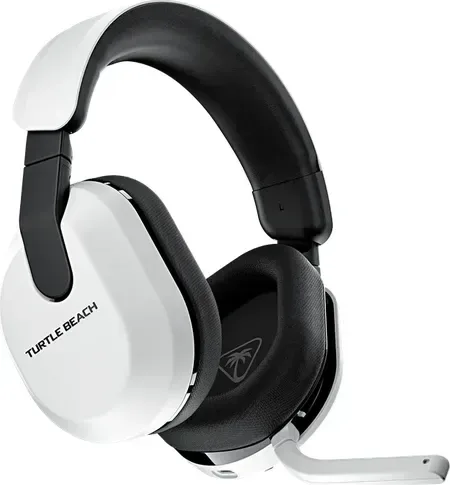
Das Turtle Beach Stealth 600 Gen 3 hebt sich hervor als erste Wahl für Spieler, die Vielseitigkeit über mehrere Plattformen hinweg suchen. Ob Sie auf Xbox, PlayStation, PC oder Nintendo Switch sind, dieses Headset liefert außergewöhnliche Audio-Performance für intensiven Wettbewerb. Eine der herausragenden Eigenschaften ist die Fähigkeit, Verbindungen mühelos zwischen Geräten zu verwalten. Benutzer beziehen sich oft auf Dokumentationen wie das Turtle Beach Stealth 600 Gen 3 Handbuch, um das volle Spektrum der Möglichkeiten dieser spezifischen Hardware-Konfiguration vor dem Start zu verstehen.

Nahtlose Konnektivität und Konfigurationsschritte

Das Einrichten des Headsets ist unkompliziert mit klaren Anweisungen des Herstellers für regionspezifische Modelle. Für Xbox-Nutzer den Sender einfach auf Xbox-Modus setzen und in den USB-Port der Konsole stecken. Nach dem Einschalten erfolgt der Pairing-Prozess automatisch, um sofort eine stabile Drahtlosverbindung herzustellen. PlayStation-, PC- und Switch-Nutzer verbinden den Sender direkt mit dem USB-A-Port ohne Modi initial zu wechseln, es sei denn, sie nutzen den Xbox-Dongle. Die QuickSwitch-Taste ermöglicht das nahtlose Umschalten zwischen Low-Latency 2.4GHz Wireless und Bluetooth-Modi. Diese Flexibilität sorgt dafür, dass Sie Anrufe beantworten oder Musik auf Ihrem Handy hören können, ohne sich ganz von Ihrer Console-Spielsitzung zu trennen.

Fortschrittliche Audio-Features und Steuerschnittstellen

Die Audiokontrolle erfolgt über die intuitive Onboard-Steuerung direkt an der linken Ohrmuschel. Das Lautstärkerad passt Master-Level sofort für alle Audiotypen an, während separate Mischknöpfe Spiel- und Chat-Audio präzise für Kommunikation ausbalancieren. Bei Xbox-Versionen steht variables Mikrofon-Monitoring zur Verfügung, damit Sie Ihre eigene Stimme deutlich hören können ohne unnatürliche Verzerrung. Die Superhuman Hearing-Einstellung verbessert Audio-Hinweise, die für das Auffinden von Gegnern im kompetitiven Spiel entscheidend sind. Um die Gerätleistung über die Zeit optimal zu halten, wird Firmware-Update über die Swarm Mobile App oder Desktop-Software dringend empfohlen vor täglichen Gebrauch.

Komfort und Design für lange Sitzungen

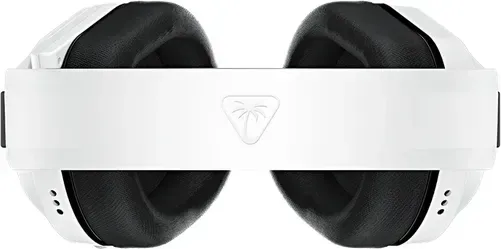
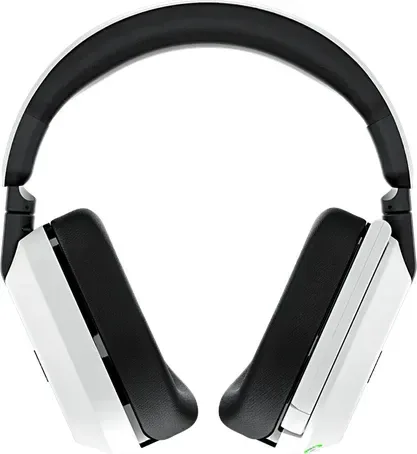
Speziell für verlängerte Gaming-Sessions konzipiert, bieten weiche Memory-Foam-Ohrpolster Unterstützung zur Reduzierung körperlicher Ermüdung während langer Matches. Der verstellbare Kopfband verteilt das Gewicht gleichmäßig oben auf dem Kopf, gewährleistet Stabilität während des Gameplays ohne unerwartetes Abrutschen. Das Aufladen ist bequem über den dedizierten USB-C-Port an der rechten Seitenebene für einfachen Zugang möglich. Dieses Energiemanagement-System stellt sicher, dass Sie weniger Zeit an einer Wandsteckdose verbringen und mehr Zeit in Ihrer virtuellen Welt sicher drinnen verbracht wird. Regulierungseinhaltung garantiert sichere Strahlungsexpositions-Grenzwerte bei normalem Betrieb nahe dem menschlichen Körper. Warnhinweise empfehlen, hohe Lautstärken über lange Perioden zu vermeiden, um mögliches Hörgeräusch zu verhindern.

Maximieren Ihres Gesamterlebnisses heute

Durch das Verstehen der Setup-Verfahren und die Nutzung von Funktionen wie QuickSwitch maximieren Spieler ihre Immersionsebenen signifikant. Egal ob Sie kristallklare Kommunikation oder immersive Soundscapes priorisieren, dieses Headset passt sich Ihren vielfältigen Anforderungen effektiv an verfügbaren Gaming-Ökosystemen an. Stellen Sie sicher, dass Ihr Gerät aktualisiert ist, um potenzielle Interferenzprobleme zu vermeiden, die in offiziellen Spezifikationen beschrieben sind. Die Produktregistrierung hilft, wichtige Updates bezüglich Firmware-Patches für fortlaufende Zuverlässigkeit zu erhalten.

M: QW-35-FL

© Copyright 2026 Manual.ly