Federal Communications Commission (FCC) Compliance Notices
Class B Interference Statement
This equipment has been tested and found to comply with the limits for a Class B digital device, pursuant to Part 15, Subpart B of the FCC Rules.
These limits are designed to provide reasonable protection against harmful interference in a residential installation. This equipment generates, uses,
and can radiate radio frequency energy and, if not installed and used in accordance with the instructions,
may cause harmful interference to radio
communications. However, there is no guarantee that interference will not occur in a particular
installation. If this equipment does cause harmful
interference to radio or television reception, which can be determined by turning the equipment o and on, the user is encouraged to try to correct
the interference by one or more of the following measures:
• Reorient or relocate the receiving antenna.
• Increase the separation between the equipment and receiver.
• Connect the equipment into an outlet on a circuit dierent from that to which the receiver is connected.
• Consult the dealer or an experienced radio/TV technician for help.
FCC Caution:
This device complies with Part 15 of the FCC Rules. Operation is subject to the following two conditions: (1) This device may not
cause harmful
interference, and (2) this device must accept any interference received, including interference that may cause undesired
operation. This product is
compliant with the Consumer Product Safety Improvement Act of 2008, Public Law 110314 (CPSIA)
FCC RF Radiation Exposure Statement:
This equipment complies with FCC radiation exposure limits set forth for an uncontrolled environment. End users must follow the specific
operating instructions for satisfying RF exposure compliance. This transmitter must not co-located or operating in conjunction with any other
antenna or transmitter.
CANADA-statement
This device complies with Innovation, Science and Economic Development Canada’s licence-exempt RSS(s).
Operation is subject to the following two conditions :
(1) This device may not cause interference; and
(2) This device must accept any interference, including interference that may cause undesired operation of the device.
Le présent appareil est conforme aux CNR d’Innovation, Sciences et Développement économique Canada exempt(s)
de licence(s) applicables aux appareils radio exempts de licence. L’exploitation est autorisée aux deux conditions suivantes :
(1) l’appareil ne doit pas produire de brouillage ;
(2) l’utilisateur de l’appareil doit accepter tout brouillage radioélectrique subi, même si le brouillage est susceptible
d’en compromettre le fonctionnement.
Radiation Exposure Statement:
The product complies with Canada portable RF exposure limits set forth for an uncontrolled environment and are safe for intended operation
as described in this manual. The further RF exposure reduction can be achieved if the product can be kept as far as possible from the user body
or set the device to lower output power if such function is available.
Le produit est conforme aux limites d‘exposition pour les appareils portables RF pour les Etats-Unis et le Canada établies pour un environnement
non contrôlé Le produit est sûr pour un fonctionnement tel que décrit dans ce manuel. La réduction aux exposition RF peut être augmentée si
l’appareil peut être conservé aussi loin que possible du corps de l‘utilisateur ou que le dispositif est réglé sur la puissance de sortie la plus faible si
une telle fonction est disponible.
Battery Caution:
• Do not disassemble, impact, squeeze or throw into fire;
• Do not continue to use if severe swelling;
• Do not place in a high temperature environment;
• Do not use after the battery is flooded;
• Do not use any charger other then that specifically provided for use with the equipment;
• Dispose of used batteries according to the instructions.
QUICK START GUIDE
GUIDE DE DÉMARRAGE RAPIDE
IMPORTANT
READ BEFORE USING
IMPORTANT
LIRE AVANT UTILISATION
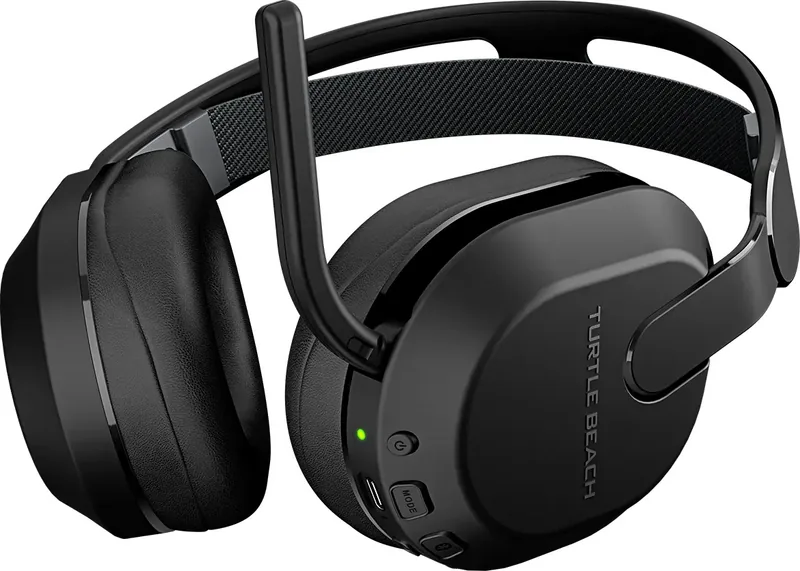
STEALTH 500
CERTIFICATION MODEL:
HEADSET: HWBB0005
DONGLE: HWAA0005
For warranty information and service, please visit www.turtlebeach.com/warranty
WARRANTY SERVICE FOR PURCHASES IN AUSTRALIA
Our goods come with guarantees that cannot be excluded under the Australian Consumer Law. For complete details please visit
www.turtlebeach.com/warranty.
To make a warranty claim in Australia during the Warranty Period, Purchaser should contact the VTB repair centre:
Tecworks International Pty Ltd, 13 Distribution Place, Seven Hills NSW 2147, Tel: 1300 074 512
Turtle Beach Europe Ltd is obligated as a producer with a main activity of selling under The Producer Responsibility Obligations (Packaging Waste)
Regulations 2007. To fulfill our obligation we are registered with Comply Direct and their Recycling Room. Here you will find advice and information
on packaging waste management, recycling symbols and the waste hierarchy principles of reduce, reuse and recycle.
https://www.complydirect.com/the-recycling-room/ For instructions in other languages, please visit http://www.turtlebeach.com/homologation
Regulations 2016(EMC), Radio Equipment Regulations 2017(Radio), Electrical Equipment Regulations 2016(Safety), The Restriction of the
Use of Certain Hazardous Substances in Electrical and Electronic Equipment Regulations 2012.
The full text of the EU/UK declaration of conformity is available at the following internet address: http://www.turtlebeach.com/homologation
Radio frequency: 2400MHz
Operating frequency: 2400~2483.5MHz
Max. Output power: 4 dBm
Warning:
To prevent possible hearing damage, do not
listen at high volume levels for long periods.
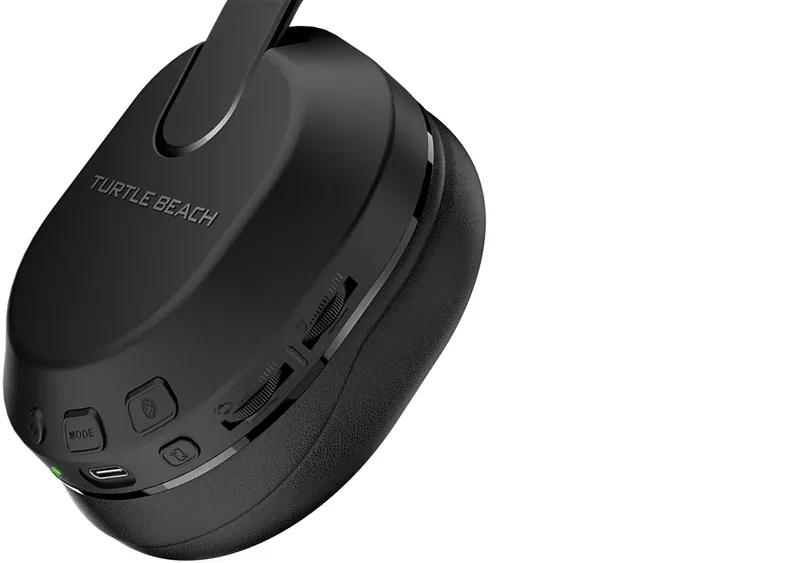
HEADSET CONTROLS | COMMANDES DU CASQUE
QuickSwitch Button
Press (1s) = Switch between
2.4GHz Wireless and
Bluetooth modes
Bouton QuickSwitch
Appuyer (1s) = Basculer
entre les modes RF 2,4 GHz
et Bluetooth
LED Status Indication
Indication de statut LED
EQ Mode Button
Bouton de mode égaliseur
Power Button,
Superhuman Hearing
Press (2s) = Power on/o
Press (1s) = Superhuman
Hearing on/o
Bouton d‘alimentation,
Superhuman Hearing
Appuyez (2s) = Allumer/éteindre
Appuyez (1s) = Superhuman
Hearing on/o
Game / Chat Mix ,
Variable Mic-Monitoring
Game / Chat Mix on Xbox version only
Variable Mic-Monitoring on PlayStation
and PC versions
Volume de réglage du chat/micro
Volume du chat sur la version Xbox
uniquement. Volume de réglage du retour
micro sur les versions PC et PlayStation
Bluetooth Multi-Function
Button (MFB)
See Bluetooth Pairing setup
Bouton multifonction
Bluetooth (MFB)
Voir la configuration de
l‘appairage Bluetooth
Master Volume
Volume principal
USB Charge & Update Port
Port de mise à jour
et charge USB
Mute | Désactivation du microUnmute | Activation du micro
Any questions? Des questions?
www.turtlebeach.com/support
Please register your product to receive important updates.
Enregistrez votre produit pour recevoir les mises à jour importantes.
www.turtlebeach.com/productregistration
For warranty, visit:
Concernant la garantie, visitez :
www.turtlebeach.com/warranty
The QuickSwitch button allows you to quickly switch between low-latency 2.4GHz Wireless and
Bluetooth modes based on your preference. Use Bluetooth mode to make calls, listen to music or
connect to other compatible Bluetooth devices. We recommend using the 2.4GHz Wireless mode
for best performance when gaming on consoles or PC.
Note: Select advanced audio features available in 2.4GHz Wireless mode may not be
supported in Bluetooth mode.
The Stealth 500 will enter Bluetooth pairing mode when
powered on. If no Bluetooth connection is made within two
minutes, pairing mode will stop.
Le Stealth 500 entrera en mode d‘appairage Bluetooth
lorsqu‘il sera allumé. Si aucune connexion Bluetooth n‘est
eectuée dans les deux minutes, le mode appairage se
désactive.
BLUETOOTH SETUP | CONFIGURATION BLUETOOTH
QUICKSWITCH BUTTON | BOUTON QUICKSWITCH
To enable Bluetooth pairing mode:
1. Press and hold the Bluetooth multi-function button (MFB)
until the “Pairing Bluetooth” voice prompt plays.
2. After placing your headset in pairing mode, select the
headset from within your device’s Bluetooth settings
menu to connect.
3. The Bluetooth MFB is used to answer and end calls as well
as media playback control when connected to a compatible
mobile phone.
When the headset is connected using the USB wireless trans-
mitter in the default 2.4GHz Wireless mode, incoming calls can
be answered by single pressing the Bluetooth MFB. The headset
will automatically switch back to 2.4GHz Wireless mode when
the call is ended by single pressing the Bluetooth MFB again.
Activation du mode d’appairage Bluetooth :
1. Appuyez sur le bouton multifonction Bluetooth (MFB) et
maintenez-le enfoncé jusqu‘à ce que vous entendiez le
message vocal „Pairing Bluetooth“.
2. Après avoir placé votre casque en mode d‘appairage, sélec-
tionnez-le dans le menu des paramètres Bluetooth de votre
appareil pour vous connecter.
3. Le bouton MFB Bluetooth est utilisé pour répondre et mettre
fin aux appels ainsi que pour contrôler la lecture des médias
lorsqu‘il est connecté à un téléphone portable compatible.
Lorsque le casque est connecté à l‘aide de l‘émetteur sans-fil USB
en mode sans fil 2,4 GHz par défaut, il est possible de répondre aux
appels entrants en appuyant simplement sur le bouton MFB Blue-
tooth. Le casque repasse automatiquement en mode sans-fil 2,4 GHz
lorsque l‘appel est terminé en appuyant à nouveau sur le bouton MFB.
Le bouton QuickSwitch vous permet de basculer rapidement entre les modes sans-fil 2,4 GHz à
faible latence et le Bluetooth selon vos préférences. Utilisez le mode Bluetooth pour passer des
appels, écouter de la musique ou vous connecter à d‘autres appareils Bluetooth compatibles.
Nous recommandons d‘utiliser le mode sans-fil 2,4 GHz pour obtenir les meilleures performances
en jeux sur consoles ou PC.
Remarque : Certaines fonctions audio avancées disponibles en mode sans-fil 2,4 GHz peuvent ne
pas être prises en charge en mode Bluetooth.
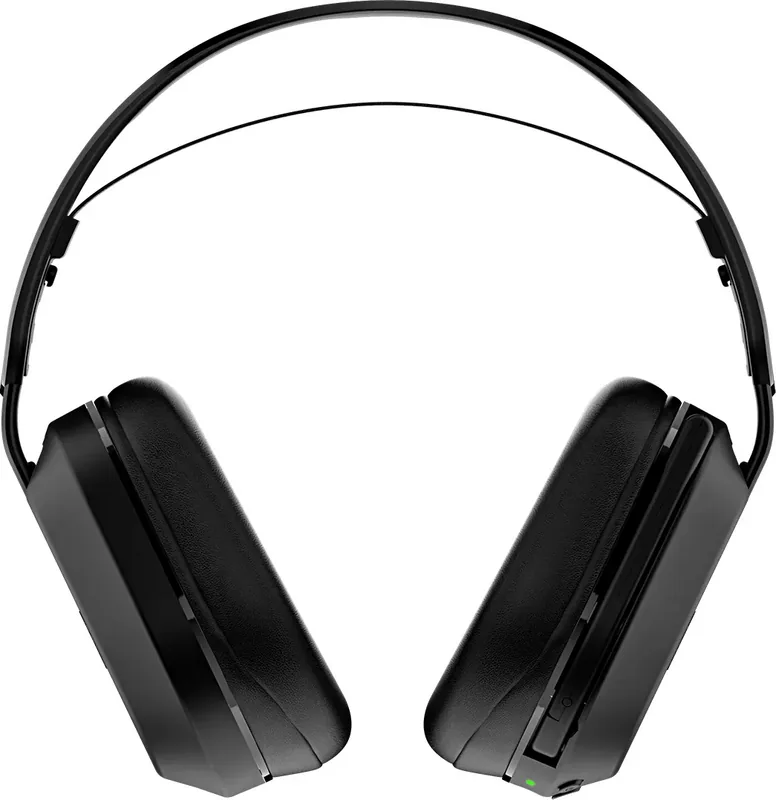
Stealth™ 500 Gaming Headset
Casque de jeu Stealth™ 500
USB Wireless Transmitter
Récepteur USB sans-fil
Charging Cable (USB-A to USB-C)
Câble de chargement (USB-A vers USB-C)
PACKAGE CONTENTS | CONTENU
Adjustable Strap
Bandeau ajustable
IMPORTANT | IMPORTANT
PLEASE MAKE SURE YOUR HEADSET IS UPDATED WITH THE LATEST FIRMWARE.
VEUILLEZ VOUS ASSURER QUE VOTRE CASQUE DISPOSE DE LA DERNIÈRE
VERSION DU MICROLOGICIEL.
AndroidiOS
Download the Swarm™ II mobile app for Android or iOS to update your headset
to the latest firmware and customize settings.
Alternatively, you can use the Swarm™ II desktop software for Windows
available at turtlebeach.com/swarm2
Téléchargez l‘application mobile Swarm™ II pour Android ou iOS afin de mettre votre
casque à jour avec la dernière version du micrologiciel et de personnaliser les paramètres.
Vous pouvez également utiliser le logiciel Swarm™ II pour Windows,
disponible sur turtlebeach.com/swarm2
SETUP FOR PLAYSTATION®, PC AND NINTENDO SWITCH™
CONFIGURATION POUR PLAYSTATION®, PC ET NINTENDO SWITCH™
FR
1. Reliez l‘émetteur sans-fil au port USB sur PlayStation
®
,
PC ou Nintendo Switch
™
2. Allumez le casque
3. Attendez que le casque et l‘émetteur USB soient appairés
DE
1. Verbinde den kabellosen Sender mit dem USB Anschluss
von PlayStation
®
, PC oder Nintendo Switch
™
2. Schalte das Headset ein
3. Warte, bis Headset und USB Sender gekoppelt sind
KO
1. USB
(PlayStation
®
, PCNintendo Switch
™
)
2.
3. USB
EN
1. Connect wireless transmitter to the USB port
on PlayStation
®
, PC or Nintendo Switch
™
2. Power on headset
3. Wait for headset and USB wireless transmitter to pair
ES
1. Conecta el transmisor inalámbrico al puerto USB
en PlayStation
®
, PC o Nintendo Switch
™
2. Enciende los auriculares
3. Espera a que se emparejen los auriculares
y el transmisor USB
JP
1. ワイヤレストランスミッターをUSB 端子に接続します。
(PlayStation
®
、PC、Nintendo Switch
™
)
2. ヘッドセットの電源を入れます。
3. ヘッドセットと USB トランスミッターがペアリングされる
のを待ちます。
1
23
PlayStation and PC versions only
SETUP FOR XBOX® | CONFIGURATION POUR XBOX®
FR
1. Reliez l‘émetteur sans-fil au port USB sur Xbox
®
2. Allumez le casque
3. Attendez que le casque et l‘émetteur USB soient appairés
DE
1. Verbinde den kabellosen Sender mit dem USB
Anschluss der Xbox
®
2. Schalte das Headset ein
3. Warte, bis Headset und USB Sender gekoppelt sind
KO
1. Xbox
®
USB
2.
3. USB
EN
1. Connect wireless transmitter to the USB port on Xbox
®
2. Power on headset
3. Wait for headset and USB wireless transmitter to pair
ES
1. Conecta el transmisor inalámbrico al puerto
USB de la Xbox
®
2. Enciende los auriculares
3. Espera a que se emparejen los auriculares
y el transmisor USB
JP
1. ワイヤレストランスミッターをXbox
®
の USB
端子に接続します。
2. ヘッドセットの電源を入れます。
3. ヘッドセットとUSB トランスミッターがペアリングされる
のを待ちます。
1
23
Xbox version only
FRONT
BACK
/1
%
Schnelle Überprüfung
Ich bin kein Roboter
Falsche Antwort, bitte versuchen Sie es erneut.
Chatten Sie mit Ihrem Turtle Beach Stealth 500 (2024)-Handbuch mithilfe von KI
Erhalten Sie sofortige KI-Antworten aus Ihrem Turtle Beach Stealth 500 (2024)-Handbuch
Fragen Sie alles über Turtle Beach Stealth 500 (2024). Antworten stammen aus diesem Handbuch, mit den Seiten, auf denen sie basieren.
Stellen Sie eine Frage
0/1000
Empfehlen Sie Stealth 500 (2024)?
JaNein
Häufig gestellte
Fragen
A
Drücken Sie die QuickSwitch-Taste für eine Sekunde, um zwischen 2.4GHz Wireless-Modus und Bluetooth-Fähigkeiten je nach Ihrem Präferenz zu wechseln.
Ist diese Antwort hilfreich?
A
Ja, Sie können Anrufe annehmen und beenden, indem Sie die Bluetooth Multi-Function Button drücken, wenn es mit einem kompatiblen Mobilgerät verbunden ist.
Ist diese Antwort hilfreich?
A
Laden Sie die Swarm II Mobile-App oder Desktop-Software herunter, um das Headset einfach auf die neueste Firmware-Version zu aktualisieren.
Ist diese Antwort hilfreich?
A
Ja, das Headset funktioniert mit der Nintendo Switch unter Verwendung des USB-Wireless-Transmitters für latenzarme Leistung.
Ist diese Antwort hilfreich?
A
Superhuman Hearing ist eine Audiofunktion, die entwickelt wurde, um Schritte und Umgebungsgeräusche für bessere Situationswahrnehmung während Spielen zu verbessern.
Ist diese Antwort hilfreich?
A
Besuchen Sie www.turtlebeach.com/warranty für vollständige Details bezüglich Garantieabdeckung und Serviceoptionen für Ihren Kauf.
Ist diese Antwort hilfreich?
M: QW-35-FL
Vorteileund
Nachteile
Vorteile
Doppelte drahtlose Konnektivität bietet nahtloses Wechseln zwischen Gaming und Mobilgerät.
QuickSwitch-Taste ermöglicht sofortige Modusänderungen ohne Menüdurchsuchung.
Superhuman Hearing-Funktion erkennt subtile Audio-Hinweise für Vorteil.
Kompatibel mit Xbox, PlayStation, PC und Nintendo Switch Plattformen.
Swarm App-Integration ermöglicht einfache Firmware-Updates und Anpassung.
VS
Nachteile
Erweiterte Audiofunktionen werden möglicherweise im Bluetooth-Modus nicht unterstützt.
Verfügbarkeit variabler Mikrofonüberwachung variiert je nach Konsolenmodell.
Batterieleistung nimmt ab, wenn häufig hohen Temperaturen ausgesetzt.
Länge des USB-Ladekabels kann Platzierungsabstand begrenzen.
Preisniveau ist höher als bei grundlegenden kabelgebundenen Headset-Alternativen.
Gaming verlangt Präzision. Zu verstehen, wie das Potenzial maximiert wird, ist entscheidend. Das Turtle Beach Stealth 500 (2024) stellt einen großen Schritt nach vorn in der drahtlosen Audiottechnologie dar. Dieses Headset bringt doppelte Verbindungsoptionen, sodass Gamer nahtlos zwischen latenzarmen drahtlosen Verbindungen und Standard-Bluetooth-Links wechseln können. Egal ob auf Konsolen dominiert oder Sprachchats von Smartphones verwaltet werden, Vielseitigkeit definiert Ihre Session.
Nahtlose Konnektivität
Ein herausragendes Merkmal ist die QuickSwitch-Tasten-Funktionalität. Drücken Sie diese Taste eine Sekunde lang, um zwischen dediziertem 2.4GHz Wireless-Modus und Bluetooth-Fähigkeiten zu wechseln. Die 2.4GHz-Verbindung sorgt für minimale Eingabelatenz, kritisch für schnelllebige Shooter. Umgekehrt öffnet Bluetooth Türen für Musikstreaming und Telefonate. Diese Flexibilität eliminiert das Bedürfnis nach mehreren Headsets. Benutzern wird empfohlen, den Wireless-Transmitter für Gaming zu priorisieren, um erweiterte Audiofunktionen zu nutzen. Setup beinhaltet das Einstecken des USB-Wireless-Transmitters in den Konsolenport und Einschalten des Headsets, bis sie sich automatisch koppeln. Signal bleibt innerhalb der Reichweite stundenlang stabil.
Anpassung und Steuerung
Anpassen von Soundprofilen erhöht Immersion erheblich. Onboard-Steuerungen ermöglichen direkte Anpassung von Game-Chat-Mixes und Mikrofonüberwachungsebenen. Auf bestimmten Plattformen lässt variable Mikrofonüberwachung Spieler ihre eigene Stimme deutlich hören. Zusätzlich hilft der Superhuman Hearing Boost subtile Schritte zu erkennen. Einstellen der Einstellungen über die Begleit-App verfeinert das Hörerlebnis weiter. Das Master-Volumenrad bietet schnellen Zugriff ohne Flussunterbrechung. Geräuschisolierungspolsterstellen stellen sicher, dass externe Ablenkungen während kritischer Runden minimal bleiben. Bequeme Materialien unterstützen lange Gaming-Sessions.
Firmware und Updates
Software aktuell zu halten ist lebenswichtig für Leistungsstabilität. Die Swarm-Anwendung erleichtert einfache Firmware-Updates über Mobile- oder Desktop-Oberflächen. Sicherstellung, dass Ihr Gerät die neueste Version ausführt, garantiert Kompatibilität mit neuen Systemupdates. Regelmäßige Wartung durch das offizielle Supportportal verlängert Lebensdauer. Richtige Ladepraktiken tragen auch zur Langlebigkeit bei. Vermeiden Sie es, die Batterie extremen Temperaturen auszusetzen. Halten Sie sich an sichere Nutzungshinweise zum Schutz des Benutzers und der Ausrüstung. Batteriegesundheit hängt davon ab, Tiefentladungszyklen zu vermeiden. Anschlüsse müssen sauber bleiben.
Hinweis: Überprüfen Sie vor dem Kauf immer die Kompatibilität mit Ihrer spezifischen Konsole. Einige Funktionen variieren je nach Region und Modellnummer.
Plattformspezifika
Verschiedene Ökosysteme erfordern spezifische Aufmerksamkeit. Xbox-Nutzer profitieren von integrierten Party-Chat-Funktionen, während PlayStation distinctive Audio-Verbesserungen bietet. PC-Gamer nutzen die Desktop-App für granulare Equalizer-Einstellung. Nintendo Switch-Besitzer genießen portables Spielen mit Wireless-Fidelity. Regulatorische Compliance sorgt für Sicherheit auf allen wichtigen Märkten. Konformitätserklärungen bestätigen, dass Hochfrequenzexposition innerhalb sicherer Grenzen bleibt. Folgen von Betriebsanweisungen verhindert Störungen. Priorisierung der Benutzersicherheit neben Leistungsexzellenz gewährleistet Genuss für jeden Gamer, der in jeder Umgebung konsistent erstklassige Klangqualität sucht.
Fazit
Integration dieses Peripheriegeräts vereinfacht Workflow und maximiert Audio-Fidelität. Durch Beherrschen von Steuerungen und Nutzen von Software-Ökosystemen erhalten Spieler einen Wettbewerbsvorsprung. Richtige Pflege gewährleistet Jahre zuverlässigen Service. Jeder Gamer, der Qualität sucht, benötigt diese Lösung effektiv.