Manual.ly Logo

Swisstone SW 320 HR Bedienungsanleitung

2,5 · 6 Bewertungen

PDF-Handbuch · 2 Seiten

Deutsch

M: OA-GPT-5-NAN
Seite

/ 2

Loading...
e720f8c25c9816e9020f9106781ebf758aa3 page 2
Warranty
In case you need support during setup or usage of your
product you will find the relevant contact details on the
following website: www.swisstone.de.
If you detect a defect resulng from manufacturing
and/or material faults within 24 months from purchase,
please contact your dealer. The warranty does not apply
for improper treatment or failure to comply with
informaon contained in this user guide, for
interference on device executed by dealer or user (e. g.
installaons, soware downloads,…) and for total loss.
Furthermore it does not apply to ingress of liquids, use
of force, non‐maintenance, improper operaon or other
circumstances caused by the user. It also does not apply
to failure caused by a thunderstorm or any other
voltage fluctuaons. The manufacturer reserves the
right in this case to charge the customer for
replacement or repair. For wear parts such as baeries
or casing a restricted warranty period of 6 months is
valid. Manuals and possibly supplied soware are
excluded from this warranty. Further or other claims
arising from the manufacturer’s warranty are excluded.
Thus, there is no liability claim for business interrupon,
loss of profits, loss of data, addionally installed
soware by user or other informaon. The receipt with
purchase date forms the warranty proof.
Correct disposal of baeries in this product
(Applicable in countries with separate collecon
systems)
The marking on the baery, manual or packaging
indicates that the baery in this product should not be
disposed of with other household waste. Where
marked, the chemical symbols Hg, Cd or Pb indicate
that the baery contains mercury, cadmium or lead
above the reference levels in EC Direcve 2006/66. If
baeries are not properly disposed of, these substances
can cause harm to human health or the environment.
To protect natural resources and to promote material
reuse, please separate baeries from other types of
waste and recycle them through your local, free baery
return system.
Declaraon of Conformity
We hereby declare that the radio equipment
type swisstone SW 320 HR is in compliance
with Direcves:
2014/53/EU and 2011/65/EC (RoHS).
A copy of the Declaraon of Conformity is available at
www.swisstone.de.
Correct disposal of this product
(Waste Electrical & Electronic Equipment)
(Applicable in countries with separate collecon
systems)
This marking on the product, accessories or manual
indicates that the product and its electronic accessories
(e.g. charger, headset, USB cable) should not be
disposed of with other household waste. To prevent
possible harm to the environment or human health
from uncontrolled waste disposal, please separate
these items from other types of waste and recycle them
responsibly to promote the sustainable reuse of
material resources.
Household users should contact either the retailer
where they purchased this product, or their local
government office, for details of where and how they
can take these items for environmentally safe recycling.
Business users should contact their supplier and check
the terms and condions of the purchase contract. This
product and its electronic accessories should not be
mixed with other commercial wastes for disposal. This
product is RoHS compliant.
When you fly
It is prohibited to use the unit in flight. Turn off the unit
before you board a plane. Using wireless Bluetooth
units inside a plane can pose risks to air safety and
interfere with telecommunicaons. It may also be
illegal.
Cleaning
• Clean the surface with a so, dry cloth.
• Do not use any sprays near the unit. Do not use any
solvents, chemicals, or cleaning soluons containing
alcohol, ammonia or abrasives.
• Do not allow liquids to spill into any openings.
Care and maintenance
Your unit is a technically advanced product and should
be treated with the greatest care. Negligence may void
the warranty.
• Do not use or keep the unit in dusty, dirty
environments. The unit’s moving parts and
electronic components can be damaged.
• Do not keep the unit in warm places. High
temperatures can reduce the lifespan for electronic
equipment, damage baeries and distort or melt
certain plascs.
• Do not keep the unit in cold places. When the unit
warms up to normal temperature, condensaon can
form on the inside which can damage the electronic
circuits.
• Do not drop the unit. Do not knock or shake it either.
If it is treated roughly the circuits and precision
mechanics can be broken.
• Do not use strong chemicals to clean the unit.
The advice above applies to the unit, baery and other
accessories. If the unit is not working as it should,
please contact the place of purchase for service. Don’t
forget the receipt or a copy of the invoice.
Bluetooth® and the Bluetooth® logo are registered
trademarks of Bluetooth SIG, Inc.
7. Further informaon
Areas with explosion risk
Always turn off the unit when you are in an area where
there is a risk of explosion. Follow all signs and
instrucons. There is a risk of explosion in places that
include areas where you are normally requested to turn
off your car engine. In these areas, sparks can cause
explosion or fire which can lead to personal injury or
even death.
Turn off the unit at filling staons, and any other place
that has fuel pumps and auto repair facilies.
Follow the restricons that apply to the use of radio
equipment near places where fuel is stored and sold,
chemical factories and places where blasng is in
progress. Areas with risk for explosion are oen – but
not always – clearly marked. This also applies to below
decks on ships; the transport or storage of chemicals;
vehicles that use liquid fuel (such as propane or
butane); areas where the air contains chemicals or
parcles, such as grain, dust or metal powder.
Li‐ion baery
This product contains a Li‐ion baery. There is a risk of
fire and burns if the baery pack is handled improperly.
WARNING
Danger of explosion if baery is incorrectly replaced. To
reduce risk of fire or burns, do not disassemble, crush,
puncture, short external contacts, expose to
temperature above 60° C (140° F), or dispose of in fire
or water. Recycle or dispose of used baeries according
to the local regulaons or reference guide supplied with
your product.
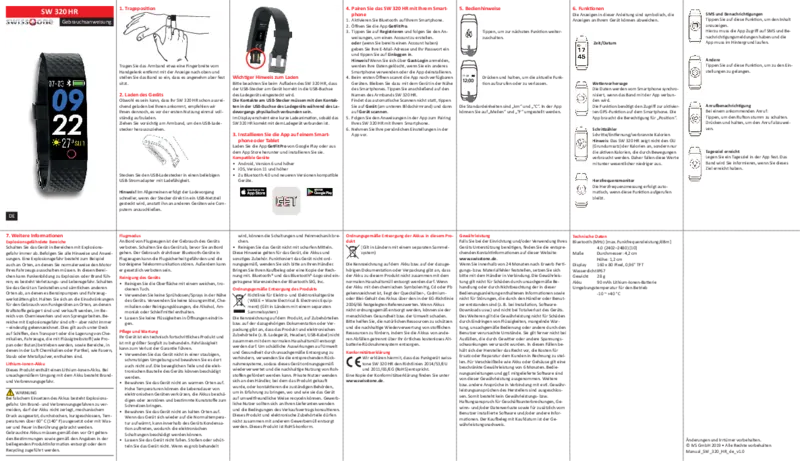
SMS and noficaons
Tap this feature to view the content.
For this, the app must have access to SMS
and noficaon messages and the app must
run in the background.
Other
Tap this funcon to access the sengs.
Call noficaon
For an incoming call:
Tap to mute the ringer.
Press and hold to reject the call.
Daily goal achieved
Set a daily goal in the app. The band will
inform you when you have reached this goal.
6. Features
The illustraons in this manual are symbolic; the
indicators on your device may differ.
Time / Date
Weather forecast
The data is synchronized by the smartphone
when the band is connected to the app.
The funcon requires access to the acvated
GPS funcon on the smartphone. The app
needs the permission for "Posion".
Pedometer
Steps / distance / calories burned
Note: The SW 320 HR does not display the
BMR (basal metabolic rate) of calories, but
only the acve calories consumed by
movements. Therefore, these values
somemes are significantly lower.
Heart rate monitor
The heart rate measurement takes place
automacally when this funcon is called up.
4. Pair the SW 320 HR to your smartphone
1. Start Bluetooth on your smartphone.
2. Open the app GetFitPro.
3. Tap Register and follow the instrucons to create an
account.
or (if you already have an account) enter your e‐mail
address and password and tap Log In.
Note! When you log in using Guest Login, your data
will be deleted if you use a different smartphone or
uninstall the app.
4. When first opened, the app scans for available
devices. Stay with the device near the smartphone.
Then tap on the name of the wristband SW 320 HR.
If automac scanning does not occur, tap Device (at
the boom of the screen) and then tap Scan Device.
5. Follow the instrucons in the app to pair your
SW 320 HR with your smartphone.
6. Make your personal sengs in the app.
Important note for charging
When charging the SW 320 HR, please make sure that
the USB plug on the device is correctly inserted into the
USB socket of the charger.
The contacts on the USB connector must be physically
connected to the contacts in the USB port of the
charger during charging.
The display will show a short charge animaon as soon
as the SW 320 HR is correctly connected to the charger.
3. Install the app to a smartphone or tablet
Download and install the app GetFitPro from Google
Play or App Store.
Compable devices
• Android version 6 and later
• iOS version 11 and later
• Bluetooth 4.0 and later compable device.
1. Wear on your wrist
Wear the wristband about one finger‐width away from
the wrist with the display facing upwards and adjust the
band so that it sits comfortably but firmly.
2. How to charge
While it’s possible that your SW 320 HR will already
come with enough charge to be powered on right out of
the box, we recommend to fully charge it before first
use.
Pull the bracelet gently to free the USB charging
connector.
Insert the USB charging connector into any USB power
adapter that permits charging.
Note! Generally charging is quicker if plugged in to a
USB power supply compared to charging via other hosts
such as computers.
Technical Specificaons
Bluetooth (MHz)
[maximum radio‐frequency power/dBm]
4.0 (2402–2480) [10]
Dimensions Diameter: 4,2 cm
Height: 1,2 cm
Display 160 x 80 pixels, 0,96“ TFT
Waterproof IP67
Weight 28 g
Baery 90 mAh Li‐ion baery
Operang ambient temperature
‐10 ~ +40 °C
EN
Changes and errors excepted.
© IVS GmbH 2020 • All rights reserved
Manual_SW_320_HR_en_v1.2
5. Operang instrucons
Tap to skip to the next funcon.
Press and hold to enter or exit the current
funcon.
The default units are “km“ and “°C“. In the app you can
switch to “Miles“ and “°F“.
SW 320 HR
Instrucons

Chatten Sie mit Ihrem Swisstone SW 320 HR-Handbuch mithilfe von KI

Erhalten Sie sofortige KI-Antworten aus Ihrem Swisstone SW 320 HR-Handbuch

Fragen Sie alles über Swisstone SW 320 HR. Antworten stammen aus diesem Handbuch, mit den Seiten, auf denen sie basieren.

SW 320 HR Wartungsplan

Bei Bedarf
Geräteoberfläche reinigen

Die Oberfläche mit einem weichen, trockenen Tuch reinigen. Keine Sprays, Lösungsmittel, Chemikalien oder Reinigungslösungen auf Alkohol-, Ammoniak- oder Schleifmittelbasis verwenden.

Bei Bedarf
Staubige oder schmutzige Umgebungen vermeiden

Das Gerät nicht in staubigen oder schmutzigen Umgebungen verwenden oder lagern, um Beschädigungen beweglicher Teile und elektronischer Bauteile zu verhindern.

M: QW-35-FL

Stellen Sie eine Frage

0/1000

Empfehlen Sie SW 320 HR?

Ja Nein
0
User Pic

Brenna Rau

vor 10 Monaten

Brauche ich wirklich die Begleit-App, um diese Smartwatch zu nutzen, und was passiert, wenn die App nicht mehr verfügbar ist oder nicht mehr funktioniert (zum Beispiel das Einstellen der Uhrzeit und die Nutzung der Schritt-/Schlaffunktionen)?

0
User Pic

Manual.ly

vor 9 Monaten

Ja, für die volle Funktionalität ist die Uhr von ihrer Begleit-App abhängig. Sie benötigen die App normalerweise für die Ersteinrichtung, das Bluetooth-Pairing, die Zeitsynchronisation und um Gesundheitsdaten wie Schritte und Schlaf anzuzeigen und zu speichern. Die Uhr allein zeigt möglicherweise nur die Grundzeit an, daher sind die Funktionen ohne die App eingeschränkt. Sollte die App in Ihrem Store nicht sichtbar sein oder nicht mehr funktionieren, überprüfen Sie, ob Sie den korrekten App-Namen für das genaue Modell verwenden, suchen Sie nach Updates und überprüfen Sie die Kompatibilität mit dem Telefon-Betriebssystem, und installieren Sie die App mit dem offiziellen Link oder QR-Code aus dem Handbuch/der Verpackung neu. Bestätigen Sie außerdem die Bluetooth-Berechtigungen, Kamera-Berechtigungen (falls für Funktionen angefordert) und dass die Uhr in den Telefoneinstellungen gekoppelt ist. Die Akkulaufzeit beträgt in der Regel etwa 2-3 Tage, abhängig von Nutzung und Einstellungen.

M: OA-GPT-5-NAN
M: OA-GPT-5-NAN

Häufig gestellte Fragen

A

Aktivieren Sie Bluetooth auf Ihrem Telefon, installieren und öffnen Sie die GetFitPro-App, registrieren Sie sich oder melden Sie sich an, halten Sie das Band in der Nähe des Telefons während die App scannt, wählen Sie dann SW 320 HR und folgen Sie den Anweisungen auf dem Bildschirm.

Ist diese Antwort hilfreich?

A

Der SW 320 HR erfasst Schritte, Entfernung, aktive Kalorien und liefert automatische Herzfrequenzmessungen, wenn die Herzfrequenzfunktion aktiv ist. Er zeigt keine basale Stoffwechselrate (BMR) an.

Ist diese Antwort hilfreich?

A

Ziehen Sie das Band vorsichtig, um den USB-Ladeanschluss freizulegen, und stecken Sie ihn in einen USB-Netzadapter. Stellen Sie sicher, dass die USB-Kontakte physisch mit dem Ladegerät ausgerichtet sind; das Display zeigt eine kurze Ladeanimation bei korrekter Verbindung. Vermeiden Sie, den Li-Ion-Akku Temperaturen über 60°C oder physischer Beschädigung auszusetzen.

Ist diese Antwort hilfreich?

A

Der SW 320 HR ist nach IP67 geschützt, das heißt, er ist gegen Staub und zeitweilige Eintauchung geschützt, jedoch nicht für längeres Untertauchen oder Schwimmen vorgesehen — vermeiden Sie längere Wasserexposition und befolgen Sie die Pflegehinweise im Handbuch.

Ist diese Antwort hilfreich?

A

Wenden Sie sich mit Ihrem Kaufbeleg an den Händler oder einen autorisierten Service. Die 24-monatige Garantie deckt Herstellungsfehler, schließt jedoch Schäden durch unsachgemäßen Gebrauch, Flüssigkeitseintritt, Nichtbeachtung der Anweisungen oder Eingriffe durch Drittsoftware aus.

Ist diese Antwort hilfreich?

A

Das Band zeigt Anruf- und Benachrichtigungsalarme an, wenn es gekoppelt ist. Um SMS- oder Benachrichtigungsinhalte anzuzeigen, erteilen Sie der GetFitPro-App Zugriff auf SMS und Benachrichtigungen und lassen Sie die App im Hintergrund laufen.

Ist diese Antwort hilfreich?

A

Kompatibel mit Android 6.0 und höher, iOS 11 und höher sowie Bluetooth 4.0 oder neuer. Einige Funktionen wie Wetter erfordern GPS des Telefons und App-Berechtigungen für die Positionszugriffe.

Ist diese Antwort hilfreich?

M: OA-GPT-5-NAN

Vorteile und Nachteile

Vorteile

  • Automatische Herzfrequenzüberwachung bei Aktivierung, bietet bequeme Messungen am Handgelenk.
  • Leicht und wasserresistent (IP67), geeignet für den täglichen Gebrauch und leichte Wasserkontakte.
  • Kompatibel mit Android 6+/iOS 11+ und Bluetooth 4.0, ermöglicht breite Smartphone-Kopplung.
  • Kompaktes 0,96" TFT-Display mit grundlegenden Benachrichtigungen, Zeit-, Datums- und Wettersynchronisation.
  • Erschwingliche Option für Nutzer, die grundlegendes Fitnesstracking ohne komplexe Funktionen suchen.
VS

Nachteile

  • Zeigt nur aktive Kalorien an; nicht die basale Stoffwechselrate (BMR), was die Gesamtkalorienverbrennung unterschätzen kann.
  • Begrenzte Akkukapazität (90 mAh) kann bei intensiver Nutzung häufiges Laden erforderlich machen.
  • Basisfunktionen fehlen erweiterte Messwerte, detaillierte Schlafanalyse oder GPS-Tracking im Gerät.
  • Das Laden erfordert die korrekte physische Ausrichtung der USB-Kontakte im Bandanschluss.
  • Die Garantie schließt Flüssigkeitseintritt, unsachgemäßen Gebrauch und Eingriffe durch Nutzer/Drittsoftware aus.
M: OA-GPT-5-NAN

Produkt Spezifikation

Display

128 x 64 Pixel, Farbdisplay, LCD, rechteckig

Betriebssystem

proprietär

Schnittstellen

Bluetooth 4.0

Herzfrequenzmessung

integriert

Messfunktionen

Uhrzeit, Schrittzähler, Distanz, Schlafüberwachung, Herzfrequenz, Kalorienverbrauch

Weitere Funktionen

Wecker, Nachrichtenbenachrichtigung (iOS, Android), Anrufbenachrichtigung (iOS, Android)

Navigation

nein

Kompatibilität

Android, iOS

Stromversorgung

Akku

Betriebszeit

15 Tage (typisch)

Armbandmaterial

Kunststoff

Gehäusefarben

schwarz

Armbandfarben

schwarz

Länge (Armband)

22 cm

Gewicht

28 g

Besondere Merkmale

Vibration, wasserbeständig

M: GO-GEM-FL-25

Produkt Beschreibung

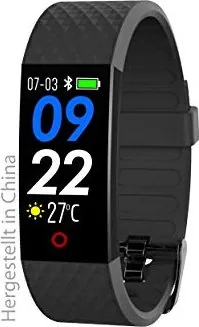
Swisstone SW 320 HR Activity Tracker Schwarz

Der Swisstone SW 320 HR Activity Tracker in Schwarz ist ein kompakter, preiswerter Fitness-Tracker für den Alltagsgebrauch und grundlegende Smart-Funktionen. Mit einem 0,96" TFT-Display, IP67-Wasserbeständigkeit und einem schlanken Profil von 28 g konzentriert sich der SW 320 HR auf wesentliche Gesundheitswerte — automatische Herzfrequenzmessung, Schrittzählung, Entfernung und aktive Kalorien — und synchronisiert sich über die GetFitPro-App mit dem Smartphone. Er unterstützt Bluetooth 4.0 und ist mit Android 6+/iOS 11+ Geräten kompatibel, wodurch er für die meisten Nutzer zugänglich ist.

Hauptmerkmale und Nutzererlebnis

Das Band liefert automatische Herzfrequenzwerte, wenn der Herzfrequenzbildschirm aktiv ist, und erfasst kontinuierlich Schritte, Entfernung und aktive Kalorien. Zeit, Datum und eine Wettervorhersage werden vom Telefon synchronisiert, und das Band kann Anrufbenachrichtigungen, SMS/Benachrichtigungsinhalte (wenn die App Berechtigungen hat) und grundlegende Bedienfunktionen für eingehende Anrufe anzeigen. Eine tägliche Zielerinnerung hilft, die Motivation hoch zu halten. Das Pairing ist einfach: Bluetooth aktivieren, GetFitPro öffnen, registrieren oder anmelden und den SW 320 HR aus den gefundenen Geräten auswählen.

Das Aufladen erfolgt über einen im Band integrierten USB-Stecker; stellen Sie sicher, dass die Kontakte für eine korrekte Ladeanimation auf dem Display ausgerichtet sind. Der 90-mAh-Lithium-Ionen-Akku bietet moderate Laufzeiten, die der Größe des Geräts entsprechen. Das Gerät enthält nützliche Sicherheits- und Pflegehinweise — vermeiden Sie extreme Temperaturen, Staub, starke Chemikalien und Stöße — sowie rechtliche/umweltbezogene Informationen wie die korrekte Entsorgung von Batterien und Elektronik sowie RoHS/WEEE-Konformität.

Praktische Hinweise

Der SW 320 HR eignet sich am besten für Nutzer, die einen erschwinglichen Tracker suchen, der Schrittzählung, aktive Kalorien, automatisierte Herzfrequenzmessungen und Smartphone-Benachrichtigungen ohne erweiterte Fitness-Analysen abdeckt. Der Tracker zeigt keinen BMR-Wert an (er meldet nur aktive Kalorien) und benötigt das GPS des Telefons für Wetter- und ortsbezogene Funktionen. Befolgen Sie die Pflegehinweise, um die Akkulaufzeit und Lebensdauer des Geräts zu erhalten: Reinigen Sie es mit einem weichen, trockenen Tuch, vermeiden Sie Lösungsmittel und setzen Sie den Li-Ion-Akku nicht extremer Hitze oder mechanischer Beschädigung aus.

Hinweise

  • Die Garantie deckt Herstellungsfehler für 24 Monate; Batterien und Gehäuse haben eine eingeschränkte 6-monatige Garantie. Bewahren Sie Ihre Quittung als Kaufnachweis auf.
  • Entsorgen Sie Batterien und elektronische Zubehörteile gemäß den örtlichen Recyclingvorschriften; werfen Sie sie nicht in den Hausmüll.
  • Flugmodus: Schalten Sie das Gerät während Flügen oder wenn es Vorschriften verlangen, aus.
M: OA-GPT-5-NAN

© Copyright 2026 Manual.ly