Manual.ly Logo

SpeaKa Professional SP-MM-940 Bedienungsanleitung

0,0 · 0 Bewertungen

PDF-Handbuch · 8 Seiten

Deutsch

M: QW-35-FL
Seite

/ 8

Loading...
debdc7977ee6253abf6b500e83af45c8c336 page 3
3
Safety Instructions
Monitor Holder with Multiport Hub
Item no: 2731204 (SP-MM-800)
1 Intended use
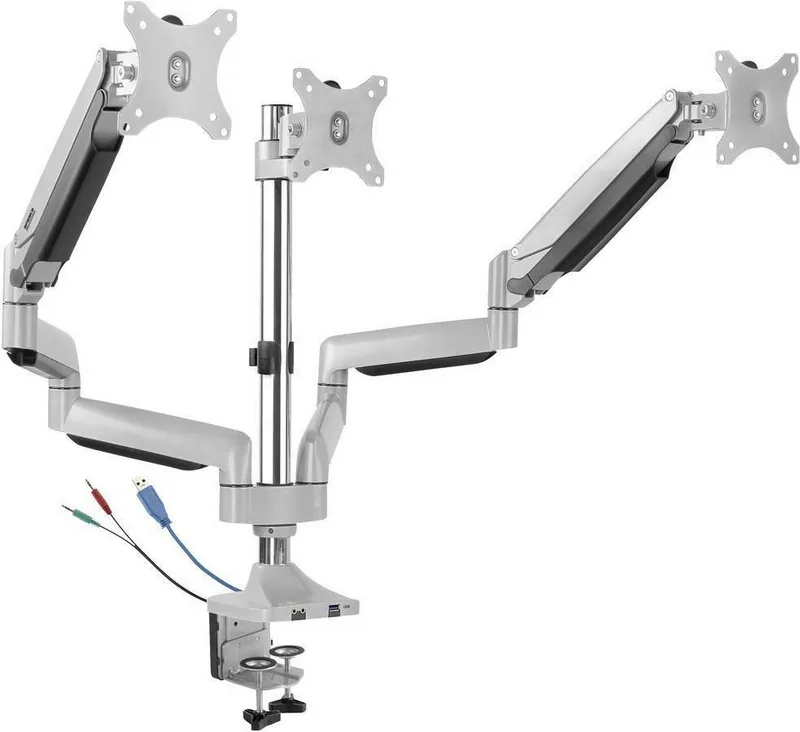
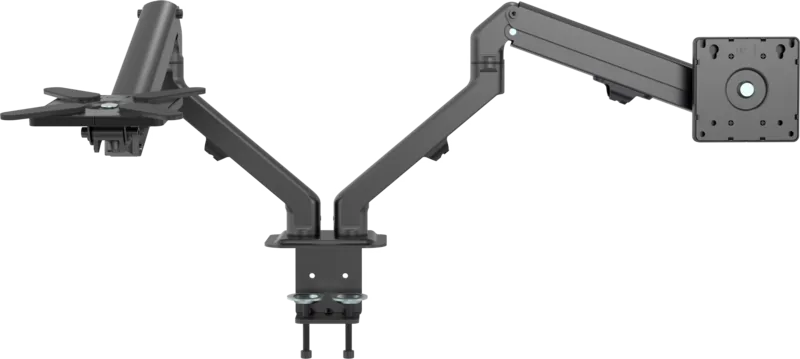
The product is a spring loaded three monitor arm with integrated hub. It secures to your table
using a clamp.
The product is intended for indoor use only. Do not use it outdoors.
Contact with moisture must be avoided under all circumstances.
If you use the product for purposes other than those described, the product may be dam-
aged.
Improper use can result in short circuits, fires, electric shocks or other hazards.
The product complies with the statutory national and European requirements.
For safety and approval purposes, you must not rebuild and/or modify the product.
Read the operating instructions carefully and store them in a safe place. Make this product
available to third parties only together with the operating instructions.
All company names and product names are trademarks of their respective owners. All rights
reserved.
2 Delivery contents
■
Product
■
Operating instructions
3 Latest product information
Download the latest product information at www.conrad.com/downloads or scan the QR
code shown. Follow the instructions on the website.
4 Description of symbols
The following symbols are on the product/appliance or are used in the text:
The symbol warns of hazards that can lead to personal injury.
The symbol warns of dangerous voltage that can lead to personal injury by elec-
tric shock.
5 Safety instructions
Read the operating instructions carefully and especially observe the safety
information. If you do not follow the safety instructions and information on
proper handling, we assume no liability for any resulting personal injury or
damage to property. Such cases will invalidate the warranty/guarantee.
5.1 General
■
The product is not a toy. Keep it out of the reach of children and pets.
■
Do not leave packaging material lying around carelessly. This may become dangerous
playing material for children.
■
If you have questions which remain unanswered by this information product, contact our
technical support service or other technical personnel.
■
Maintenance, modifications and repairs must only be completed by a technician or an
authorised repair centre.
5.2 Handling
■
Handle the product carefully. Jolts, impacts or a fall even from a low height can damage
the product.
5.3 Operating environment
■
Do not place the product under any mechanical stress.
■
Protect the appliance from extreme temperatures, strong jolts, flammable gases, steam
and solvents.
■
Protect the product from high humidity and moisture.
■
Protect the product from direct sunlight.
■
Do not switch the product on after it has been taken from a cold to a warm environment.
The condensation that forms might destroy the product. Allow the product to reach room
temperature before you use it.
5.4 Operation
■
Consult an expert when in doubt about the operation, safety or connection of the
product.
■
If it is no longer possible to operate the product safely, take it out of operation and pro-
tect it from any accidental use. DO NOT attempt to repair the product yourself. Safe op-
eration can no longer be guaranteed if the product:
– is visibly damaged,
– is no longer working properly,
– has been stored for extended periods in poor ambient conditions or
– has been subjected to any serious transport-related stresses.
5.5 Connected devices
■
Also observe the safety and operating instructions of any other devices which are con-
nected to the product.
5.6 Installation location
■
Select an installation location for the monitor holder and any supplied accessories that
facilitates safe and ergonomic use.
5.7 Before assembly and installation
■
Verify that the delivery content is complete before assembling the monitor holder and ac-
cessories. Do not assemble if any parts are missing.
■
Prevent damage to the monitor. Refer to the manufacturer instructions that came with
the monitor to find out how and where to attach a monitor holder or monitor mount.
■
Handle the monitor and screen with care. Always lay the monitor flat and use a pad or
cloth to protect the table surface and monitor from damage.
■
Risk of injury and/or damage when unpacking the spring loaded arm! Hold each spring
arm together while someone else cuts the zip tie. Slowly release the pressure on the
spring arms and open slowly to full length.
5.8 Table mounting
If you mount the monitor holder on a table:
■
Attach the monitor holder only to a sufficiently stable, horizontal table top. Tables made
of glass, ceramic or stone slabs or thin plastic-coated wooden-fibre slabs, are categoric-
ally unsuitable for attachments. Furthermore, you must not attach the monitor holder to
shelves or similar unstable or unsteady surfaces.
■
Attach the monitor holder only at a position on the table top that is suitable for this pur-
pose. Consider the significant lever action involved!
■
The weight of the monitor and monitor holder as well as its fixed position and significant
lever action can all cause pressure marks on the table top. For this reason, we do not re-
commend that you mount it on valuable furniture items!
■
For safety reasons, the monitor holder and the monitor that is attached to it should be
situated only above the table surface. The design of many monitor holders means that it
is not suitable for the monitor arm to be situated anywhere other than above the table
surface. There is also a danger of it toppling over in certain circumstances!
■
Ensure that the monitor holder is fixed to the table top securely. Otherwise it could slip
off the table top when you are moving the monitor and the monitor holder. As well as
causing material damage, this poses a danger of personal injury!
5.9 Removing a monitor
■
Risk of injury and/or damage from spring loaded arm! Before removing an attached mon-
itor, always set the front arm to the highest position so it cannot "spring up" after the
monitor is removed.
6 Maintenance
■
Adjusting the positions of the monitor and the monitor mount can cause the screws to
become loose over time. Check all the screw fittings from time to time.
7 Cleaning and care
Important:
– Do not use aggressive cleaning agents, rubbing alcohol or other chemical solutions.
They damage the housing and can cause the product to malfunction.
– Do not immerse the product in water.
1. Disconnect the product from the power supply.
2. Clean the product with a dry, fibre-free cloth.
8 Disposal
This symbol must appear on any electrical and electronic equipment placed on
the EU market. This symbol indicates that this device should not be disposed of
as unsorted municipal waste at the end of its service life.
Owners of WEEE (Waste from Electrical and Electronic Equipment) shall dispose
of it separately from unsorted municipal waste. Spent batteries and accumulators,
which are not enclosed by the WEEE, as well as lamps that can be removed from
the WEEE in a non-destructive manner, must be removed by end users from the
WEEE in a non-destructive manner before it is handed over to a collection point.
Distributors of electrical and electronic equipment are legally obliged to provide free take-
back of waste. Conrad provides the following return options free of charge (more details on
our website):
■
in our Conrad offices
■
at the Conrad collection points
■
at the collection points of public waste management authorities or the collection points
set up by manufacturers or distributors within the meaning of the ElektroG
End users are responsible for deleting personal data from the WEEE to be disposed of.
It should be noted that different obligations about the return or recycling of WEEE may apply
in countries outside of Germany.

Chatten Sie mit Ihrem SpeaKa Professional SP-MM-940-Handbuch mithilfe von KI

Erhalten Sie sofortige KI-Antworten aus Ihrem SpeaKa Professional SP-MM-940-Handbuch

Fragen Sie alles über SpeaKa Professional SP-MM-940. Antworten stammen aus diesem Handbuch, mit den Seiten, auf denen sie basieren.

SP-MM-940 Wartungsplan

Regelmäßig
Alle Schraubverbindungen prüfen

Durch die Anpassung der Monitorpositionen können sich die Schrauben im Laufe der Zeit lösen. Überprüfen Sie alle Schraubverbindungen von Zeit zu Zeit.

Bei Bedarf
Produktgehäuse reinigen

Trennen Sie das Gerät vom Stromnetz und reinigen Sie es mit einem trockenen, fusselfreien Tuch. Verwenden Sie keine aggressiven Reinigungsmittel und tauchen Sie das Produkt nicht in Wasser ein.

M: qwen/qwen3.8-flash

Stellen Sie eine Frage

0/1000

Empfehlen Sie SP-MM-940?

Ja Nein

Häufig gestellte Fragen

A

Nein, das Produkt ist nur für den Innenbereich bestimmt. Kontakt mit Feuchtigkeit ist unter keinen Umständen erlaubt. Die Verwendung draußen kann zu Schäden oder Sicherheitsgefahren wie Stromschlägen führen.

Ist diese Antwort hilfreich?

A

Dieses System unterstützt bis zu drei Monitore. Jeder Monitor kann zwischen eins und sieben Kilogramm wiegen. Stellen Sie sicher, dass das Gesamtgewicht an der Klemme die Tischgrenzen nicht überschreitet.

Ist diese Antwort hilfreich?

A

Die Halterung unterstützt VESA 75x75 und 100x100 Millimetermuster. Monitore sind von 13 Zoll bis 32 Zoll groß. Überprüfen Sie immer Ihre spezifischen Monitorspezifikationen vor dem Anbringen.

Ist diese Antwort hilfreich?

A

Trennen Sie das Produkt zuerst vom Strom. Verwenden Sie ein trockenes, fusselfreies Tuch. Verwenden Sie kein Wasser, Alkohol oder chemische Reinigungsmittel, da diese das Gehäuse beschädigen können.

Ist diese Antwort hilfreich?

A

Verletzungsgefahr besteht durch federgeladene Arme. Halten Sie die Arme zusammen, während Sie Befestigungselemente abschneiden. Lösen Sie den Druck langsam. Stellen Sie sicher, dass der Tisch stabil und horizontal ist, um ein Kippen zu verhindern.

Ist diese Antwort hilfreich?

A

Nicht in unsortierten Hausmüll werfen. Folgen Sie lokalen Gesetzen zur Elektroschrottentsorgung für getrennte Sammlung. Löschen Sie personenbezogene Daten, bevor sie Sammlern übergeben werden.

Ist diese Antwort hilfreich?

A

Ja, der Multiport Hub benötigt fünf Volt Gleichstrom bei einem Ampere. Er verbindet sich über eine USB-Schnittstelle. Stellen Sie sicher, dass Ihre angeschlossenen Quellen angemessene Leistungsstufen bereitstellen.

Ist diese Antwort hilfreich?

M: QW-35-FL

Vorteile und Nachteile

Vorteile

  • Integriert Multiport Hub für straffere Konnektivität.
  • Unterstützt bis zu drei Monitore gleichzeitig.
  • VESA-kompatibel mit 75x75 und 100x100 Standards.
  • Federgeladener Arm sorgt für sanfte vertikale Positionierung.
  • Konform mit europäischen Sicherheits- und Vorschriftenanforderungen.
VS

Nachteile

  • Nur für den Innenbereich, Feuchtigkeit muss vermieden werden.
  • Federarme stellen Verletzungsrisiko beim Auspacken dar.
  • Erfordert stabile Tischplatte, nicht für Glas geeignet.
  • Gewichtslimit pro Monitor ist maximal sieben Kilogramm.
  • Reinigung auf trockenes Tuch beschränkt, keine Chemikalien.
M: QW-35-FL

Produkt Spezifikation

Typ

Schreibtisch

Monitoranzahl

3

Bildschirmgröße

33,02 - 81,28 cm

Verstellbarkeit

Neigung (-95 deg, +90 deg), Schwenken (180 deg), Drehschwenken (180 deg), Höhenverstellbar

Maximale Belastung

7,00 kg

VESA

75x75, 100x100

Hauptmerkmale

Gasfeder, Kabelmanagement, USB-Hub

Farbe

Silber

Abmessungen (BxHxT)

153,00 x 70,00 x 19,00 cm

Gewicht

9,51 kg

M: QW-35-FL

Produkt Beschreibung

SpeaKa Professionell SP-MM-940 Überblick

Steigern Sie die Effizienz Ihres Arbeitsplatzes mit dem SpeaKa Professionell SP-MM-940. Dieser innovative Monitorhalter wurde entwickelt, um Ihre ergonomische Einrichtung zu verwandeln. Mit integriertem Multiport Hub vereinfacht er das Kabelmanagement erheblich. Der Arm unterstützt bis zu drei Monitore gleichzeitig. Dies gewährleistet optimale Bildschirmfläche für Multitasking-Profis. Der integrierte federgeladene Mechanismus bietet sanfte Einstellungen für Höhe und Winkel. Sie können Ihre Aussicht anpassen, um Nackenbelastung während langer Stunden zu reduzieren.

Die Installation ist einfach mit der mitgelieferten Klemme. Sie sichert eine stabile Tischplatte innerhalb bestimmter Dickenlimits. Eine C-Klemme ist ebenfalls für alternative Montagemethoden enthalten. Stellen Sie sicher, dass die Oberfläche horizontal und stark genug ist, um die Last zu tragen. VESA-Kompatibilität unterstützt verschiedene Monitorgrößen von dreizehn bis 32 Zoll. Die Gewichts pro Monitor liegt zwischen eins und sieben Kilogramm. Diese Flexibilität bietet eine gute Anpassung für verschiedene Schirme.

Sicherheit hat oberste Priorität bei dieser Ausrüstung. Halten Sie das Gerät nur im Innenbereich, um Feuchtigkeitsbeschädigungen zu vermeiden. Vermeiden Sie direkte Sonneneinstrahlung und extreme Temperaturen, um die Haltbarkeit zu erhalten. Kondensationsrisiken bestehen beim Wechsel von kalten zu warmen Umgebungen. Lassen Sie vor der Verwendung aufwärmen. Versuchen Sie keine Selbstreparatur, wenn die Sicherheit beeinträchtigt ist. Halten Sie Kinder fern, da es kein Spielzeug ist. Verpackungsmaterialien sollten sicher entsorgt werden, um Gefahren zu vermeiden.

Der Hub verbindet sich über USB-A, der fünf Volt Gleichstrom benötigt. Dies ermöglicht bequeme Stromversorgung für Peripheriegeräte ohne zusätzliche Adapter. Die Maße sind erheblich mit einer Höhe von 1530 Millimetern. Das Gewicht des Geräts beträgt ungefähr neun Kilogramm und einundfünfzig Gramm. Die Montage erfordert Vorsicht wegen Federspannung. Schneiden Sie Kabelbinder vorsichtig, während Sie die Arme halten. Lösen Sie den Druck langsam, um plötzliche Bewegung zu verhindern.

Wartung umfasst regelmäßige Kontrollen der Schraubenverbindungen. Einstellung kann im Laufe der Zeit zum Lockern führen. Reinigen Sie nur mit einem trockenen, fusselfreien Tuch. Keine Wasserimmersion erlaubt. Verwenden Sie keine Chemikalien. Trennen Sie die Stromversorgung zuerst. Für die Entsorgung befolgen Sie örtliche Gesetze zur Elektroschrottentsorgung. Bringen Sie sie zu Sammelstellen, falls verfügbar. Überprüfen Sie immer den Lieferumfang vor der Montage. Lesen Sie das SpeaKa Professionell SP-MM-940 Handbuch für weitere Sicherheit und Konformität. Dies gewährleistet die Strukturintegrität.

M: QW-35-FL

© Copyright 2026 Manual.ly
