Manual.ly Logo

SpeaKa Professional 10125216 Bedienungsanleitung

5,0 · 1 Bewertungen

PDF-Handbuch · 8 Seiten

Deutsch

M: QW-35-FL
Seite

/ 8

Loading...
58f90aa509bf39274d8946856ea4d7317930 page 3
3
Important Information
Smart Motorized TV Ceiling Mount
Item no: 2531304 / SP-TVCM-510
Item no: 2531305 / SP-TVCM-520
1 Intended use
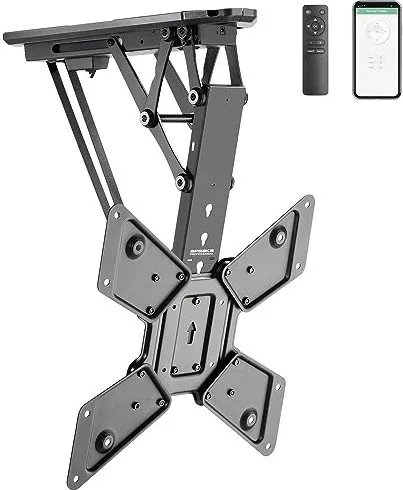
The product is a motorized TV/monitor ceiling mount. The product must be mounted to a ceiling before
use. The product is designed to hold one TV/monitor. The built-in motor moves the mount and TV/monitor
into a suitable position. The user can control the built-in motor in the following ways:
■
Remote control
■
Tuya mobile app
The product is intended for indoor use only. Do not use it outdoors.
Contact with moisture must be avoided under all circumstances.
If you use the product for purposes other than those described, the product may be damaged.
Improper use can result in short circuits, fires, electric shocks or other hazards.
The product complies with the statutory national and European requirements.
For safety and approval purposes, you must not rebuild and/or modify the product.
Read the safety instructions and any accompanying instructions carefully and store them in a safe place.
Make this product available to third parties only together with the safety instructions and any accompany-
ing instructions.
All company names and product names are trademarks of their respective owners. All rights reserved.
2 Latest product information
Download the latest product information at www.conrad.com/downloads or scan the QR code shown. Fol-
low the instructions on the website.
3 Description of symbols
The following symbols are on the product/appliance or are used in the text:
The symbol warns of hazards that can lead to personal injury.
The symbol warns of dangerous voltage that can lead to personal injury by electric shock.
4 Safety instructions
Read this document and the accompanying operating instructions carefully and espe-
cially observe the safety information. If you do not follow the safety instructions and
information on proper handling, we assume no liability for any resulting personal in-
jury or damage to property. Such cases will invalidate the warranty/guarantee.
4.1 General
■
The product is not a toy. Keep it out of the reach of children and pets.
■
Do not leave packaging material lying around carelessly. This may become dangerous playing mater-
ial for children.
■
If you have questions which remain unanswered by this information product, contact our technical
support service or other technical personnel.
■
Maintenance, modifications and repairs must only be completed by a technician or an authorised re-
pair centre.
4.2 Do not misuse
■
Do not sit, stand, hang onto, or support yourself on the product. The product can collapse or fall down
and cause injury.
■
Do not hang objects onto the product. The product can collapse or fall down and cause injury.
4.3 Handling
■
Handle the product carefully. Jolts, impacts or a fall even from a low height can damage the product.
4.4 Operating environment
■
Do not place the product under any mechanical stress.
■
Protect the appliance from extreme temperatures, strong jolts, flammable gases, steam and solvents.
■
Protect the product from high humidity and moisture.
■
Protect the product from direct sunlight.
■
Do not switch the product on after it has been taken from a cold to a warm environment. The con-
densation that forms might destroy the product. Allow the product to reach room temperature before
you use it.
4.5 Mounting surface
■
Unsuitable mounting surfaces can cause the mount to fall down and cause serious personal injury.
The mounting surface must be able to support the combined weight of the mount and the installed
monitor. If you are in doubt, ask a specialist before mounting.
4.6 Mounting materials
■
Unsuitable mounting materials can cause the mount to fall down and cause serious personal injury.
Select mounting materials (example: screws and dowels) that are suitable for the base wall material
(example: concrete).
4.7 Drilling
When penetrating the surface (example: drilling or inserting fasteners), make sure no cables
or pipes are damaged. Inadvertently penetrating electric cables causes the life-threatening
danger of an electric shock! Check for concealed wires and pipes before drilling or inserting
fasteners.
4.8 Monitor installation
■
Verify that the delivery content is complete before assembling the product. Do not assemble the
product if the delivery content is not complete.
■
Before beginning the installation process, check whether there are appropriate mounting options for a
mount on the back of your monitor.
■
A falling monitor or mount can cause serious personal damage. Keep people away from underneath
the installation location while installing the monitor.
■
Depending on the size and design of the monitor and mount concerned, it is sensible for a second
person to help with the installation. This person can hold the monitor still, for example, while you are
attaching the monitor to the mount.
■
Observe the maximum permissible monitor weight in the product documentation. Overloading can
cause the mount to collapse and lead to injury or property damage.
■
Proceed with care when assembling and installing the product! The product has some sharp edges.
There is a risk of injury!
■
Carry out only the work on the mount that is necessary to install it (or to change its location). Never
dismantle the mount and never attempt to convert it or to repair it in any way. Some mounts contain
highly pre-stressed metal springs. Dismantling such a mount in the wrong way could cause you
severe injury!
■
When fixing the monitor to the mount, make certain you use the correct screws. Not only must these
be of the correct thread type for the monitor, but they must also not be too long; otherwise, they will
damage the monitor. The screws must not be too short, however, since otherwise the connection will
not be secure.
■
The screws must be screwed into the threaded fixture holes on the monitor with at least 5 full 360°
turns. The correct screws are usually supplied together with the mount or with the monitor. Occasion-
ally, however (depending on the monitor type), other screws are required; these can be purchased
from specialist retailers.
■
Do not use any force when tightening the screws; otherwise, the monitor may be destroyed, leading
to loss of warranty/guarantee!
■
If you have any doubt about the correct length of the screws required, we recommend that you con-
tact the monitor manufacturer or an appropriate specialist.
■
Apply your full concentration when carrying out the installation, because if the monitor and/or mount
were to fall, this could cause expensive damage to the equipment and there is the potential danger of
personal injury!
■
Lay all the monitor’s cables in such a way that they do not get jammed or kinked in the mount.
■
Check all the screw fittings from time to time. Adjusting the position of the monitor and/or the mount
and moving them can sometimes cause the screws to become loose over time.
4.9 Power adapter
Do not modify or repair mains supply components including mains plugs, mains cables, and
power supplies. Do not use damaged components. Risk of death by electric shock!
■
Connect the appliance to a wall socket that can be accessed easily.
■
As power supply, only use the supplied mains adaptor.
■
Only connect the power adaptor to a normal mains socket connected to the public supply. Before
plugging in the power adaptor, check whether the voltage stated on the power adaptor complies with
the voltage of your electricity supplier.
■
Never connect or disconnect power adaptors if your hands are wet.
■
Never unplug the power adaptor from the mains socket by pulling on the cable; always use the grips
on the plug.
■
For safety reasons, disconnect the power adaptor from the mains socket during storms.
■
Do not touch the power adapter if there are any signs of damage, as this may cause a fatal electric
shock! Take the following steps:
– Switch off the mains voltage to the socket containing the power adapter (switch off the correspond-
ing circuit breaker or remove the safety fuse, and then switch off the corresponding RCD protective
switch).
– Unplug the power adapter from the mains socket.
– Use a new power adapter of the same design. Do not use the damaged adapter again.
■
Ensure that cables are not pinched, kinked or damaged by sharp edges.
■
Always lay cables so that nobody can trip over or become entangled in them. This poses a risk of in-
jury.
4.10 Batteries
■
Correct polarity must be observed while inserting batteries.
■
The batteries should be removed from the device if it is not used for a long period of time to avoid
damage through leaking. Leaking or damaged batteries might cause acid burns when in contact with
skin, therefore use suitable protective gloves to handle corrupted batteries.
■
Batteries must be kept out of reach of children. Do not leave batteries lying around, as there is risk,
that children or pets swallow them.
■
All batteries should be replaced at the same time. Mixing old and new batteries in the device can lead
to battery leakage and device damage.
■
Batteries must not be dismantled, short-circuited or thrown into fire. Never recharge non-rechargeable
batteries. There is a risk of explosion!
4.11 Operation
■
Consult an expert when in doubt about the operation, safety or connection of the product.
■
If it is no longer possible to operate the product safely, take it out of operation and protect it from any
accidental use. DO NOT attempt to repair the product yourself. Safe operation can no longer be guar-
anteed if the product:
– is visibly damaged,

Chatten Sie mit Ihrem SpeaKa Professional 10125216-Handbuch mithilfe von KI

Erhalten Sie sofortige KI-Antworten aus Ihrem SpeaKa Professional 10125216-Handbuch

Fragen Sie alles über SpeaKa Professional 10125216. Antworten stammen aus diesem Handbuch, mit den Seiten, auf denen sie basieren.

10125216 Wartungsplan

Regelmäßig
Alle Schraubverbindungen prüfen

Überprüfen Sie, ob sich die Schrauben im Laufe der Zeit durch Monitoranpassungen oder Bewegungen des Halters gelöst haben. Bei Bedarf festziehen.

Bei Bedarf
Gehäuse des Produkts reinigen

Vom Netz trennen und mit einem trockenen, fusselfreien Tuch abwischen. Keine aggressiven Reinigungsmittel verwenden und nicht in Wasser eintauchen.

M: qwen/qwen3.8-flash

Stellen Sie eine Frage

0/1000

Empfehlen Sie 10125216?

Ja Nein
0
User Pic

NisiQui94

vor 5 Monaten

Ist das Wandhalterungssystem stabil, und ermöglicht die Companion-App eine einfache Höhenverstellung des Fernsehers?

0
User Pic

Manual.ly

vor 5 Monaten

Ja, Nutzer bestätigen, dass die Halterung sehr zufriedenstellend ist. Die App steuert die Bewegung des Fernsehers auf und ab perfekt über das Smartphone. Zusätzlich helfen das beiliegende Handbuch und die Bohrschablone erheblich beim Anbringen des Produkts. Die Installation ist unkompliziert, und die Funktion funktioniert laut Feedback einwandfrei.

M: QW-35-FL
M: QW-35-FL

Häufig gestellte Fragen

A

Nein, dieses Produkt ist nur für den Innenbereichgebrauch konzipiert. Kontakt mit Feuchtigkeit ist unter allen Umständen zu vermeiden, um Schäden und Sicherheit zu gewährleisten. Die Verwendung im Außenbereich widerspricht den Garantiebedingungen.

Ist diese Antwort hilfreich?

A

Je nach spezifischer Modellvariante kann es bis zu 30 oder 35 Kilogramm tragen. Überprüfen Sie stets, dass die Deckenfläche das kombinierte Gewicht der Halterung und Ihres Geräts tragen kann.

Ist diese Antwort hilfreich?

A

Sie können den integrierten Motor mit der enthaltenen Fernbedienung steuern oder indem Sie sich mit der Tuya Mobile App verbinden. Dies bietet flexible Positionierungsoptionen für Ihre Unterhaltungsanlage.

Ist diese Antwort hilfreich?

A

Die Fernbedienung erfordert zwei Typ AAA Batterien, die jeweils 1,5 Volt liefern. Stellen Sie sicher, dass Sie beide Batterien bei Bedarf gleichzeitig ersetzen, um eine ordnungsgemäße Funktion aufrechtzuerhalten.

Ist diese Antwort hilfreich?

A

Verwenden Sie ein trockenes, faserfreies Tuch, um das Gehäuse zu reinigen. Trennen Sie das Produkt zuerst von der Stromversorgung. Tauchen Sie es nicht in Wasser und verwenden Sie keine aggressiven Reinigungsmittel.

Ist diese Antwort hilfreich?

M: QW-35-FL

Vorteile und Nachteile

Vorteile

  • Motorisierte Einstellung per Fernbedienung oder Mobils-App
  • Unterstützt große Bildschirme bis zu 70 Zoll
  • Erfüllt europäische Sicherheits- und Compliance-Standards
  • Drahtlose Konnektivität mit 20 Meter Reichweite
  • Inneninstallation spart Platz am Boden
VS

Nachteile

  • Streng nur für Innenbereichgebrauch
  • Kann im Außenbereich bei Feuchtigkeit nicht verwendet werden
  • Montage erfordert präzise Schraubenlängenüberprüfung
  • Vorgespannte Federn stellen Montage-Risiken dar
  • Zwingender Batteriewechsel jedes Mal
M: QW-35-FL

Produkt Spezifikation

Typ

Deckenmontage

Anzahl der Monitore

1

Bildschirmgröße

58,42 - 139,70 cm

Beweglichkeit

neigbar (0 Grad, +75 Grad), schwenkbar (6 Grad), höhenverstellbar, motorisiert

Maximale Last

30,00 kg

VESA

100x100, 200x200, 300x300, 400x200, 400x400

Farbe

Schwarz

Gewicht

7,44 kg

M: QW-35-FL

Produkt Beschreibung

Verwandeln Sie Ihren Wohnraum mit dem SpeaKa Professional 10125216

Rüsten Sie Ihr Heim-Unterhaltungssystem mit dem SpeaKa Professional 10125216 auf. Diese innovative motorisierte TV-Deckenhalterung bietet ein elegantes Design und fortschrittliche Funktionalität. Die Beachtung der SpeaKa Professional 10125216 Anleitung gewährleistet eine ordnungsgemäße Installation für Sicherheit und Langlebigkeit. Der eingebaute Motor passt die Positionierung mühelos über eine praktische Fernbedienung oder die Tuya Mobile App an. Es ist speziell nur für den Innenbereichgebrauch konzipiert. Kontakt mit Feuchtigkeit ist unter allen Umständen zu vermeiden, um Schäden zu verhindern.

Dieses Gerät hält einen Fernseher oder Monitor sicher über Augenhöhe. Die Installation erfordert eine Deckenfläche, die das kombinierte Gewicht der Halterung und des Geräts tragen kann. Spezifische Modellvarianten unterstützen Gewichtslimits bis zu 35 Kilogramm mit kompatiblen Bildschirmgrößen, die von 23 bis 70 Zoll reichen. Überprüfen Sie stets Schraubenlängen sorgfältig, um interne Schäden zu verhindern. Scharfe Kanten existieren während der Montage, also handhaben Sie diese mit äußerster Sorgfalt, um Verletzungen zu vermeiden.

Wartung umfasst regelmäßige Reinigung mit einem trockenen, faserfreien Tuch. Verwenden Sie kein Wasser oder aggressive Chemikalien auf dem Gehäuse. Stellen Sie sicher, dass die Stromversorgung vor Beginn eines Reinigungsprozesses getrennt ist. Der Netzadapter erfordert Standard-Haushaltsspannung konform mit öffentlichen Versorgungsnormen. Batterien in der Fernbedienung sind vom Typ AAA und müssen gleichzeitig ausgetauscht werden. Wi-Fi-Abdeckung erreicht zuverlässig bis zu 20 Meter. Bluetooth unterstützt ebenfalls einen 20 Meter-Abstand für Konnektivität.

Sicherheit ist während des gesamten Lebenszyklus des Besitzes von höchster Wichtigkeit. Missbrauchen Sie die Halterung nicht, indem Sie darauf sitzen oder Objekte daran hängen. Versuchen Sie nicht, die Halterung selbst zu demontieren, da sie vorspannfedern enthält. Halten Sie Kinder von Verpackungsmaterialien fern, um Erstickungsgefahr zu verhindern. Wenn sichtbar beschädigt, reparieren Sie nicht selbst. Konsultieren Sie einen Techniker, um sicherzustellen, dass die Garantie gültig bleibt und Sicherheit gewahrt bleibt. Umweltbedingungen müssen zwischen 0 und 40 Grad Celsius bleiben mit einer relativen Luftfeuchtigkeit zwischen 20 und 85 Prozent.

Eine ordnungsgemäße Entsorgung ist am Ende der Produktlebensdauer erforderlich. Trennen Sie Batterien von der Einheit vor dem Wegwerfen. Folgen Sie lokalen Vorschriften für Elektronikschrott streng. Dieses Gerät erfüllt europäische Sicherheitsanforderungen. Genießen Sie einen flexiblen Betrachtungswinkel ohne permanente strukturelle Einschränkungen, sobald es korrekt installiert ist. Der SpeaKa Professional 10125216 bringt intelligente Bequemlichkeit zu Ihrer Raumgestaltung und maximiert die Bodenraumeffizienz. Prüfen Sie alle Befestigungen periodisch, weil Bewegung diese mit der Zeit lockern kann.

Nutzungshinweise

Stellen Sie sicher, dass die Stromversorgung vor der Reinigung getrennt ist. Prüfen Sie alle Schraubenbefestigungen periodisch, weil Bewegung diese mit der Zeit lockern kann. Regelmäßige Inspektion stellt sicher, dass Ihre Investition hält.

M: QW-35-FL

© Copyright 2026 Manual.ly
