
Reloop Stand Hub Bedienungsanleitung
PDF-Handbuch · 12 Seiten
Deutsch



Schnelle Überprüfung
Falsche Antwort, bitte versuchen Sie es erneut.
Chatten Sie mit Ihrem Reloop Stand Hub-Handbuch mithilfe von KI
Erhalten Sie sofortige KI-Antworten aus Ihrem Reloop Stand Hub-Handbuch
Fragen Sie alles über Reloop Stand Hub. Antworten stammen aus diesem Handbuch, mit den Seiten, auf denen sie basieren.
Stand Hub Wartungsplan
Das Gerät regelmäßig auf sichtbare Schäden am Netzkabel oder Gehäuse überprüfen. Bei Verdacht auf unsichere Bedienung sofort vom Netz trennen.
Das Gerät vor jedem Reinigungsprozess immer aus der Steckdose ziehen. Nie am Netzkabel ziehen; den Steckerkörper festhalten.
Das Gerät mit einem leicht feuchten Tuch abwischen. Keine Lösungsmittel, reinigungsprodukte auf Erdölbasis verwenden oder in Wasser eintauchen.
Stellen Sie eine Frage
Empfehlen Sie Stand Hub?
Ja NeinHäufig gestellte Fragen
Der Stand Hub kann eine maximale Last von 5,0 kg sicher tragen.
Ist diese Antwort hilfreich?
Ja, der USB-C PD Port unterstützt Stromversorgung bis zu 60 Watt.
Ist diese Antwort hilfreich?
Das Gerät bietet 6 unterschiedliche Einstellpositionen mit verschiedenen Formen.
Ist diese Antwort hilfreich?
Nein, unbefugte Änderungen oder das Öffnen des Gehäuses führen zum Erlöschen der Garantie.
Ist diese Antwort hilfreich?
Nur ein feuchtes Tuch verwenden. Niemals Lösungsmittel oder Reinigungsflüssigkeiten verwenden.
Ist diese Antwort hilfreich?
Es enthält ein 30 cm USB-C Kabel und 25 cm und 50 cm USB-A Kabel.
Ist diese Antwort hilfreich?
Betreiben Sie innerhalb von 5 Grad bis 35 Grad, um Schäden durch extreme Bedingungen zu vermeiden.
Ist diese Antwort hilfreich?
Vorteile und Nachteile
Vorteile

- Unterstützt 6 ergonomische Positionen für Laptops, Tastaturen und Tablets.
- Integrierter USB-C PD Port unterstützt bis zu 60 Watt zum Laden.
- Enthält 4 USB-A 3.0 Ports für sichere Peripheriegeräteverbindung.
- Kompaktes Design mit mitgelieferter Tragetasche für einfaches Reisen.
- Ports mit hoher Haltekraft stellen sicher, dass Kabel sicher verbunden bleiben.
Nachteile

- Garantie erlischt, wenn das Geräteggehäuse geöffnet oder verändert wird.
- Interne Komponenten sind von Benutzern nicht für Wartung wartbar.
- Muss nach Transport in kalter Umgebung auf Raumtemperatur akklimatisieren, um Kondensat zu vermeiden.
- Erfordert externe USB-Stromversorgung für aktiven Hub-Modus Betrieb.
- Kann nicht in Umgebungen unter 5 Grad oder über 35 Grad verwendet werden.
Produkt Spezifikation
Typ
Ständer
Gerät
Notebook
Material
Stahl
Kontaktfläche
Gummi
Farbe
Schwarz
Traglast
5,00 kg
Gewicht
1,40 kg
Merkmale
inklusive Tasche
Produkt Beschreibung
Willkommen zur professionellen Audio-Workflow-Revolution mit dem Reloop Stand Hub. Dieses innovative Gerät kombiniert einen stabilen Laptop-Ständer mit einem unverzichtbaren USB-Hub für Ihr Studio-Setup. Für vollständige Sicherheit und optimale Funktionalität konsultieren Sie vor dem ersten Betrieb immer die Reloop Stand Hub Bedienungsanleitung. Sicherheitsvorkehrungen sind von größter Bedeutung, um Sie und Ihre Geräte vor potenziellen Gefahren wie Stromschlag zu schützen. Das Gerät erfüllt europäische und nationale Vorschriften.
Design und Verarbeitungsqualität
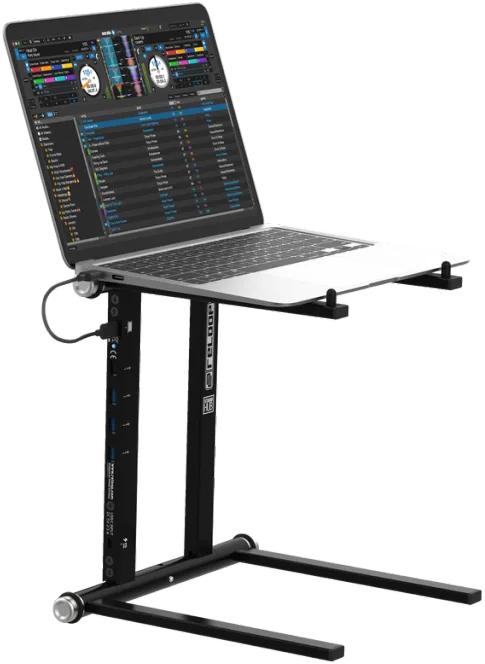
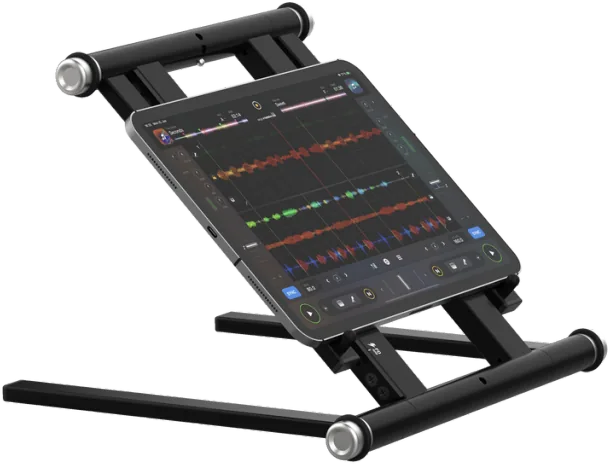
Der Stand Hub verfügt über eine robuste Industriestruktur, die eine maximale Last von fünf Kilogramm aufnehmen kann. Seine physischen Abmessungen betragen 290 mal 250 mal 270 Millimeter. Das Gerät wiegt etwa 1,4 Kilogramm, wenn es vollständig bestückt ist. Das Design umfasst 6 unterscheidbare einstellbare Konfigurationen. Diese reichen von der flachen Lower Z-Shape bis zur erhöhten Higher Z-Shape. Sie können Höhen einstellen, um Ihre Arbeitsposition zu optimieren oder Tastaturpositionen zu nutzen. Diese Anpassungsfähigkeit macht es ideal für verschiedene Setups, sei es in einem festen Studio oder bei mobilen Gigs.
Connectivity und Stromversorgung
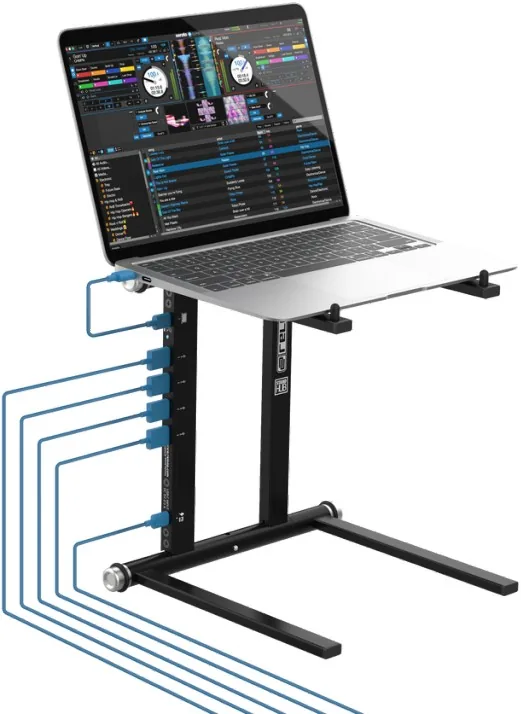
Konnektivität ist umfassend und für hohe Leistung ausgelegt. Es gibt einen USB-C Port primär für die Datenübertragung zu Ihrem Computer. Es gibt auch einen dedizierten USB-C PD Port integriert für Stromversorgung. Der PD Port unterstützt bis zu 60 Watt Leistung. Dies ermöglicht es Ihnen, Ihren Laptop direkt zu laden, während Sie den Ständer verwenden. Zusätzlich gibt es vier USB-A 3.0 Ports. Diese verfügen über ein High-Retention Design und sind mit früheren Versionen kompatibel. Sie sind perfekt, um Peripheriegeräte sicher anzuschließen, ohne sich um Trennungen sorgen zu müssen.
Setup und mitgelieferte Kabel
Das Paket enthält eine Auswahl an qualitativ hochwertigen Kabeln, um Verbindungsstabilität zu gewährleisten. Sie erhalten ein 30 Zentimeter langes USB-C auf C Kabel für direkte Geräteverbindung. Sie erhalten auch Kabel von 25 Zentimeter und 50 Zentimeter für USB-A Verbindungen. Um das Higher Z-Shape Design spezifisch zu nutzen, müssen Sie Sicherheitsschrauben in Gewinde B einschrauben. Setzen Sie den Hub auf eine stabile, horizontale Oberfläche, um Kippen zu verhindern. Vermeiden Sie während des Aufbaus, Kabel scharfen Kanten auszusetzen.
Sicherheits- und Wartungswarnungen
Vermeiden Sie Wasser und Flüssigkeiten im Gerät vollständig, da Schäden die Garantie erlöschen lassen. Öffnen Sie das Gehäuse nicht, da die Garantie sofort bei unbefugtem Öffnen erlischt. Reinigen Sie nur mit einem feuchten Tuch und verwenden Sie niemals Lösungsmittel oder Reinigungsflüssigkeiten. Betreiben Sie streng innerhalb von 5 bis 35 Grad Celsius Umgebungstemperatur. Starten Sie das Gerät nicht, wenn es aus kalten Umgebungen kommt, um Schäden durch Kondenswasser zu vermeiden. Bewahren Sie die Anleitung für Garantiefälle bezüglich Seriennummern auf. Stellen Sie sicher, dass Netzkabel nicht gequetscht werden oder andere Leitungen berühren. Trennen Sie die Stromversorgung vor der Reinigung des Gehäuses ab. Achten Sie auf Spannungsrisiken wie 115V oder 230V.
Regulatory und Fazit
Dieses Produkt erfüllt alle europäischen und nationalen Vorschriften. Der Hersteller haftet nicht für Schäden durch Missbrauch oder unbefugte Änderung. Befolgen Sie immer die Sicherheitsrichtlinien, die in der Dokumentation gefunden werden, die mit der Hardware geliefert wird. Ob für professionelle Studios oder mobile DJs, dieser Hub integriert sich perfekt, um einen gestrafften Workflow zu schaffen. Verwenden Sie die mitgelieferte Tragetasche für Sicherheit während der Reise. Genießen Sie einen stabilen und verbundenen Arbeitsplatz mit Zuverlässigkeit und Sorgenfreiheit. Das separate Netzteil Artikel 243382 ist für den aktiven Hub-Modus verfügbar. Professionelle Nutzer in gewerblichen Einrichtungen müssen Unfallverhütungsvorschriften einhalten. Schulen und Hobbywerkstätten erfordern die Aufsicht geschulten Personals. Dies gewährleistet die Sicherheit aller Personen, die die Geräte während des Betriebs verwenden. Das Gerät sollte bei Umzügen im Originalverpackung behalten werden, um Schäden zu verhindern.
Suche nach 67.732 Bedienungsanleitungen online


Marke oder Modell eingeben