
Manual.ly Logo

Reloop Flux Bedienungsanleitung

0,0 · 0 Bewertungen

PDF-Handbuch · 28 Seiten

Deutsch

M: QW-35-FL
Seite

/ 28

Loading...
f66273e5d7cf7a97c3b0193f1b64d2ca430f page 2
ENGLISH
2
ATTENTION! For your own safety, please read this operation manual carefully before the initial operation! All
persons involved in the installation, setting-up, operation, maintenance and service of this device must be
appropriately qualied and observe this operation manual in detail. This product complies with the requirements
of the applicable European and national regulations. Conformity has been proven. The respective statements and
documents are deposited at the manufacturer.
Before operating this equipment we ask you to carefully study and observe all instructions. Please remove the FLUX
from its packaging. Check before an initial operation to make sure that the device has not been visibly damaged during
transport. If you detect any damage to the USB cable or the casing, do not operate the device. Contact your specialized
dealer.
SAFETY INSTRUCTIONS
CAUTION! Please exercise particular caution when handling power voltage. This voltage rating may lead to a
critical electrical shock! Any damage caused by the non-observance of this operation manual excludes any
warranty claims. The manufacturer is not liable for any damage to property or for personal injury caused by
improper handling or non-observance of the safety instructions.
- This device left the factory in perfect condition. To maintain this condition and to ensure a risk-free operation the user
must observe the safety instructions and warnings contained in this operation manual.
- For reasons of safety and certication (CE) the unauthorized conversion and/or modication of the device is prohibited.
Please note that in the event of damage caused by the manual modication to this device, any warranty claims are
excluded.
- The inside of the device does not contain any parts which require maintenance, with the exception of worn parts that can be
exchanged from the outside. Qualied staff must carry out maintenance, otherwise, the warranty does not apply!
- Ensure that the power will only be supplied after the device has been fully set up. Always plug in the USB plug last.
- Only use cables that comply with regulations. Observe that all jacks and bushes are tightened and correctly hooked
up. Refer to your dealer if you have any questions.
- Ensure that when setting up the product the USB cable is not squashed or damaged by sharp edges.
- Disconnect the device when not in use and before cleaning! Be sure to hold the USB plug by the body. Never pull the USB cord!
- Position the device on a horizontal and stable base.
- Avoid any concussions or violent impact when installing or operating the device.
- When selecting the location of installation make sure that the device is not exposed to excessive heat, humidity, and
dust. Be sure that no cables lie around openly. You will endanger your own safety and that of others!
- Do not rest any containers lled with liquid that could easily spill onto the device or its immediate vicinity. If, however,
uids should access the inside of the device, immediately disconnect the USB plug. Have the device checked by a
qualied service technician before reuse. Damage caused by uids inside the device is excluded from the warranty.
- Do not operate the device under extremely hot (in excess of 35° C) or extremely cold (below 5° C) conditions. Keep the
device away from direct exposure to the sun and heat sources such as radiators, ovens, etc. (even during transport in
a closed vehicle). Never cover the cooling fan or vents. Always ensure sufcient ventilation.
- The device must not be operated after being taken from a cold environment into a warm environment. The
condensation caused at this moment may destroy your device. Do not switch on or operate the device until it has
reached ambient temperature!
- Controls and switches should never be treated with spray-on cleaning agents and lubricants. This device should only
be cleaned with a damp cloth. Never use solvents or cleaning uids with a petroleum base for cleaning.
- When relocating, the device should be transported in its original packaging.
- At commercial facilities, the regulations for the prevention of accidents as stipulated by the organization of professional
associations must be observed.
- At schools, training facilities, hobby and self-help workshops the operation of the device must be monitored with
responsibility by trained staff.
- Keep this operation manual in a safe place for later reference in the event of questions or problems.
APPLICATION IN ACCORDANCE WITH REGULATIONS
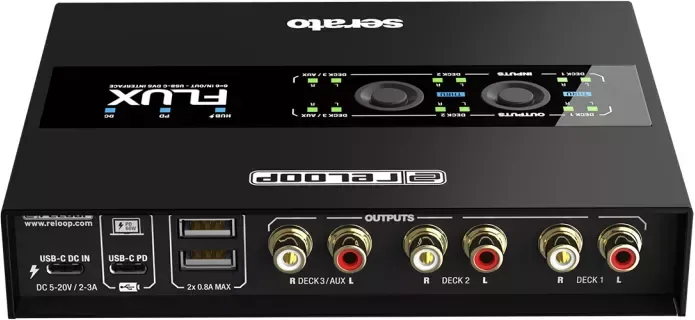
- This device is a professional USB-C DVS interface. The FLUX interface converts the control signal coming from
each deck into digital audio, to be sent via USB to the Serato DJ software, which decodes that signal into a stream
of information based on what the DJ is doing with the control disc. A virtual “deck” replicates the movements of the
control disc. Audio les loaded onto the virtual decks are then played back through the outputs of the hardware, with
any manipulation of the control disc reproduced on the audio, effectively emulating vinyl control of the les loaded
into the software.
- If the device is used for other purposes than those described in the operation manual, damage can be caused to the
product, leading to the exclusion of warranty rights. Moreover, any other application that does not comply with the
specied purpose harbors risks such as short circuits, res, electrical shocks, etc.
MAINTENANCE
- Check the technical safety of the device regularly for damage to the USB cable or the casing, as well as for wear out
of wear parts such as buttons and switches.
- If it is to be assumed that a safe operation is no longer feasible then the device must be disconnected and secured
against accidental use. Always disconnect the USB cable from the outlet!
- Disconnect the USB cable from your computer.
- It must be assumed that a safe operation is no longer feasible if the device bears visible defects, if the device no longer
functions, following longer storage under unfavorable conditions or after major transport stress.

Chatten Sie mit Ihrem Reloop Flux-Handbuch mithilfe von KI

Erhalten Sie sofortige KI-Antworten aus Ihrem Reloop Flux-Handbuch

Fragen Sie alles über Reloop Flux. Antworten stammen aus diesem Handbuch, mit den Seiten, auf denen sie basieren.

Flux Wartungsplan

Regelmäßig
Gerät auf technische Sicherheit prüfen

USB-Kabel und Gehäuse auf Beschädigungen prüfen. Verschleißteile wie Tasten und Schalter auf Abnutzung kontrollieren.

Vor der Reinigung
Gerät vom Strom trennen

Den USB-Stecker stets am Steckerkörper anfassen und abziehen, bevor das Gerät gereinigt wird, um einen elektrischen Schlag zu vermeiden.

Bei Bedarf
Gehäuse mit feuchtem Tuch reinigen

Das Gerät nur mit einem feuchten Tuch reinigen. Niemals Lösungsmittel, erdölhaltige Reinigungsmittel oder Sprühmittel auf Bedienelemente anwenden.

M: qwen/qwen3.8-flash

Stellen Sie eine Frage

0/1000

Empfehlen Sie Flux?

Ja Nein

Häufig gestellte Fragen

A

Von Serato Website herunterladen. Software aktiviert sich mit Gerät. ASIO-Treiber installieren, falls in Windows angefordert. Manuelles ASIO-Treiber steht auf Webseite zur Verfügung.

Ist diese Antwort hilfreich?

A

Ja mit Thru-Modus, aber externe Stromversorgung benötigt. USB-C-Netzteil anschließen, um Ausgänge ohne PC zu nutzen.

Ist diese Antwort hilfreich?

A

2 A oder höher. Externes DC für aktive Hub-Nutzung empfohlen. USB-Bus-Strom Minimum 400 mA.

Ist diese Antwort hilfreich?

A

Reloop Firmware Update App verwenden. Java Runtime Environment erforderlich. Bildschirmschritte befolgen. Update dauert 3 bis 5 Minuten.

Ist diese Antwort hilfreich?

A

RCA-Eingänge an Plattenspieler anschließen. Erdungsleitung an Klemme anschließen. Phono/Line-Schalter für Plattenspieler nach OBEN stellen.

Ist diese Antwort hilfreich?

A

Ja via USB-C PD wenn externes Strom in Flux gesteckt. Sicherstellen dass mindestens 15 Watt von Versorgung vorhanden.

Ist diese Antwort hilfreich?

A

160 mal 120 mal 34 mm. Gewicht ist 0,85 kg. Kompaktes Design passt leicht in Standard-Racks.

Ist diese Antwort hilfreich?

M: QW-35-FL

Vorteile und Nachteile

Vorteile

  • Integrierte Serato DJ Pro und DVS Lizenz enthalten
  • Drei Deck Support für erweiterte Setups
  • Aktive USB-Hubs für mehrere Zubehöre
VS

Nachteile

  • Benötigt externe Stromversorgung für Thru ohne Computer
  • Keine interne Wartung vom Benutzer erlaubt
  • Muss Umgebungstemperatur nach kaltem Transport abwarten
M: QW-35-FL

Produkt Spezifikation

Schnittstelle

USB-C 2.0

Eingangskanäle

6

Ausgangskanäle

6

Mikrofonvorverstärker

Nein

Analog-Eingänge

3 x Phono/Stereo Line-In (RCA)

Analog-Ausgänge

3 x Stereo Line-Out (RCA)

Digitale Eingänge

Nein

Digitale Ausgänge

Nein

AD/DA-Wandler

24 Bit/96 kHz

Funktionen

Busgespeist

Abmessungen

16,00 x 3,40 x 11,99 cm (B x H x T)

Gewicht

0,85 kg

M: QW-35-FL

Produkt Beschreibung

Reloop Flux Test

Das Reloop Flux zeichnet sich als professionelle USB-C DVS Schnittstelle für moderne DJ Setups aus. Es ermöglicht DJs, ihre Vinyl-Kontrolle präzise zu digitalisieren. Die Einheit verbindet Plattenspieler direkt mit Serato DJ Software. Jede Bewegung der Control-Disc wird virtuell repliziert. Sie erhalten digitale Kontrolle, ohne das Gefühl analoger Medien zu opfern.

Fortgeschrittene Kontrollfunktionen

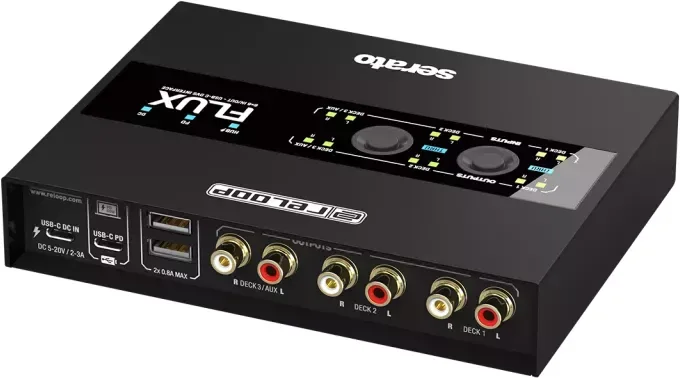
Das Verwalten von Audiosignalen ist unkompliziert mit drei Deck-Eingängen. Jeder Eingang unterstützt sowohl Phono- als auch Line-Quellen. Sie schalten um, um Geräte anzupassen. Die Schnittstelle verfügt über Ein- und Ausgangs-Status-LEDs. Diese zeigen Signalpegel und Clipping-Gefahren in Echtzeit an. Zwei aktive USB-Hubs ermöglichen das einfache Anschließen von MIDI-Controllern. Power Delivery wird über einen USB-C-Port gehandhabt. Sie können ein externes DC-Netzteil anschließen.

Integration und Software

Serato DJ Pro und Serato DVS Lizenzen sind eingebaut. Zusätzliche Keys sind nicht erforderlich. Software wird automatisch aktiviert. Windows-Benutzer benötigen den ASIO-Treiber. Der Einbau in eine Tour-Rig ist einfach. Er misst 160 mal 120 Millimeter. Mit 0,85 kg bleibt er tragbar. Sicherheitsanweisungen sind wichtig. Halten Sie ihn trocken. Gehäuse nicht öffnen. Das Reloop Flux Handbuch bietet Richtlinien. Flüssigkeiten vermeiden. Mit feuchtem Tuch reinigen. In Verpackung transportieren. Belüftung ist entscheidend. Lüftungsschlitze nicht abdecken. Bei Kälte drinnen aufwärmen. Thru-Tasten ermöglichen Bypass ohne Computer. Nützlich für Vinyl-only Sets. Power Management passt sich an. USB Bus Power funktioniert, externe Quelle empfohlen. Webseite für Firmware-Updates prüfen.

Audioqualität und Sicherheit

Die Audioqualität unterstützt hohe Auflösung. Sie verarbeitet 24-Bit-Dateien bei verschiedenen Abtastraten bis 96 kHz. Das Signal-Rausch-Verhältnis übersteigt 83 dB bei Line-Eingängen. Dies sorgt für sauberen Sound in professionellen Spielstätten. Gain Control variiert zwischen Phono- und Line-Modi. Sie gewinnen bis zu 36 dB für Plattenspieler. Line-Eingänge benötigen viel weniger. Maximaler Ausgang erreicht über 11 dBV. Dies treibt Mischer effektiv an.

Sicherheit steht während des Betriebs an oberster Stelle. Elektrischer Schock besteht bei unsachgemäßer Spannungshandhabung. Befolgen Sie alle Einrichtungsanweisungen sorgfältig. Betreiben Sie nicht bei extremer Hitze über 35 C. Luftfeuchtigkeit birgt ebenfalls Risiken. Staub kann内部的 Komponenten im Laufe der Zeit verschlechtern. Falls Flüssigkeiten eindringen, sofort trennen. Service für Inspektion kontaktieren. Unautorisierte Modifikationen machen Garantieansprüche ungültig. Wartung beschränkt sich auf externe Teile. Qualifiziertes Personal muss interne Reparaturen durchführen. Das Handbuch für zukünftige Referenz gespeichert halten.

Konnektivitätsoptionen unterstützen Workflows. Sie versorgen Computer via USB-C PD. Dies verwendet 15 Watt Minimum. Hub liefert maximale Leistung. Zwei Ports erlauben 0,8 Ampere jeweils. Unterstützt Zubehör. LEDs zeigen Leistungsmodus an. Passiv bei USB-A. Aktiv bei ausreichender Leistung. Hilft bei Fehlerbehebung.

M: QW-35-FL

© Copyright 2026 Manual.ly