
Manual.ly Logo

Muse M-22 Bedienungsanleitung

0,0 · 0 Bewertungen

PDF-Handbuch · 15 Seiten

Deutsch

M: OA-GPT-5-NAN
Seite

/ 15

Loading...
d976c30e977b2df99508530257acca3ac3c8 page 5
EN - 3 EN - 4
SPECIFICATIONS
POWER SUPPLY:
AC:
DC:
POWER CONSUMPTION:
OUTPUT POWER:
BLUETOOTH
Bluetooth Version: V5.0
Bluetooth:2.402-2.48GHz
RF Output Power: 0 dBm
Working Distance: Up to 10 meters measured in open space (wall and structures may a󰀨ect range of device)
Specications are subject to change without notice.
RADIO
FREQUENCY RANGE
FM:
AM(MW):
230V 50Hz
9V 6x 1,5 V type UM-2/R14/ ‘C’
14W
2 x 1 Watt RMS
87.5 - 108 MHz
522 - 1620 kHz
SAFETY
CAUTION:
To reduce the risk of electric shock, do not disassemble this product. The unit contains no
user serviceable parts inside . Refer all servicing to a qualied technician.
The lightning ash with arrowhead within a triangle alerts the user to the presence of “dangerous voltage” inside
the product.
The exclamation point within a triangle to alert the user to the presence of important instructions in the literature
accompanying the appliance.
WARNING: TO PREVENT FIRE OR SHOCK HAZARD, DO NOT EXPOSE THIS PRODUCT TO RAIN OR MOISTURE.
ATTENTION: Invisible when safety devices are open or defective laser radiation . Avoid exposure to beam.
Device class 1 laser.
ATTENTION!
- Ensure proper ventilation of the unit and do not cover the ventilation openings with items such as newspapers,
tablecloths, curtains, etc. .
- Do not put any heat sources , such as lighted candles , on or near the appliance .
- Use this unit in a temperate climate .
- Do not expose the unit to dripping or moisture .
- Ensure a minimum distance of 5 cm around the unit to allow adequate ventilation.
- Do not place objects lled with liquids, such as vases, on or near the appliance.
- The plate is located at the rear of this unit.
- The mains plug is used to disconnect the device and must be easily accessible. To completely remove power from the
unit, unplug the AC power plug from the outlet completely. The AC power plug can not be constrained and must be
easily accessible during use.
- As a result of electrostatic phenomena and / or electrical transients, the product may malfunction and reset may be
necessary.
- Do not expose the batteries to excessive heat such as direct sunlight, re or other sources of heat.
- Please respect the environment when disposing of used batteries.
- To prevent splashing, place objects lled with liquids, such as vases, near the product.
- Under the inuence of fast transient and / or electrostatic electric phenomenon, the product may malfunction and the
user must perform a power reset of the device.
- The normal function of the product may be disturbed by strong Electro-Magnetic Interference. If so, simply reset the
product to resume normal operation by following the instruction manual. In case the function could not resume, please
use the product in other location.
If you want to dispose this product, remember to recycle in a landll for household electric appliances. Learn
to know your recycling center nearest you. Check with local authorities or your dealer for details. (Directive on
Waste Electrical and Electronic Equipment )
CLASS 1 LASER PRODUCT
APPAREIL À LASER DE CLASSE 1
PRODUCTO LASER DE CLASE 1
PRODUTO LASER CLASSE 1
PROGRAM PLAYBACK
1. Insert the disc with the label facing up, into the compartment and close the CD door.
2. Press .
3. Press .
4. Select the desired track with or then press to save the program in memory.
5. Repeat step 4 until the end of your programming.
6. Press to start playback. This PROGRAM function is automatically cancelled when opening the CD door or shutdown
of the unit.
Note: CD up to 20 programs.
MAINTENANCE
CLEANING
CAUTION: Disconnect this device from any power source before cleaning.
- Use a soft, clean, dry cloth. Dust regularly ventilation holes on the back or sides of the apparatus.
- The use of solvents or abrasive products or with a basis of alcohol can damage the unit.
- If an object or liquid enters the unit, unplug it immediately and have it checked by an authorized engineer.
Notes on discs
* Do not use irregularly shaped discs (example : heart-shaped, octagonal ones). The unit may malfunction.
* Do not place more than one disc in the compartment.
* Do not attempt to open the disc tray during playback.
* Do not touch the lens. You could cause a malfunction.
* If the disc is scratched, dirty or smudged with ngerprints, the device may not work. Before playing, wipe the disc with a
cloth. Proceed from the center outwards. Do not store discs in places with high temperature or high humidity. They could
bend. After reading, replace the disc in its case.
IMPORTANT NOTE
Remove the disc from its compartment if the device is to be transported.
AUXILIARY INPUT ( AUX . IN)
1. Connect one end of the cable (not supplied) to the auxiliary input connector of the device.
AUX IN
2. Connect the other end of the cable to the headphones jack or the line out jack of your external audio appliance.
3. Press to select the auxiliary mode. « AUX » appears on the display. Normally use your external audio appliance;
the sound automatically goes through the speakers of your device.
4. Adjust the volume to the desired level.
5. Disconnect the external appliance from the auxiliary input to stop playback.
LISTENING TO DISC
1. Press to turn the unit on.
2. Open the CD door.
3. Insert the disc with the label facing up and then close the compartment.
4. Press to select the CD mode.
5. After a few seconds, the total number of tracks and the CD icon will appear on the display.
To:
- Pause Playback: Press once / PAIR
- Resume playback: Press again / PAIR
- Permanently stop playback: Press
- Search forward or backward: Press and hold or
- To skip to the next or previous track: press or
DISK ERROR
Note: If the disc is dirty, damaged or unreadable or if it is placed upside down, “NO” is displayed. If this happens, clean the
disc, insert the disc correctly or try another disc.
If you encounter CD playback problem, either of the following ways may help:
1. Turn o󰀨 the unit. Disconnect the AC power cord from AC outlet and reconnect it again.
2. Clean your CD disc.
REPEAT PLAYBACK
Repeatedly press to select one of the following playback modes. Track Repeat, Repeat All.
TO DISABLE THE REPEAT PLAYBACK
Press repeatedly until the repeat mode indicator disappears from the display. The repeat function is automatically
cancelled at the opening of the door of the CD or the shutdown of the unit.
NEW ONE S.A.S
10, Rue de la Mission, 25480 Ecole Valentin, France
RD-3353TC IB MUSE 001 REV2.indd 5RD-3353TC IB MUSE 001 REV2.indd 5 2023/5/17 15:38:342023/5/17 15:38:34

Chatten Sie mit Ihrem Muse M-22-Handbuch mithilfe von KI

Erhalten Sie sofortige KI-Antworten aus Ihrem Muse M-22-Handbuch

Fragen Sie alles über Muse M-22. Antworten stammen aus diesem Handbuch, mit den Seiten, auf denen sie basieren.

M-22 Wartungsplan

Regelmäßig
Staubentlüftungsöffnungen reinigen

Entfernen Sie regelmäßig mit einem weichen, sauberen, trockenen Tuch Staub von den Lüftungsöffnungen an der Rückseite oder den Seiten des Geräts. Bedecken Sie diese Öffnungen nicht mit Gegenständen.

Vor der Verwendung
CD-Scheibe reinigen

Wischen Sie die Scheibe vor dem Abspielen mit einem weichen Tuch von der Mitte nach außen ab, wenn sie zerkratzt, schmutzig oder mit Fingerabdrücken verschmiert ist.

M: QW-35-FL

Stellen Sie eine Frage

0/1000

Empfehlen Sie M-22?

Ja Nein

Häufig gestellte Fragen

A

Das M-22 unterstützt CD-Wiedergabe (Standard-Audio-CDs), FM- und AM (MW)-Radio, Bluetooth-Kabelloses Streaming und einen AUX-Eingang für verkabelte externe Audioquellen.

Ist diese Antwort hilfreich?

A

Wählen Sie den Bluetooth-Modus am Gerät, aktivieren Sie Bluetooth an Ihrem Telefon und suchen Sie nach Geräten. Wählen Sie "M-22 BT" und bestätigen Sie. Falls aufgefordert, PIN 0000 eingeben. Ein Piepton und ein Symbol zeigen erfolgreiche Kopplung an.

Ist diese Antwort hilfreich?

A

Ja. Das Gerät nimmt sechs 1,5V C (UM-2/R14) Batterien auf. Setzen Sie diese unter Beachtung der Polarität ein und trennen Sie das Netzkabel, um im Batteriebetrieb zu arbeiten. Entfernen Sie die Batterien bei längerer Lagerung, um Auslaufen zu vermeiden.

Ist diese Antwort hilfreich?

A

Sie können manuell oder automatisch einen Sender abstimmen, die Memory-Taste drücken, um einen Preset-Slot (z. B. P01) auszuwählen und zu speichern. Gespeicherte Sender überschreiben vorhandene Sender auf dem gewählten Preset-Platz.

Ist diese Antwort hilfreich?

A

Wenn das Display einen Fehler anzeigt, reinigen Sie die Disc vom Zentrum zum Rand, stellen Sie sicher, dass sie mit der bedruckten Seite nach oben eingelegt ist, probieren Sie eine andere Disc und schalten Sie bei Bedarf das Gerät aus und wieder ein, indem Sie das Netzkabel trennen und wieder anschließen.

Ist diese Antwort hilfreich?

A

Bluetooth v5.0, Frequenz 2,402–2,480 GHz, HF-Ausgang 0 dBm. Die Reichweite beträgt bis zu etwa 10 Meter im Freifeld; Hindernisse und Wände können die Effektivreichweite verringern.

Ist diese Antwort hilfreich?

A

Ja. Lüftung freihalten (ca. 5 cm Abstand), Feuchtigkeit und Hitze vermeiden, vor der Reinigung stromlos schalten, ein weiches trockenes Tuch verwenden, Lösungsmittel vermeiden und Batterien sowie das Gerät entsprechend lokalen Vorschriften recyceln.

Ist diese Antwort hilfreich?

M: OA-GPT-5-NAN

Vorteile und Nachteile

Vorteile

  • Mehrere Wiedergabeoptionen: CD, FM/AM-Radio, Bluetooth v5.0 und AUX-Eingang.
  • Tragbar mit doppelter Stromversorgung: Netz oder 6×C-Batterien für mobilen Einsatz.
  • Einfache Bedienung mit Presets, Programmwiedergabe (bis zu 20 Titel) und Wiederholfunktionen.
  • Bluetooth-Kopplung ist einfach; das Gerät erscheint als "M-22 BT" und unterstützt kabelloses Streaming bis 10 m.
  • Wartungs- und CD-Pflegehinweise enthalten; Gerät entspricht anwendbaren EU-Konformitätsstandards.
VS

Nachteile

  • Begrenzte Ausgangsleistung (2 × 1 W RMS) — nicht ideal für große Räume oder lautes Musikhören.
  • CD-Mechanik empfindlich gegenüber zerkratzten/verschmutzten Discs; unregelmäßig geformte Discs werden nicht unterstützt.
  • Batteriebetrieb verwendet sechs C-Zellen, die sperrig und kostspielig bei häufigem mobilen Einsatz sein können.
  • Bluetooth-Reichweite und -Leistung können durch Wände und Hindernisse beeinträchtigt werden; Sichtverbindung empfohlen.
  • Basisfunktionen ohne erweiterte Audioverbesserungen (EQ, digitales Radio oder Streaming-Apps).
M: OA-GPT-5-NAN

Produkt Spezifikation

Audioformate

CD-Audio, CD-R/RW

Tuner

FM, AM

Display

LED, Uhrzeit

Audioanschlüsse

AUX In (3.5mm Klinke)

Drahtlos

Bluetooth

Stromversorgung

C-Batterie, Netzbetrieb

Besondere Merkmale

Teleskopantenne

Gewicht

1,40 kg

M: GO-GEM-FL-25

Produkt Beschreibung

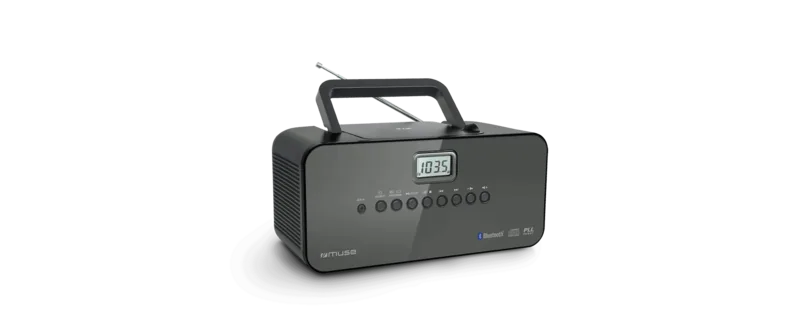
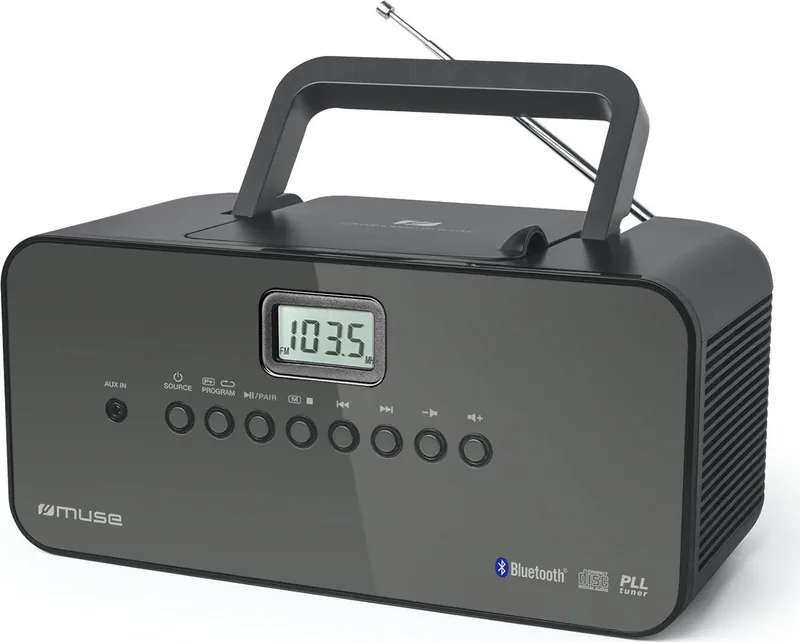
Muse M-22 — Kompakter Bluetooth-CD-Radio

Das Muse M-22 ist ein vielseitiges tragbares Audio-Gerät, das einen CD-Player, FM/AM-Radio, Bluetooth-Streaming und einen AUX-Eingang in einem leichten, batteriebetriebenen oder netzbetriebenen Gehäuse kombiniert. Mit einer Teleskop-FM-Antenne, gut ablesbarem LCD und frontseitigen Lautsprechern richtet es sich an Nutzer, die eine einfache All-in-One-Musiklösung für Zuhause, Reisen oder Outdoor-Einsatz suchen.

Der Player akzeptiert Standard-Audio-CDs (bis zu 20 spuren programmierbare Wiedergabelisten), unterstützt Pause/Stopp/Sprung- und Wiederholfunktionen und warnt bei Laufwerksfehlern durch verschmutzte oder beschädigte Discs. Radiofunktionen umfassen manuelles und automatisches Tuning, Stationsspeicher und Hinweise zur Optimierung des Empfangs (Antenne für FM ausfahren, Gerät für AM drehen). Bluetooth v5.0 bietet kabelloses Streaming bis etwa 10 Meter im Freifeld und manuelle Kopplung über den Gerätenamen "M-22 BT" (Standard-PIN 0000, falls erforderlich).

Stromoptionen sind flexibel: Betrieb über Netzstrom (230V~50Hz) oder sechs C-Batterien für den mobilen Einsatz. Hinweise zu Batterien und Sicherheit werden gegeben — Batterien entfernen, wenn das Gerät längere Zeit nicht verwendet wird, Batterietypen nicht mischen und Batterien nicht Hitze aussetzen. Das Gerät entspricht relevanten europäischen Richtlinien und enthält Standard-Sicherheitswarnungen zu Feuchtigkeit, Belüftung, Laserklasse-1-CD-Optik sowie Entsorgungs-/Recyclinganweisungen.

Die Bedienung ist einfach: Eine einzige Quelle-/Ein/Aus-Taste schaltet zwischen FM, AM (MW), CD, Bluetooth und AUX-Modi; dedizierte Tasten übernehmen Play/Pause/Kopplung, Memory/Presets, Tuning/Sprung, Lautstärke hoch/runter und Programm/Speichern für die CD-Wiedergabe. Der Aux-Eingang ermöglicht das Anschließen externer Audiogeräte per Kabel, um den Ton über die Lautsprecher des Geräts auszugeben.

Die Wartung ist unkompliziert: Vor der Reinigung ausschalten, ein weiches, trockenes Tuch verwenden, Lösungsmittel vermeiden und Lüftungsöffnungen staubfrei halten. Für die CD-Pflege Discs vom Zentrum zum Rand abwischen, unregelmäßig geformte Medien vermeiden und Discs vor dem Transport entfernen.

Hinweise:

  • Bluetooth: V5.0, 2,402–2,48 GHz, 0 dBm HF-Ausgang, Reichweite bis zu 10 m im Freifeld.
  • CD: unterstützt Programmwiedergabe (bis zu 20 Titel), Wiederholfunktionen und standardmäßige CD-Fehlerbehandlung.
  • Strom: Netz 230V 50Hz oder DC 9V über 6×1,5V C-Batterien.

Kurzzusammenfassung

  • Tragbares CD-Radio mit Bluetooth-Streaming und AUX-Eingang
  • Einfache Bedienung, Senderspeicher und CD-Programmierung
  • Doppelte Stromversorgung: Netz oder Batterien; CD-Mechanik Klasse 1
M: OA-GPT-5-NAN

© Copyright 2026 Manual.ly