Manual.ly Logo

Ksix TrueBuds 3 Bedienungsanleitung

0,0 · 0 Bewertungen

PDF-Handbuch · 19 Seiten

Deutsch

M: QW-35-FL
Seite

/ 19

Loading...
b1cd6628ba4a539ec125a90dae691a06387d page 1
TRUE BUDS 3
Earphones
User manual
Technical information
Bluetooth version: 5.0
Bluetooth profile: A2DP / AVRCP / HFP
Transmission range: ≈ 10 m
Sensitivity: 104 ± 3 dB
Frequency range: 20 ~ 20 000Hz
Impedance: 32 Ω
Weight: 36 g
Single earbud weight: 3.9 g
Play time: ≈ 3 hours
Standby time: ≈ 300 hours
Charging time for the charging case: ≈ 2 hours
Earbud charging time: ≈ 2 hours
Charging case battery capacity: 320mAh
Earbud battery capacity: 40mAh
Input: 5V – 1A
In the box
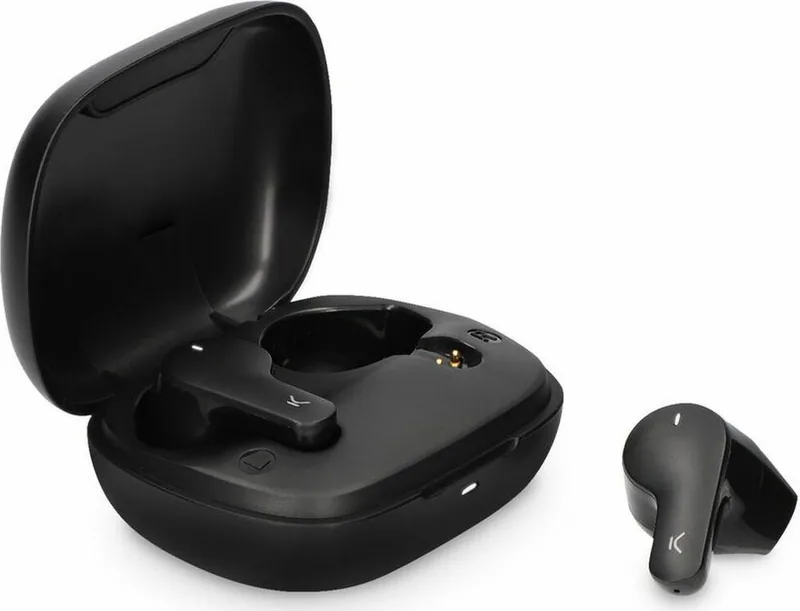
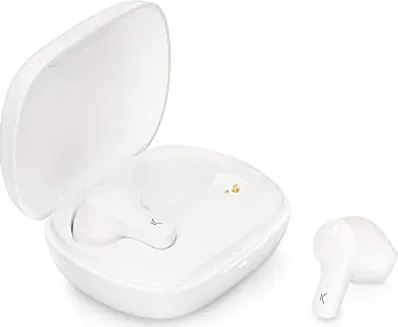
1 x charging case
2 x earphones
1 x type C charging cable
How to connect the earphones
Turning on
The earphones are automatically turned on when the charging case is opened.
If they are out of the charging case, long press the touch surface of both earphones for 3
seconds to turn them on. The red and white indicator lights will flash for 1 second and the
word “Connected” will be heard.
Pairing (first use)
Open the charging case. The indicator light of both earphones will alternately flash red and
white. After 10 seconds, the earphones will pair automatically, and the indicator light will
start flashing red and light slowly. This means they are ready to be paired with the device.
Enable the Bluetooth function on your device, search for a device named TRUEBUDS3 and
select “connect”. Once the connection has been successful, the word “Connected” will be
heard.
If the device Bluetooth version is lower than 3.0, enter the default security code 0000
when the password window pops up
Turning o
Introduce the earphones in the charging case and close the cover to turn them o.
They can also be turned o by holding pressed the touch surface of both earphones for 5
seconds. The red and white indicator lights will flash for 1 second and the word “Powered
o”.
The earphones are turned o automatically after 3 minutes of disconnection from the
device.
How to use
Use the touch surface to change from one song to another and to manage incoming calls.
• Play/Pause: Short press the touch surface of any of the earphones.
• Previous/Next song: Long press the touch surface of the left earphone for 2 seconds to
go back to the previous song. Long press the touch surface of the right earphone for 2
seconds to change to the next song.
• Answer/Hang up a call: When a call comes in, short press the touch surface of any of the
earphones to answer it. Once the call is in process, short press the touch surface of any of
the earphones to hang it up.
• Reject a call: When a call comes in, long press the touch surface of any of the earphones
for 2 seconds to reject it.
• Reset: When both earphones are o, long press the touch surface of both earphones for 8
seconds to reset the pairing information.
• Siri: Short press the touch surface of any of the earphones three times to open Siri.
How to charge
When the earphones have low battery, the indicator light will flash red slowly, and the
phrase “Battery low” will be heard.
Charging the earphones
Introduce both earphones in the charging case and close the cover. Please, check that both
earphones are correctly introduced in the case. The indicator light of the charging light will
turn on, and the indicator lights of both earphones will turn red.
Once the earphones are fully charged, the indicator light will fade. It takes about 2 hours to
charge the earphones completely. A fully charged charging case can be used to charge the
earphones more than 2 times.
Charging the charging case
Please, use a 5V-1A charger. During charging, the charging case indicator light will flash red.
When it is fully charged, the red light will turn into static mode. It takes about 2 hours to
charge the charging case completely.
Maintenance recommendations
• Regularly clean the product with a dry cloth. The product must be disconnected or
switched o when you clean it.
• Keep the connectors and/ or ports free from dust, lint, etc. to prevent improper
connections.
• Avoid breaking the device. Do not put objects over it or bend it too strong.
• If the product includes a cable do not bend it too strong and do not pull from it to unplug
the product.
• Do not wet the product. Keep it always in a dry place, away from humidity.
• When not using the product, store it in a place free from dust, dirt, lint, liquids, etc.
z• If water or other liquids enter the product interior, unplug it immediately from any
attached power source or device it is connected to.
• Avoid dropping or hitting the product. It might be damaged.
• Do not use the product for anything other than its intended use.
• Please recycle the product in accordance with local environmental laws and regulations.
Safety information
Please read the following instructions before using the device for the first time:
• When you use device keep it away from heat sources (fire) and from humidity sources
(water and other liquids).
• If the product is wet or damaged do not us it.
• Do not use the product with wet hands.
• Do not leave the product in contact with flammable materials.
• Do not expose the product to high temperatures (for example: inside a car during hot
weather)
• Do not throw the product into fire.
• Keep the product away from children.
• Disconnect or switch o the product if you are not going to use for a long period of time.
• Do not use the device if you perceive any visible defects.
• Do not attempt to open or puncture the product. You might damage it.
• Do not use the product with incompatible devices.
• Do not dismount or modify the product. These actions will invalidate the Warranty.
Legal Note
Hereby, Atlantis Internacional S.L. declares that this product is in compliance with the
essential requirements and other relevant provisions of Directive 2014/53/EC.
The features and functions described in this manual are based on tests made by Atlantis
Internacional S.L. It is the user’s responsibility to examine and verify the product after its
purchase. Atlantis Internacional S.L. is not responsible and will never be liable for any
personal loss or injury, economical loss, material loss or any damage due to misuse, abuse
or improper installation of the product.
For electronical devices with Bluetooth: Atlantis Internacional S.L. is not responsible and
will never be liable for any function, communication and connection failure between the
product and Bluetooth enabled devices.
Electronic and electrical devices disposal
This symbol indicates that electrical and electronic equipment is to be collected separately.
• This product is designated for separate collection at an appropriate collection point. Do
not dispose of as household waste.
• The final price of this product includes the cost necessary for the correct environmental
management of the generated waste.
• If the equipment uses batteries, they must be removed from the equipment and disposed
in an appropriate collection center. If the batteries cannot be removed, do not
attempt to do it yourself since it must be done by a qualified professional.
• Separate collection and recycling helps conserve natural resources and prevent negative
consequences for human health and the environment that might result from incorrect
disposal.
• For more information, contact the retailer or the local authorities in charge of waste
management.
CE Declaration of Conformity
We hereby declare that the product (s) listed below satisfies the provision for CE-marking
according to the following European directive(s):
EN 55032:2015/A11:2020
EN IEC 61000-3-2:2019
EN 61000-3-3:2013/A1:2019
EN 55035:2017/A11:2020
Article: BXTW03B3 / BXTW03N3
EAN: 8427542122144 / 8427542122151
Features:
dc 3.7V By battery or DC 5V by adapter
Manufacturer:
ATLANTIS INTERNACIONAL, S.L.
Address:
Carrer del Crom, 53, 08907 L'Hospitalet de Llobregat, Barcelona (Spain)
Place and date of the declaration:
L’Hospitalet de Llobregat, February 21, 2022
Nico Broder
General Manager

Chatten Sie mit Ihrem Ksix TrueBuds 3-Handbuch mithilfe von KI

Erhalten Sie sofortige KI-Antworten aus Ihrem Ksix TrueBuds 3-Handbuch

Fragen Sie alles über Ksix TrueBuds 3. Antworten stammen aus diesem Handbuch, mit den Seiten, auf denen sie basieren.

TrueBuds 3 Wartungsplan

Regelmäßig
Reinigen Sie das Produkt mit einem trockenen Tuch

Stellen Sie sicher, dass das Produkt vor der Reinigung vom Netz getrennt oder ausgeschaltet ist.

Bei Bedarf
Halten Sie Anschlüsse und Ports staubfrei

Entfernen Sie Staub, Fussel und Schmutz von Anschlüssen und Ports, um unsachgemäße Verbindungen zu verhindern.

M: qwen/qwen3.8-flash

Stellen Sie eine Frage

0/1000

Empfehlen Sie TrueBuds 3?

Ja Nein

Häufig gestellte Fragen

A

Öffnen Sie das Ladecase, um sie automatisch einzuschalten. Aktivieren Sie Bluetooth auf Ihrem Gerät, suchen Sie nach TRUEBUDS3 und wählen Sie Verbinden aus. Wenn ein Code für Geräte unter Bluetooth 3.0 angezeigt wird, geben Sie 0000 ein.

Ist diese Antwort hilfreich?

A

Die Kopfhörer bieten etwa 3 Stunden Wiedergabezeit mit einer einzigen Ladung. Das Ladecase bietet genug Energie, um sie mehr als zweimal aufzuladen, was die Gesamtverwendung deutlich verlängert.

Ist diese Antwort hilfreich?

A

Sowohl die Kopfhörer als auch das Ladecase benötigen etwa 2 Stunden für einen vollständigen Ladezyklus mit einem Standard-Adapter mit 5 Volt und 1 Ampere. Die Anzeigelampen hören auf zu blinken, wenn sie voll geladen sind.

Ist diese Antwort hilfreich?

A

Ja. Wenn beide Kopfhörer ausgeschaltet sind, drücken Sie die Touch-Oberfläche auf beiden gleichzeitig 8 Sekunden lang. Dies setzt alle Pairing-Informationen für neue Verbindungsversuche zurück.

Ist diese Antwort hilfreich?

A

Ja. Sie können Siri aktivieren, indem Sie die Touch-Oberfläche an einem der Kopfhörer dreimal schnell kurz drücken. Dies funktioniert nahtlos mit unterstützten Geräten.

Ist diese Antwort hilfreich?

A

Wenn Flüssigkeit ins Innere gelangt, trennen Sie sofort jede Stromquelle. Nicht verwenden, wenn feucht oder beschädigt. Produkte an trockenen Orten lagern, um Feuchtigkeitsbelastung zu vermeiden.

Ist diese Antwort hilfreich?

A

Das Paket enthält ein Ladecase, zwei Kopfhörer und ein Typ-C-Ladekabel. Prüfen Sie alle Artikel beim Kauf, um die Vollständigkeit sicherzustellen.

Ist diese Antwort hilfreich?

M: QW-35-FL

Vorteile und Nachteile

Vorteile

  • Bluetooth 5.0-Konnektivität sorgt für stabilen Bereich bis zu 10 Metern für ununterbrochenes Streamen.
  • Automatische Einschaltung beim Öffnen des Cases vereinfacht den täglichen Nutzungsablauf effektiv.
  • Sprachprompts bestätigen Verbindungsstatus und Batterielevel akustisch während des Betriebs.
VS

Nachteile

  • 3 Stunden Spielzeit erfordern häufiges Laden bei intensiver Nutzung tagsüber.
  • Ladevorgang dauert 2 Stunden, was die Verfügbarkeit für sofortige Wiederverwendungssituationen verzögert.
  • Produkt besitzt keine angegebene Wasserdichtigkeitsbewertung, daher bleibt das Risiko für Feuchtigkeitsschäden höher.
M: QW-35-FL

Produkt Spezifikation

Typ

In-Ear-Kopfhörer

Bauform

True Wireless, bügelfrei

Mikrofon

Integriert

Drahtlos

Bluetooth 5.0

Bedienung

Touch-Bedienung

Akkulaufzeit

3 h, 10 h (mit Ladeetui)

Akku

USB-C-Ladeanschluss, Ladeetui (320 mAh), 2 h Ladezeit

Frequenzbereich

20 Hz-20 kHz

Impedanz

32 Ohm

Empfindlichkeit

104 dB

Gewicht

3,97 g (jeweils), 36,00 g (Etui)

M: QW-35-FL

Produkt Beschreibung

Entdecken Sie Ksix TrueBuds 3 Funktionen

Willkommen in der Welt des nahtlosen Audios mit den Ksix TrueBuds 3. Diese kabellosen Kopfhörer definieren den Komfort für Nutzer neu, die hohe Leistung ohne Komplexität suchen. Entworfen mit modernster Technologie, verfügen sie über Bluetooth Version 5.0 für stabile Verbindungen bis zu 10 Metern. Ob Pendeln oder Training, der Übertragungsbereich stellt sicher, dass Ihre Musik unterbrechungsfrei bleibt. Die Benutzeroberfläche beruht stark auf intuitiven Touch-Oberflächen. Sie können Wiedergabe steuern, Anrufe beantworten und Sprachassistenten direkt von den Ohrstöpseln triggern. Diese Funktionalität wird ausführlich im Ksix TrueBuds 3 Handbuch detailliert dargestellt, um sicherzustellen, dass jede Funktion korrekt genutzt wird. Kurzes Drücken schaltet zwischen Spiel und Pause um. Langes Drücken navigiert Songs vorwärts oder rückwärts. Anrufe können durch einmaliges Tippen angenommen oder durch Halten abgelehnt werden.

Klangqualität und Designspezifikationen

Die Audioqualität bleibt eine Priorität für moderne Verbraucher. Mit einem Frequenzbereich von 20 bis 20.000 Hertz und einer Empfindlichkeit von 104 Dezibel ist Klarheit gewährleistet. Der Impedanzwert liegt bei 32 Ohm, was ausgewogene Klangprofile für verschiedene Genres bietet. Das Gewicht wurde ebenfalls beim Design berücksichtigt. Jeder einzelne Ohrhörer wiegt nur 3,9 Gramm, wodurch sie für längere Tragezeiten komfortabel sind. Das Gesamtgewicht inklusive Case beträgt 36 Gramm, passt leicht in Taschen. Die Standby-Zeit erreicht ungefähr 300 Stunden bei korrekter Lagerung im Gehäuse.

Strommanagement und Ladedetails

Das Batteriemanagement ist für den täglichen Einsatz kritisch. Die Spielzeit beträgt ca. 3 Stunden bei einer einzigen Ladung. Dies mag für Audiophile kurz erscheinen, aber das Ladecase erweitert die Nützlichkeit erheblich. Es hält zwei volle Ladungen, was mehr als 6 Stunden Hördauer ermöglicht, bevor das Case selbst eingesteckt werden muss. Das Laden dauert etwa 2 Stunden sowohl für die Stöpsel als auch das Case mit einem 5-Volt-1-Ampere-Adapter. Sprach-Prompts wie Verbunden oder Aus geschaltet bestätigen Statusänderungen automatisch. Warnungen bei niedrigem Akku alarmieren Benutzer durch Blinklichter und gesprochene Phrasen. Das Freihalten der Anschlüsse von Staub verhindert fehlerhafte Verbindungen im Laufe der Zeit.

Gebrauchsanweisung und Wartungstipps

Die Konnektivitätskonfiguration beinhaltet das Öffnen des Cases, wobei Indikatoren rot und weiß blinken. Die Kopplung sucht nach einem Gerät namens TRUEBUDS3 auf Ihrem Handy. Für ältere Bluetooth-Versionen unter 3.0 werden Sicherheitscodes benötigt. Wartung erfordert das Trockenhalten des Produkts und Reinigen mit einem trockenen Tuch. Vermeiden Sie Exposition gegenüber Hitzequellen oder Flüssigkeiten, um Schäden zu verhindern. Bewahren Sie es immer fern von Feuchtigkeit auf, wenn es nicht verwendet wird. Das beigefügte Typ-C-Kabel vereinfacht die Ladelogistik. Sicherheitshinweise raten davon ab, das Gerät zu perforieren oder zu modifizieren, um die Garantiehaftung zu wahren. Die umweltgerechte Entsorgung wird ebenfalls betont, um die Auswirkungen auf Elektronikschrott zu reduzieren. Schließlich erklärt der Hersteller die Einhaltung europäischer Richtlinien bezüglich elektromagnetischer Verträglichkeit. Erleben Sie heute zuverlässiges Audio mit diesen gut ausgestatteten Kopfhörern. Überprüfen Sie den Leitfaden regelmäßig für optimale Wartungspläne und Troubleshooting-Schritte, um die Haltbarkeit Ihrer Hardware-Komponenten zu gewährleisten.

M: QW-35-FL

© Copyright 2026 Manual.ly