
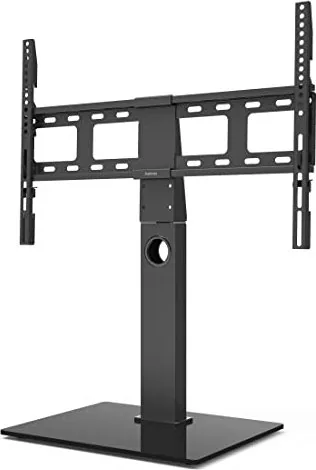
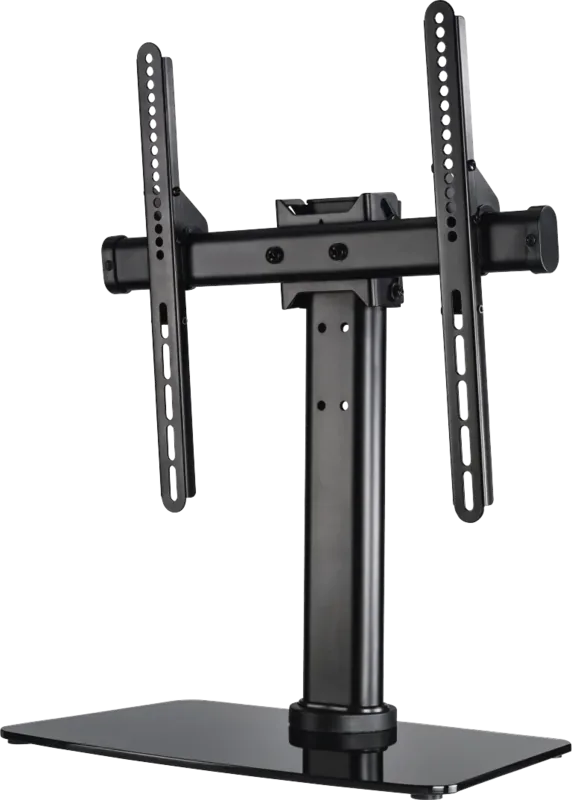
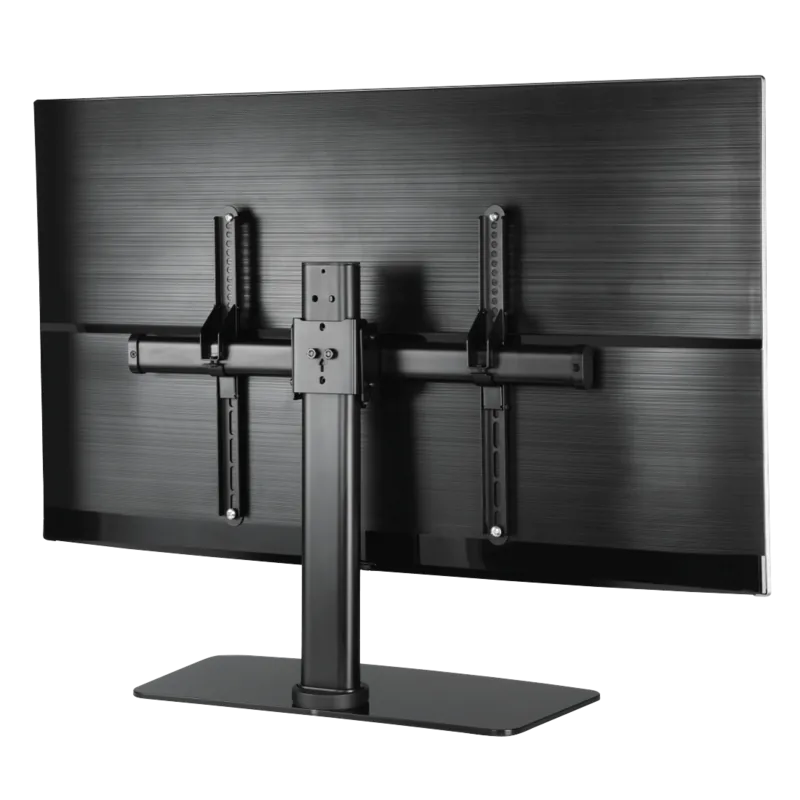
Hama Fullmotion Table Stand Bedienungsanleitung
PDF-Handbuch · 28 Seiten
Deutsch



Schnelle Überprüfung
Falsche Antwort, bitte versuchen Sie es erneut.
Chatten Sie mit Ihrem Hama Fullmotion Table Stand-Handbuch mithilfe von KI
Erhalten Sie sofortige KI-Antworten aus Ihrem Hama Fullmotion Table Stand-Handbuch
Fragen Sie alles über Hama Fullmotion Table Stand. Antworten stammen aus diesem Handbuch, mit den Seiten, auf denen sie basieren.
Fullmotion Wartungsplan
Wiederholen Sie die Kontrolle in regelmäßigen Abständen, um sicherzustellen, dass der TV-Ständer ausreichend sicher und benutzbar ist.
Verwenden Sie nur Wasser oder handelsübliche Haushaltsreiniger zur Reinigung. Verwenden Sie keine anderen Substanzen.
Kostenlose Wartungserinnerungen
Abgestimmt auf Ihr Kaufdatum. Immer kostenlos, jederzeit abbestellbar.
Stellen Sie eine Frage
Empfehlen Sie Fullmotion?
Ja NeinHäufig gestellte Fragen
Das Gerät unterstützt Flachbildschirme mit einer Diagonalmessung zwischen 81 und 165 Zentimetern. Dies deckt Bildschirme von 32 bis 65 Zoll ab. Es entspricht VESA-Normen bis zu 600x400.
Ist diese Antwort hilfreich?
Die maximale Tragfähigkeit beträgt 40 kg. Überschreiten Sie dieses Gewicht nicht oder die maximal angegebene Diagonalgröße, um Sicherheit zu gewährleisten und ein Kippen zu verhindern.
Ist diese Antwort hilfreich?
Nein, Sie müssen das Gestell mit Hilfe einer zweiten Person montieren. Versuchen Sie niemals alleine eine Installation aufgrund des Gewichts und der damit verbundenen Sicherheitsrisiken.
Ist diese Antwort hilfreich?
Regelmäßige Kontrollen sind mindestens alle drei Monate erforderlich. Sie müssen sicherstellen, dass das Produkt und das angehängte Gerät sicher positioniert sind.
Ist diese Antwort hilfreich?
Nein, das Produkt ist nur für den Innenbereich bestimmt. Setzen Sie es keinen Außenelementen oder Wetterbedingungen aus.
Ist diese Antwort hilfreich?
Wenn die Rotationsfunktion steif ist, lösen Sie die Mutter am Scharnier leicht nach. Sie sollten Wasser oder Standardreiniger zur Wartung verwenden, keine aggressiven Chemikalien.
Ist diese Antwort hilfreich?
Nein. Modifizieren Sie das Produkt auf keine Weise. Unsachgemäßer Gebrauch oder Installation schließt die Garantie und Haftung aus.
Ist diese Antwort hilfreich?
Vorteile und Nachteile
Vorteile

- Große VESA-Unterstützung bis zu 600x400 für verschiedene Fernseher.
- Hohe Tragfähigkeit von 40 kg für schwere Bildschirme.
- Schwenkt 60 Grad für optimale Blickwinkel.
- Robuste schwarze Oberfläche passt zu vielen Möbelstilen.
- Enthält umfassendes Installationskit für die Montage.
Nachteile

- Nur für den Innenbereich, nicht wetterfest.
- Verpflichtende Installation durch zwei Personen erforderlich.
- Sicherheitsinspektionen müssen alle drei Monate erfolgen.
- Füße können Druckmarken auf dem Boden hinterlassen.
- Fußabdruck der Basis ist 42x33 cm, was beträchtlich ist.
Produkt Spezifikation
Typ
Schreibtisch
Monitoranzahl
1
Bildschirmgröße
81,28-165,10 cm
Beweglichkeit
Drehbar (60 Grad), Höhenverstellbar
Traglast
40,00 kg
VESA
200x200, 200x300, 300x100, 300x200, 300x300, 300x400, 400x200, 400x300, 400x400, 600x200, 600x300, 600x400
Ablagen
0
Funktionen
Kabelmanagement
Farbe
Schwarz
Abmessungen (BxHxT)
64,29x81,79x32,99 cm
Produkt Beschreibung
Erleben Sie nahtlose Unterhaltung mit dem Hama Fullmotion Schwarz TV-Ständer-Handbuch
Suchen Sie eine zuverlässige Möglichkeit, Ihr großes Fernsehen sicher zu befestigen? Das Hama Fullmotion Schwarz TV-Ständer-Handbuch bietet eine hervorragende Lösung für moderne Wohnzimmer. Dieses Produkt wurde speziell für den nicht-kommerziellen privaten Haushaltsgebrauch entwickelt. Es unterstützt Flachbildschirme mit einer Diagonalmessung zwischen 81 und 165 Zentimetern. Ob Sie einen 32 oder 65 Zoll Bildschirm besitzen, dieses Gerät passt auf mehrere Modelle. Es stellt sicher, dass Ihr Fernseherlebnis auf Ihre Komfortbedürfnisse zugeschnitten ist.
Kritische technische Spezifikationen
Die Montage-Säule akzeptiert VESA-Muster bis zu 600x400. Sie können schwere Geräte mit einer maximalen Tragfähigkeit von 40 kg platzieren. Die Struktur ermöglicht eine Schwenkung bis zu 60 Grad für optimale Blickwinkel. Die Basisplatte misst 42 mal 33 cm, um eine stabile Standfläche zu gewährleisten. Die Höhe in der Mitte der Platte beträgt 55,4 cm. Diese Maße garantieren die Kompatibilität mit den meisten Standardfernsehgeräten. Es funktioniert sowohl für flache als auch für gebogene TV-Rückseiten unter Verwendung von Abstandshaltern.
Wesentliche Installationshinweise
Eine ordnungsgemäße Einrichtung ist für die langfristige Sicherheit entscheidend. Sie müssen das Gestell mit Hilfe einer zweiten Person montieren. Versuchen Sie niemals alleine eine Installation aufgrund des Gewichts. Stellen Sie sicher, dass keine Elektrokabel während des Vorgangs gequetscht werden. Prüfen Sie, dass die Halterung flach an der TV-Rückseite liegt. Verwenden Sie mitgelieferte Abstandshalter, wenn die Rückseite uneben ist. Gehen Sie Schritt für Schritt durch die illustrierten Anweisungen. Sichern Sie immer das Befestigungselement F2, um die Halterung zu verriegeln.
Warnung: Stellen Sie die Halterung nur unter Anwesenheit einer zweiten Person ein. Warnung: Platzieren Sie keine Lasten, die schwerer als die angegebene Kapazität sind.
Wartung und Langlebigkeit
Regelmäßige Kontrollen sind mindestens alle drei Monate erforderlich. Stellen Sie sicher, dass das Produkt ausreichend gesichert ist. Wenn die Rotationsfunktion steif wird, lösen Sie die Mutter am Scharnier leicht nach. Reinigen Sie das Gerät mit Wasser oder Standard Haushaltsreinigern. Verwenden Sie keine aggressiven Chemikalien, die das Finish beschädigen könnten. Prüfen Sie Schrauben und stellen Sie sicher, dass sie handfest sind.
Wichtige Garantie- und Sicherheitshinweise
Modifizieren Sie das Produkt auf keine Weise. Unsachgemäßer Betrieb schließt die Garantie aus. Halten Sie Verpackungsmaterial außerhalb der Reichweite von Kindern. Stellen Sie sicher, dass die Oberfläche eben und rutschfest ist. Prüfen Sie die allgemeine betriebliche Sicherheit regelmäßig. Wenn Schäden auftreten, entfernen Sie das angehängte Gewicht sofort. Entsorgen Sie die Verpackung gemäß lokalen Vorschriften. Die Füße können je nach Oberflächenstabilität Druckmarken hinterlassen. Wenn Sie das Gerät verkaufen, übergeben Sie die Anweisungen an den neuen Besitzer.
Nutzungsumgebung
Dieses Produkt ist nur für den Innenbereich bestimmt. Setzen Sie es keinen Außenelementen aus. Es ist für stabile Oberflächen ausgelegt, die das Gewicht des Produkts und des Geräts tragen können. Stellen Sie sicher, dass die Last symmetrisch ausgeglichen ist, um ein Kippen zu verhindern. Prüfen Sie regelmäßig, dass das Produkt und das angehängte Gerät sicher positioniert sind.
Durch Befolgen dieser Richtlinien des Hama Fullmotion Schwarz TV-Ständer-Handbuchs stellen Sie Sicherheit und Leistung sicher. Genießen Sie Ihre Heimkino-Setup mit dem guten Gewissen, dass Ihre Geräte sicher sind. Verweisen Sie immer auf die spezifischen Anweisungen für Ihre Region. Dies sorgt für die Einhaltung lokaler Sicherheitsstandards. Hama GmbH übernimmt keine Haftung für unsachgemäße Installation.
Suche nach 67.732 Bedienungsanleitungen online


Marke oder Modell eingeben