
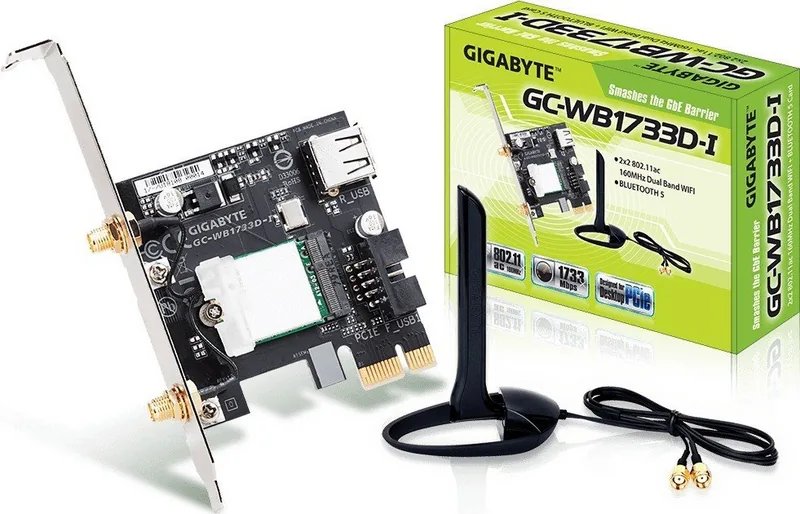
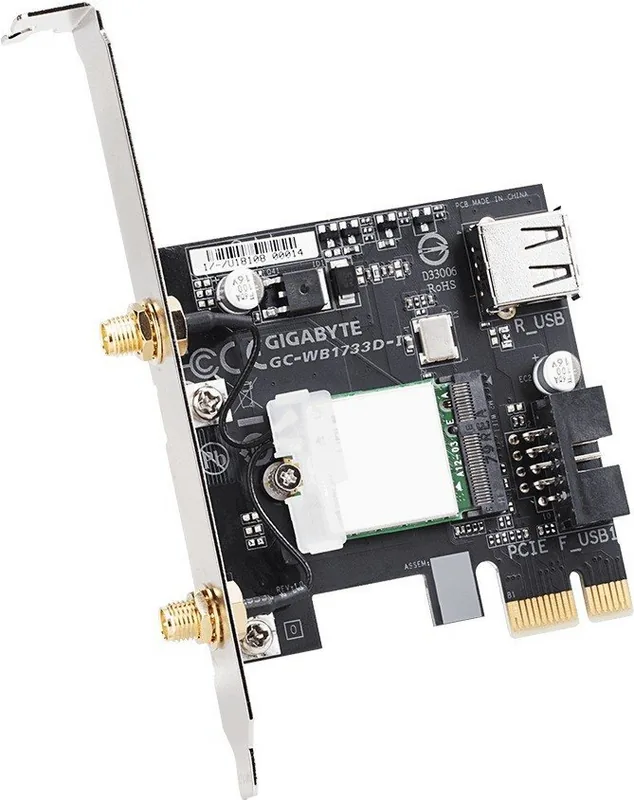

GIGABYTE GC-WB1733D-I Bedienungsanleitung
PDF-Handbuch · 14 Seiten
Deutsch



Schnelle Überprüfung
Falsche Antwort, bitte versuchen Sie es erneut.
Chatten Sie mit Ihrem GIGABYTE GC-WB1733D-I-Handbuch mithilfe von KI
Erhalten Sie sofortige KI-Antworten aus Ihrem GIGABYTE GC-WB1733D-I-Handbuch
Fragen Sie alles über GIGABYTE GC-WB1733D-I. Antworten stammen aus diesem Handbuch, mit den Seiten, auf denen sie basieren.
Stellen Sie eine Frage
Empfehlen Sie GC-WB1733D-I?
Ja NeinHäufig gestellte Fragen
Sie passt in PCI Express x1 Steckplätze auf dem Motherboard.
Ist diese Antwort hilfreich?
Ja, die Karte integriert Bluetooth 5.1 Low Energy Funktionalität.
Ist diese Antwort hilfreich?
Ja, Antennen müssen angeschlossen werden, um Funkschäden zu vermeiden.
Ist diese Antwort hilfreich?
Es erfüllt FCC Teil 15 Regeln für digitale Geräte.
Ist diese Antwort hilfreich?
Ja, Treiber müssen nach der Hardware-Einrichtung installiert werden.
Ist diese Antwort hilfreich?
5GHz Bänder sind in einigen Regionen wie Kanada im Innenbereich möglicherweise eingeschränkt.
Ist diese Antwort hilfreich?
Vorteile und Nachteile
Vorteile

- Unterstützt 2.4GHz und 5GHz WLAN Bänder für vielfältige Konnektivitätsoptionen.
- Bluetooth 5.1 LE bietet verbesserte Reichweite und Energieeffizienz.
- Einfach in Standard-PCI-Express-x1-Steckplätze auf Motherboards zu installieren.
Nachteile

- 5GHz Nutzung ist in bestimmten Frequenzbändern für einige Regionen im Innenbereich eingeschränkt.
- Erfordert externe Antennenbefestigung, was störend für Schreibtischästhetik sein kann.
- Muss einen bestimmten USB-Header auf dem Motherboard für Bluetooth verwenden.
Produkt Spezifikation
Typ
WLAN-Adapter, WPAN-Adapter
Formfaktor
1x PCIe-Karte (Adapter), 1x M.2-Modul 2230
Schnittstelle
1x PCIe x1, 1x USB 2.0 9-Pin Pin-Header (Buchse, 480 Mb/s), 1x USB-A 2.0, 1x M.2-A-E-Key (1x PCIe 1.0 x1, 1x USB 2.0)
Anschlüsse
1x WLAN 802.11a/b/g/n/ac (1x 2,4 GHz oder 1x 5 GHz, inkl. 802.11d/e/i/h/w/r/v/k/mc), 1x Bluetooth 5.1 (LE), 1x Leistungsverstärker (2x RP-SMA-Antennenstecker), 1x Antenne (RP-SMA, individuell einstellbar, mit magnetischer Antennenhalterung, 2x elektrisch)
Datenraten
1x 2,4 GHz WLAN (300 Mb/s, 2x2), 1x 5 GHz WLAN (1,73 Gb/s, 2x2), 1x Bluetooth 5.1
Stromversorgung
Stromversorgung ausschließlich über Schnittstelle
Chipsatz
Intel 9260 (WLAN-Adapter, WPAN-Adapter)
Kompatibilität
Universell
Funktionen
TPC/DFS, Intel Wireless Display, MU-MIMO
USB-Bezeichnung
Verbindung
Produkt Beschreibung
Upgrade Your PC Connectivity with GIGABYTE GC-WB1733D-I
Enhancing your personal computer networking capabilities is essential for modern digital experiences. The GIGABYTE GC-WB1733D-I (Rev. 1.0) stands out as a robust solution for expanding wireless and Bluetooth functionality into desktop systems. This adapter supports both 2.4GHz and 5GHz WLAN bands, ensuring stable connections for high-speed internet access without the hassle of physical cables. Furthermore, the integrated Bluetooth 5.1 LE capability allows for seamless pairing with various peripherals like headsets and controllers.
Installation Process
Setting up this hardware is straightforward for enthusiasts and technical professionals alike. You begin by inserting the card into a suitable PCI Express x1 slot on your motherboard chassis. The design includes a dedicated USB connector that requires connection to an F_USB header on the board. This ensures necessary data transmission for Bluetooth auxiliary functions. Additionally, external antenna cables must be screwed firmly to the antenna connectors on the card itself to prevent loose signal loss. Proper placement and orientation of antennas significantly impact signal strength and maximum range for your environment.
Regulatory Compliance and Safety
Safety and global regulatory compliance are paramount for electronic devices operating in public frequencies. This unit meets FCC standards for Class B digital devices in the United States and adheres to Canadian ICES regulations regarding radio noise. In the European Union, it strictly complies with CE directives regarding electromagnetic compatibility and the Radio Equipment Directive. China RoHS restrictions are also addressed to ensure environmental safety during disposal. These certifications provide users peace of mind regarding local usage laws and protection against harmful interference from neighboring devices.
Performance and Advanced Features
Utilizing an Intel wireless module, the card delivers reliable performance across multiple operating systems. Users benefit from wide channel support and improved power efficiency compared to older Wi-Fi generation standards. The 5GHz frequency band offers significantly less congestion than the 2.4GHz option, making it ideal for high-bandwidth activities like streaming or competitive gaming. However, users in certain regions might find indoor restrictions active on specific 5GHz frequency bands near radars. Always check local compliance before attempting outdoor usage in the restricted 5GHz range to avoid legal issues.
Conclusion and Driver Setup
Whether for home gaming setups or demanding office productivity, adding this card improves your overall network environment significantly. Drivers and utilities must be installed correctly after physical setup to enable full functionality and stability. Adjusting settings based on your specific environment optimizes connectivity further for your specific needs. This product represents a solid upgrade path for desktop systems lacking modern wireless standards while maintaining regulatory adherence worldwide for safe use. Ensure you download the latest software from the manufacturer website for optimal performance and bug fixes.
Suche nach 67.706 Bedienungsanleitungen online


Marke oder Modell eingeben
Thomas Schmidt
vor 8 Monaten
Ich sehe in Rezensionen, dass Bluetooth einen USB-Header benötigt. Ist dieses Kabel im Lieferumfang enthalten und unbedingt notwendig, oder funktioniert Bluetooth allein über den PCIe-Slot?
Manual.ly
vor 8 Monaten
Danke für die Frage. Diese Karte benötigt das mitgelieferte USB-2.0-Header-Kabel, das an Ihr Mainboard angeschlossen werden muss, um die Bluetooth-Funktion zu aktivieren. Der PCIe-Slot wird ausschließlich für die WLAN-Daten genutzt. Zwar benötigen Sie für das WLAN nicht zwingend einen freien USB-Port, aber Sie müssen einen freien USB-2.0-Header auf dem Board finden, damit Bluetooth funktioniert. Wir empfehlen, vor der Installation in der Anleitung Ihres Mainboards nachzusehen, ob Header verfügbar sind, um Verbindungsprobleme mit Peripheriegeräten zu vermeiden.