Note 1 : “Exceeding 0.1 wt %” and “exceeding 0.01 wt %” indicate that the percentage content of the restricted substance exceeds the reference percentage value of presence condition.
備考2.〝○〞係指該項限用物質之百分比含量未超出百分比含量基準值。
Note 2 :
“○”
indicates that the percentage content of the restricted substance does not exceed the percentage of reference value of presence.
備考3.〝-〞係指該項限用物質為排除項目。
Note 3 : The “−” indicates that the restricted substance corresponds to the exemption.
A customer who purchases outside Japan should contact the local retailer in the country of purchasefor enquiries.
In “ELECOM CO., LTD. (Japan)”, no customer support is available forenquiries about purchases or usage in/from any countries
other than Japan. Also, no foreign language other than Japanese is available. Replacements willbe made under stipulation of the
Elecom warranty, but arenot available from outside of Japan.
·
·
·
·
取得審驗證明之低功率射頻器材,非經核准,公司、商號或使用者均不得擅自變更頻
率、加大功率或變更原設計之特性及功能。低功率射頻器材之使用不得影響飛航安全及
干擾合法通信;經發現有干擾現象時,應立即停用,並改善至無干擾時方得繼續使用。
前述合法通信,指依電信管理法規定作業之無線電通信。低功率射頻器材須忍受合法通
信或工業、科學及醫療用電波輻射性電機設備之干擾。
Responsible party
ELECOM USA, Inc.
18575 Jamboree Road Suite 600, Irvine CA 92612 USA
elecomus.com
Trademark and name of the manufacturer:
FCC ID: YWO-M-XPT1MR
YWO-ELECOM10
Please see the current state of RoHS compliant:
請參考 RoHS 合規性目前的狀態:
Xin tham khảo theo hiện trạng tuân thủ RoHS:
Complies with
IMDA standards
DA106058.
Unauthorised copying and/or reproducing of all or part of this manual is prohibited.
The specications and appearance of this product may be changed without prior notice for product improvement purposes.
When exporting this product, check the export regulations for the country of origin.
The Bluetooth
®
word mark and logos are registered trademarks owned by Bluetooth SIG, Inc. and any use of such marks by
ELECOM CO., LTD. is under license.
Windows and the Windows logo are trademarks of the Microsoft group of companies.
macOS and Macintosh are trademarks of Apple Inc., registered in the U.S. and other countries.
Company names, product names, and other names in this manual are either trademarks or registered trademarks.
·
·
·
건전지
B052R1329-22001
트랙볼�마우스
R-C-ELJ-M-XPT1MR
리시버�유닛
R-C-ELJ-elecom10
제작자�및�설치자는�해당무선설비가�전파혼신�가능성이
있으므로�인명안전과관련된서비스는�할�수없습니다.
www.elecom.co.jp/global/certification/
Importer EU Contact
(For CE matters only)
Around the World Trading, Ltd.
5th floor, Koenigsallee 2b, Dusseldorf,
Nordrhein-Westfalen, 40212, Germany
WEEE Disposal and Recycling Information
This symbol means that waste of electrical and electronic equipment
(WEEE) should not be disposed as general household waste. WEEE
should be treated separately to prevent possible harm to the
environment or human health. Consult your retailer or local municipal
o
ffi
ce for collection, return, recycle or reuse of WEEE.
ELECOM CO., LTD.
www.elecom.co.jp/global/
ELECOM Singapore Pte. Ltd
Blk 10, Kaki Bukit Avenue 1,
#02-04 Kaki Bukit Industrial Estate, Singapore 417942
Il driver viene installato automaticamente e la trackball può essere utilizzata.
Avviare il PC.
Inserire il ricevitore in una porta USB del PC.
Cambiare il selettore di modalità di connessione a "2.4 GHz wireless".
Il driver viene installato automaticamente e la trackball può essere utilizzata.
Quando ci si connette tramite 2.4 GHz wireless
Modalità risparmio energetico
Al fine di ridurre l’usura della batteria, quando l’interruttore di selezione della modalità di alimentazione è posizionato su H o L e il
prodotto non è in funzione per un periodo di tempo prestabilito, la trackball entra automaticamente in modalità risparmio energetico.
Muovendo la sfera si ripristina dalla modalità di risparmio energetico.
* Per due o tre secondi dopo il ripristino dalla modalità di risparmio energetico, il funzionamento della trackball potrebbe essere instabile.
Assicurarsi del corretto orientamento e della posizione di inserimento del connettore.
Se durante l'inserimento, si avverte una forte resistenza, controllare la forma e l'orientamento del connettore. Inserire con
forza il connettore potrebbe danneggiare il connettore, e c'è il rischio di lesioni per l’utente.
Non toccare direttamente l’area del terminale del connettore USB.
Indicatore rosso
Area di contatto
Indicatore blu
Il metodo di accoppiamento può differire a seconda del PC che si sta utilizzando.
In tal caso, si prega di leggere il manuale di istruzioni del vostro PC.
Indicatore blu
Indicatore blu
MSC-M-XPT1MR(EU) ver.212
If a foreign object (water, metal chips) enters the
product, immediately stop using the product, remove
the receiver unit from the PC, and remove the batteries
from the trackball. If used as is, it may cause a fire or
electric shock.
Please do not drop or bump this product. In the unlikely
event that this product is damaged, immediately stop
using the product, remove the receiver unit from the PC,
and remove the batteries from the trackball. After that,
please contact your dealer. If used while still damaged,
it may cause a fire or electric shock.
Do not attempt to disassemble, modify or repair this
product. Doing so may cause a fire, an electric shock,
or malfunction.
Please do not throw this product into a fire. Rupturing
may cause fire or injury.
Please do not insert or pull out the receiver unit with wet
hands. In addition, do not modify or forcibly bend the
product. It will cause a fire or electric shock.
Do not place this product in any of the following environments.
This product does not have a waterproof structure. Use
or store in a place not exposed to liquids such as water.
Rain, water spray, juice, coffee, steam, sweat can also
be the cause of malfunctions.
Only use this product with PCs and video game systems.
Do not use this product with any device that may
significantly be affected in the case of this product
malfunctioning.
The receiver unit presents a swallowing hazard for
children, so be sure to store it in a place out of the
reach of children. It will cause a fire or electric shock.
If the product is behaving abnormally, such as by
generating heat, smoke, or giving off a strange smell,
immediately stop using the product, shut down the PC,
and then after sufficiently checking for whether the
product is generating heat without being burned,
remove the receiver unit from the PC, and remove the
batteries from the trackball. After that, please contact your
dealer. If used as is, it may cause a fire or electric shock.
In a car exposed to sunlight, a place exposed to direct
sunlight
In a place that becomes hot, such as around a heater
In a moist place or a place where condensation may occur
In a place where it is not flat or there is vibration
In a place where a magnetic field is generated, such
as near a magnet
In a dusty place
For this product, use AA alkaline batteries, AA
manganese batteries, or AA type nickel-metal hydride
rechargeable batteries.
When not using this product for long periods of time,
remove the batteries. This may cause fluid leak or
malfunction.
Do not use batteries of different types or use a mixture
of old batteries and new batteries. The batteries may
leak fluid, causing a malfunction.
Use of a volatile liquid (paint thinner, benzene, alcohol)
may affect the material quality and color of the product.
If the product body becomes dirty, wipe it with a soft, dry cloth.
This product is a wireless device that can use the entire 2.4
GHz band, and is able to avoid the mobile entity identification
device range.The GFSK method is adopted as the radio wave
method, and the interference distance is 10 m.
* “Other wireless stations” refer to industrial, scientific, medical
instruments which use the same 2.4 GHz as this product, as well
as other wireless stations of the same type, such as in-house
mobile entity identification wireless stations requiring a license,
specific low power wireless stations and amateur wireless
stations not requiring a license, used in plant production lines.
Precautions on wireless
Before using this product, check whether “other wireless
stations*” are not operating nearby.
In the unlikely event that radio interference occurs between
this product and "other wireless stations *", change the
location of use or stop using this product.
Do not use in equipment which may cause serious
effects due to it malfunctioning. In rare cases, it may
be affected by radio waves of the same frequency or
radio waves of mobile phones from outside, causing a
malfunction, deterioration in operation, or stop working.
Do not use this product in places where radio wave
usage is prohibited, such as hospitals. Radio waves of
this product may affect electronic devices and medical
devices (for example pacemakers).
Due to the possibility of hindering safe navigation of
aircraft, use of wireless mice in aircraft is prohibited by the
Civil Aeronautics Act. Turn off the power of the wireless
mice before boarding and do not ever use after boarding.
* Please note that we can not assume any responsibility,
even if events such as an accident or social damage
occur due to a failure of this product.
Limitation of Liability
In no event will ELECOM Co., Ltd be liable for any lost profits
or special, consequential, indirect, punitive damages arising
out of the use of this product.
ELECOM Co., Ltd will have no liability for any loss of data,
damages, or any other problems that may occur to any
devices connected to this product.
If the trackball is not used for one month or more,
remove the receiver unit from the PC.
When disposing of this product and the batteries, follow
your local regulations and laws.
Safety Precautions
Prohibited action
Mandatory action
Situation that needs attention
WARNING
CAUTION
Batteries
Cleaning the Product
WARNING
Falls ein außenstehendes Objekt (Wasser, Metallstück) in
das Produkt eindringt, dann hören Sie sofort auf, das
Produkt zu nutzen, entfernen Sie den Empfänger aus dem
PC und entfernen Sie die Batterie aus dem Trackball. Wenn
Sie das Produkt unter solchen Bedingungen weiterhin
nutzen, kann es zu einem Brand oder Stromschlag kommen.
Bitte lassen Sie dieses Produkt nicht fallen und stoßen Sie es
nicht an. In dem unwahrscheinlichen Fall, dass das Produkt
beschädigt ist, sofort aufhören, das Produkt zu verwenden, das
Empfangsgerät vom PC entfernen und die Batterien aus den
Trackball entfernen. Danach kontaktieren Sie bitte Ihren
Händler. Wird das Gerät bei Beschädigung dennoch verwendet,
kann es zu einem Brand oder Stromschlag kommen.
Versuchen Sie nicht, dieses Produkt zu zerlegen,
umzubauen oder zu reparieren. Dies kann zu Feuer,
Stromschlag oder Fehlfunktionen führen.
Bitte werfen Sie dieses Produkt nicht ins Feuer. Bersten
kann Brand oder Verletzungen verursachen.
Die Empfängereinheit nicht mit nassen Händen einführen
oder herausziehen. Außerdem darf das Produkt nicht
umgebaut oder gewaltsam gebogen werden. Dies kann
zu einem Brand oder Stromschlag führen.
Platzieren Sie dieses Produkt nicht an folgenden Orten.
Dieses Produkt hat keine wasserdichte Struktur.
Verwenden oder lagern Sie es an einem Ort, der keinen
Flüssigkeiten wie Wasser ausgesetzt ist. Regen,
Spritzwasser, Saft, Kaffee, Dampf, Schweiß kann auch
Ursache für Störungen sein.
Nutzen Sie dieses Produkt nur mit PCs und
Videospielkonsolen.
Verwenden Sie dieses Produkt nicht bei Geräten, die
bei einer Fehlfunktion des Produkts erheblich
beeinträchtigt werden könnten.
Die Empfängereinheit stellt eine Schluckgefahr für
Kinder dar, stellen Sie daher sicher, dass sich diese
außerhalb der Reichweite von Kindern befindet. Dies
kann zu einem Brand oder Stromschlag führen.
Falls sich das Produkt unnormal verhält, z. B. durch
Hitzeentwicklung, Rauchentwicklung oder das Ausströmen
eines ungewöhnlichen Geruchs, schalten Sie das Produkt
sofort aus und fahren Sie den PC herunter. Nachdem
ausreichend geprüft wurde, ob das Produkt Wärme erzeugt,
ohne verbrannt zu werden, entfernen Sie die Empfängereinheit
vom PC. Entfernen Sie zudem die Batterien aus dem Trackball.
Danach kontaktieren Sie bitte Ihren Händler. Wenn Sie das
Produkt unter solchen Bedingungen weiterhin nutzen, kann es
zu einem Brand oder Stromschlag kommen.
In einem Auto, das dem Sonnenlicht ausgesetzt ist, an
einem Ort, der direktem Sonnenlicht ausgesetzt ist
An einem Ort, der warm wird, etwa um eine Heizung
herum
An einem feuchten Ort oder an einem Ort, an dem es zu
Kondensation kommt.
An einem Ort, wo es nicht flach ist oder es Vibrationen gibt
An einem Ort, wo ein Magnetfeld erzeugt wird, wie
etwa neben einem Magneten
An einem staubigen Ort
Verwenden Sie für dieses Produkt AA-Alkali-Batterien,
AA-Mangan-Batterien oder AA-Nickel-Metallhydrid-Ak-
kus.
Wenn Sie dieses Produkt längere Zeit nicht benutzen,
die Batterien entfernen. Dies kann zu einem
Flüssigkeitsleck oder einer Fehlfunktion führen.
Verwenden Sie keine Batterien verschiedener Typen
oder eine Kombination aus alten und neuen Batterien.
Die Batterien können Flüssigkeit verlieren und eine
Fehlfunktion verursachen.
Die Nutzung von flüchtigen Flüssigkeiten
(Farbverdünner, Benzol, Alkohol) kann die
Materialqualität und die Farbe des Produkts verändern.
Falls der Produktkörper schmutzig wird, wischen Sie es mit
einem weichen und trockenen Tuch ab.
Dieses Produkt ist ein drahtloses Gerät, welches das gesamte
2,4-GHz-Band nutzen kann und in der Lage ist, den Bereich
der mobilen Entitätsidentifikationsgeräte zu vermeiden. Die
GFSK-Methode wird als Radiowellenmethode übernommen,
und der Interferenzabstand beträgt 10 m.
* „Andere drahtlose Stationen“ sin industrielle, wissenschaftli-
che, medizinische Instrumente, welche die gleichen 2,4 GHz
wie dieses Produkt verwenden, sowie auf andere drahtlose
Stationen des gleichen Typs, wie z Power-Wireless-Stationen
und Amateurfunk-Stationen, die keine Lizenz benötigen und
in Produktionslinien für Anlagen verwendet werden.
Vorsichtsmaßnahmen bei kabellos
Bevor Sie dieses Produkt verwenden, überprüfen Sie, ob
„andere drahtlose Stationen*“ nicht in der Nähe arbeiten.
In dem unwahrscheinlichen Fall, dass Funkstörungen
zwischen diesem Produkt und „anderen drahtlosen Stationen*
“ auftreten, ändern Sie den Verwendungsort oder stellen Sie
die Verwendung dieses Produkts ein.
Verwenden Sie das Produkt nicht in Geräten, die
aufgrund einer Fehlfunktion schwerwiegende Auswirkun-
gen haben können. In seltenen Fällen kann es durch
Funkwellen der gleichen Frequenz oder Funkwellen von
Mobiltelefonen von außen beeinträchtigt werden, was
zu Fehlfunktionen, Funktionsbeeinträchtigungen oder
Betriebsunterbrechungen führt.
Verwenden Sie dieses Produkt nicht an Orten, an
denen die Nutzung von Radiowellen verboten ist, wie
etwa in Krankenhäusern. Die Funkwellen dieses
Produkts können elektronische Geräte und medizini-
sche Geräte (z. B. Herzschrittmacher) beeinträchtigen.
Aufgrund der Möglichkeit, die sichere Navigation von
Flugzeugen zu behindern, ist die Verwendung von
Funkmäusen in Flugzeugen nach dem Civil
Aeronautics Act verboten. Schalten Sie die Funkmäu-
se vor dem Einsteigen aus und verwenden Sie diese
niemals nach dem Einsteigen.
* Bitte beachten Sie, dass wir keine Haftung übernehmen
können, auch wenn Ereignisse wie ein Unfall oder soziale
Schäden aufgrund eines Fehlers dieses Produkts auftreten.
Haftungsbegrenzung
ELECOM Co. Ltd haftet unter keinen Umständen für Verluste
oder spezielle, konsequente, indirekte oder straiche
Schäden, die durch die Nutzung des Produkts entstehen.
ELECOM Co. haftet nicht für eventuelle Verluste von Daten,
Schäden oder andere Probleme mit Geräten, die mit diesem
Produkt verbunden sind.
Falls der Trackball einen Monat oder länger nicht benutzt
wird, entfernen Sie die Empfängereinheit vom PC.
Sicherheitsvorkehrungen
Untersagte Handlung
Unbedingte Handlung
Geben Sie hierbei Acht
ACHTUNG
ACHTUNG
Batterien
Reinigung des Produkts
WARNHINWEIS
Si un corps étranger (de l’eau, un copeau de métal, etc.)
entre dans le produit, arrêtez immédiatement d’utiliser
le produit, déconnectez l’appareil récepteur du PC, et
retirez les batteries du trackball. Continuer d’utiliser le
produit sous ces conditions peut provoquer un incendie
ou une électrocution.
Veuillez ne pas faire tomber le produit ou le soumettre aux
impacts. Dans le cas peu probable que ce produit soit
endommagé, arrêtez immédiatement de l’utiliser,
déconnectez l’appareil récepteur du PC, puis retirez les
batteries du trackball. Après cela, veuillez contacter votre
revendeur. Si le produit est utilisé lorsqu’il est endommagé,
il peut provoquer un incendie ou une électrocution.
N’essayez pas de démonter, modifier ou réparer ce
produit. Ceci peut provoquer un incendie, un choc
électrique ou un dysfonctionnement.
Veuillez ne pas jeter ce produit dans le feu. Une rupture
peut provoquer un incendie ou des blessures.
Veuillez ne pas insérer ou retirer l’appareil récepteur
avec des mains humides. En outre, ne changez ni ne
pliez le produit par force. Il peut provoquer un incendie
ou une électrocution.
Ne pas placer ce produit dans l’un des environnements suivants:
Ce produit n’a pas une structure imperméable à l’eau.
Utilisez-le ou stockez-le dans un endroit non exposé
aux liquides tels que de l’eau. La pluie, les jets d’eau, du
jus, du café, la vapeur, la sueur peuvent également être
la cause des dysfonctionnements.
N’utilisez ce trackball qu’avec des systèmes pour PC et
jeu vidéo.
Ne pas utiliser ce produit avec n’importe quel appareil
qui pourrait sérieusement affecter un autre équipement,
au cas où il présenterait des dysfonctionnements.
L’appareil récepteur présente un risque d’ingestion et
d’étouffement pour les enfants, rassurez-vous donc de
ne pas le laisser dans un endroit à leur portée. Il peut
provoquer un incendie ou une électrocution.
Si le produit présente un dysfonctionnement tel que la
production de chaleur, de fumée, ou une odeur suspecte,
arrêtez immédiatement d’utiliser le produit, débranchez
le PC, puis après avoir suffisamment vérifié s’il produit
de la chaleur sans risque de brûlure, déconnectez
l’appareil récepteur du PC, puis retirez les batteries du
trackball. Après cela, veuillez contacter votre revendeur.
Continuer d’utiliser le produit sous ces conditions peut
provoquer un incendie ou une électrocution.
Dans une voiture exposée au soleil, un endroit exposé
aux rayons du soleil
Dans un endroit qui deviendrait chaud, comme autour
d’un appareil de chauffage
Dans un endroit humide ou un lieu où la condensation
pourrait se produire
Sur une surface inégale ou un endroit exposé aux
vibrations
Dans un endroit où un champ magnétique est généré,
comme près d’un aimant
Dans un endroit poussiéreux
Utilisez des batteries alcalines AA, des batteries au
manganèse AA, ou des batteries rechargeables AA au
nickel-hydrure avec ce produit.
Lorsque vous n’utilisez pas ce produit pendant une
longue période de temps, retirez les batteries. Ceci peut
provoquer la fuite de liquide ou un dysfonctionnement.
Ne pas utiliser des batteries de types différents ou un
mélange de vieilles batteries et batteries neuves. Les
batteries peuvent couler, provoquant un
dysfonctionnement.
L’usage d’un liquide volatile (diluant à peinture, benzène,
alcool, etc.) peut affecter la qualité du matériau et la
couleur du produit.
Si le corps du produit est sale, nettoyez-le avec un chiffon
doux et sec.
Ce produit est un appareil sans fil qui peut utiliser la bande
complète de 2,4 GHz et est en mesure d’éviter la gamme de
dispositif d’identification d’objets mobiles. La méthode GFSK
est adoptée comme méthode par onde radio, et la distance
d’interférence est de 10m.
* Par «autres stations sans fil», on entend les instruments
industriels, scientifiques, médicaux, qui utilisent la même
fréquence de 2,4 GHz que ce produit, mais aussi d’autres
stations sans fil de même type, comme les stations sans fil
d’identification d’objets mobiles internes et nécessitant une
licence, les stations sans fil de faible puissance spécifique et
les stations amateurs sans fil ne nécessitant pas une licence,
utilisées dans les usines de production.
Précautions pour l’équipement sans fil
Avant d’utiliser ce produit, vérifiez si «d’autres stations sans
fil*» ne sont pas présentes dans le voisinage.
Dans le cas peu probable où l’interférence radio se produit
entre ce produit et «d’autres stations sans fil *», modifiez
l’emplacement d’utilisation ou cessez d’utiliser ce produit.
Ne pas l’utiliser dans un équipement qui pourrait
causer de graves dommages en raison de son
mauvais fonctionnement. Dans de rares cas, il peut
être affecté par des ondes radio de la même fréquence
ou les ondes radio des téléphones portables depuis
l’extérieur, provoquant un dysfonctionnement, une
détérioration pendant l’exploitation, ou tout
simplement cesser de fonctionner.
Ne pas utiliser ce produit dans des endroits où l’usage
d’ondes radio est interdit, comme les hôpitaux. Les
ondes radio de ce produit peuvent affecter les
équipements électroniques et médicaux (par exemple
les stimulateurs cardiaques).
En raison de la possibilité d’interférence avec les plans
de navigation d’un avion, l’utilisation des souris sans fil
dans les avions est interdite par la Loi sur l’aéronautique
civile. Coupez l’alimentation des souris sans fil avant
l’embarquement et ne les utilisez pas dans l’avion.
* Veuillez noter que nous ne pouvons assumer aucune
responsabilité, même si des événements tels qu’un
accident ou des dommages sociaux se produisent en
raison d’une défaillance de ce produit.
Limitations de responsabilité
En aucun cas ELECOM Co., Ltd ne sera tenu pour
responsable des bénéces perdus ou spéciaux, consécutifs,
indirects, des dommages-intérêts punitifs découlant de
l’utilisation de ce produit.
ELECOM Co., Ltd n’assumera aucune responsabilité pour
toute perte de données, dommages, ou tout autre problème
qui pourrait survenir sur les appareils connectés à ce produit.
Si ce trackball ne doit pas être utilisé pendant un mois
ou plus, déconnectez l’appareil récepteur du PC.
Lorsque vous vous débarrassez de ce produit et des batteries,
veuillez suivre la législation en vigueur dans votre localité.
Consignes de sécurité
Action interdite
Action obligatoire
Situation nécessitant une attention
AVERTISSEMENT
ATTENTION
Batteries
Nettoyage du produit
AVERTISSEMENT
Si se introduce un objeto extraño en el producto (agua,
astilla de metal, etc.) deje de utilizar el producto
inmediatamente, extraiga el receptor del PC, y saque la
pila del trackball. Si se usa en esas condiciones, puede
causar un incendio o una descarga eléctrica.
No deje caer ni golpee este producto. En el improbable
caso de que este producto se encuentre dañado, deje
de usar el producto inmediatamente, extraiga el
receptor del PC y saque la pila del trackball. Después
de eso, contacte con su distribuidor. Si se utiliza
cuando todavía está dañado, puede causar un incendio
o una descarga eléctrica.
No intente desmontar, modificar o reparar este
producto. Hacerlo puede provocar un incendio, una
descarga eléctrica o mal funcionamiento.
No arroje este producto al fuego. Si se rompe puede
causar incendio o lesiones.
No introduzca o extraiga el receptor con las manos
húmedas. Además, no modifique ni doble forzosamente el
producto. Provocará un incendio o una descarga eléctrica.
No coloque este producto en ninguno de los siguientes entornos.
Este producto no dispone de estructura impermeable.
Utilice o guarde en un lugar no expuesto a líquidos como
el agua. La lluvia, el rocío de agua, zumo, café, vapor,
sudor también puede ser la causa de mal funcionamiento.
Sólo use este producto con ordenadores y sistemas de
videojuegos.
No use este producto con cualquier dispositivo que
pueda verse afectado significativamente en caso de
mal funcionamiento de este producto.
El receptor representa un peligro si se lo tragan lo niños,
asegúrese de almacenar el receptor en un lugar fuera
del alcance de los niños. Provocará un incendio o una
descarga eléctrica.
Si ocurre algo anormal en el producto, como calentarse,
salir humo, o un olor extraño, deje de utilizar el producto
inmediatamente, apague el PC y, a continuación,
compruebe si el producto se calienta con cuidado de
no quemarse. Después, extraiga el receptor del PC y
extraiga la pila del trackball. Después de eso, contacte
con su distribuidor. Si se usa en esas condiciones,
puede causar un incendio o una descarga eléctrica.
En un automóvil expuesto a la luz del sol, en un lugar
expuesto a la luz directa del sol
En un lugar que se caliente, como por ejemplo cerca
de una estufa o radiador
En un lugar húmedo o en un lugar donde se pueda formar
condensación.
En un lugar que no sea plano o haya vibraciones
En un lugar donde se genera un campo magnético,
como por ejemplo cerca de un imán
En un lugar con mucho polvo.
Para este producto, utilice pilas alcalinas AA, pilas de
manganeso AA o baterías recargables de níquel hidruro
metálico tipo AA.
Cuando no utilice este producto durante largos
periodos de tiempo, saque las pilas. Esto puede causar
fugas de líquidos o mal funcionamiento.
No use pilas de diferentes tipos o una mezcla de pilas
usadas y nuevas. Las pilas pueden derramar líquido,
causando un mal funcionamiento.
El uso de un líquido volátil (disolvente, benceno,
alcohol) puede afectar a la calidad del material y el color
del producto.
Si se ensucia la carcasa del producto, límpiela con un paño
seco y suave, etc.
Este producto es un dispositivo inalámbrico que puede usar
toda la banda de 2,4 GHz y puede evitar el rango de
dispositivo de identificación de entidad móvil. El método GFSK
es adoptado como el método de ondas de radio, y la distancia
de interferencia es 10 m.
* "Otras estaciones inalámbricas" se refiere a instrumentos
médicos, científicos, industriales que utilizan la misma 2,4 GHz
que este producto, además de otras estaciones inalámbricas
del mismo tipo, como las estaciones inalámbricas del
identificación de entidad móvil internas que requieren una
licencia, las estaciones inalámbricas de baja potencia específica
y estaciones inalámbricas de aficionado que no requieren una
licencia, que se utilizan en cadenas de producción de la planta.
Precauciones en dispositivos inalámbricos
Antes de usar este producto, compruebe que no haya "otras
estaciones inalámbricas' funcionando alrededor'.
En el caso improbable de que se produzcan interferencias de
radio entre este producto y "otras estaciones inalámbricas*,
cambie la ubicación de uso o deje de usar este producto.
No utilizar en equipos que puede causar graves efectos
debido a su mal funcionamiento. En casos raros,
pueden verse afectados por ondas de radio de la
misma frecuencia u ondas de radio de los teléfonos
móviles del exterior, que causen un mal funcionamiento,
deterioro del funcionamiento, o deje de funcionar.
No utilice este producto en lugares donde esté
prohibido el uso de ondas de radio, como por ejemplo
en hospitales. Las ondas de radio de este producto
pueden afectar a aparatos electrónicos y dispositivos
médicos (por ejemplo marcapasos).
Debido a la posibilidad de obstaculizar la navegación
segura de los aviones, el uso de ratones
inalámbricos en aviones está prohibido por la Ley de
Aeronáutica Civil. Desconecte la corriente eléctrica
de los ratones inalámbricos antes de embarcar y no
la utilice después del embarque.
* Tenga en cuenta que no podemos asumir ninguna
responsabilidad, incluso en casos de accidente o
daño social debido a un fallo de este producto.
Limitación de responsabilidad
En ningún caso ELECOM Co., Ltd se responsabilizará de
ninguna pérdida de benecios, o daño especial, resultante,
indirecto, o punitivo derivado del uso de este producto.
ELECOM Co., Ltd no se responsabilizará de ninguna pérdida
de datos, daños, o cualquier otro problema que pueda ocurrir
a cualquier dispositivo conectado a este producto.
Si no se usa el trackball durante un mes o más, extraiga
el receptor del PC.
Al desechar este producto y las pilas, siga sus leyes y
normativas locales.
Precauciones de seguridad
Acción prohibida
Acción obligatoria
Situación que necesita atención
ADVERTENCIA
PRECAUCIÓN
Pilas
Limpieza del producto
ADVERTENCIA
Bitte beachten Sie bei der Entsorgung dieses Produkts
und der Batterien die örtlichen Vorschriften und Gesetze.
Se un corpo estraneo (acqua, trucioli di metallo) entra
nel prodotto, interrompere immediatamente l’utilizzo del
prodotto, rimuovere l’unità di ricezione dal PC e
rimuovere le batterie dalla trackball. Se usato come è,
può causare un incendio o scosse elettriche.
Si prega di non far cadere o urtare questo prodotto. Nella
remota possibilità che questo prodotto venga
danneggiato, interrompere immediatamente l’utilizzo del
prodotto, rimuovere l’unità di ricezione dal PC e rimuovere
le batterie dalla trackball. Dopo di che, siete pregati di
contattare il vostro rivenditore. Se utilizzato mentre ancora
danneggiato, può causare un incendio o scosse elettriche.
Non tentare di smontare, modificare o riparare questo
prodotto. Farlo può causare incendio, scossa elettrica o
malfunzionamento.
Si prega di non gettare questo prodotto nel fuoco. La
rottura può causare incendi o lesioni.
Si prega di non inserire o estrarre l'unità di ricezione con
le mani bagnate. Inoltre, non modificare o piegare
forzatamente il prodotto. Ciò causerà incendio o scossa
elettrica.
Non posizionare il prodotto in uno qualsiasi dei seguenti ambienti.
Questo prodotto non è dotato di struttura impermeabile.
Utilizzare o conservare in un luogo non esposto a liquidi
come l'acqua. Pioggia, spruzzi d'acqua, succo di frutta,
caffè, vapore, sudore possono anche essere la causa di
malfunzionamenti.
Utilizzare questo prodotto solo con PC e console per
videogiochi.
Non utilizzare questo prodotto con qualsiasi dispositivo
che potrebbe venire danneggiato in modo significativo
in caso di malfunzionamento del prodotto.
L’unità di ricezione presenta un rischio di soffocamento
per i bambini, per tanto assicurarsi di conservarla in un
luogo lontano dalla portata dei bambini. Ciò causerà
incendio o scossa elettrica.
Se il prodotto si comporta in modo anomalo, ad
esempio genera calore, fumo, o emette uno strano odore,
interrompere immediatamente l’utilizzo del prodotto,
spegnere il PC e poi dopo aver sufficientemente
controllato se il prodotto sta generando calore senza
essere bruciato, rimuovere l'unità di ricezione dal PC e
rimuovere le batterie dalla trackball. Dopo di che, siete
pregati di contattare il vostro rivenditore. Se usato come
è, può causare un incendio o scosse elettriche.
In un'automobile esposta al sole, un luogo esposto alla
luce diretta del sole
In un luogo che diventa caldo, come intorno a un calorifero
In un luogo umido o dove si forma della condensa
In un luogo non stabile o che presenta vibrazioni
In un luogo dove viene generato un campo magnetico,
ad esempio vicino a un magnete
In un luogo polveroso
Per questo prodotto, utilizzare batterie alcaline AA,
batterie al manganese AA o batterie ricaricabili al
nichel-metallo idruro di tipo AA.
Quando non si utilizza questo prodotto per lunghi
periodi di tempo, rimuovere le batterie. Ciò potrebbe
causare perdite di fluido o malfunzionamento.
Non utilizzare batterie di tipo diverso e non utilizzare un
misto di batterie vecchie e nuove. Le batterie possono
perdere liquido, causando un malfunzionamento.
L’utilizzo di un liquido infiammabile (diluenti, benzene,
alcool) può pregiudicare la qualità del materiale e il
colore del prodotto.
Se il prodotto si sporca, pulirlo con un panno morbido e asciutto.
Questo prodotto è un dispositivo wireless che può utilizzare
l'intera banda 2.4 GHz ed è in grado di evitare la gamma di
dispositivo di identificazione dell’unità mobile. Il metodo GFSK
è adottato come metodo di onde radio e la distanza di
interferenza è di 10m.
* Con altre “stazioni radio wireless” si fa riferimento a dispositivi
industriali, scientifici e medici che utilizzano la banda 2.4 GHz,
come questo prodotto e altre stazioni radio di questo tipo, come
sedi di stazioni radio autorizzate per il sistema di identificazione di
cellulari che richiedono una licenza, specifiche stazioni wireless a
basso consumo e stazioni wireless amatoriali che non richiedono
una licenza, utilizzate nelle linee di produzione delle fabbriche.
Precauzioni per l’utilizzo wireless
Prima di utilizzare questo prodotto, verificare che nelle vicinanze
non siano presenti “altre stazioni wireless*” in funzione.
Nella remota possibilità che si verifichi un’interferenza radio tra
questo prodotto e “altre stazioni wireless*”, cambiare luogo di
utilizzo o interrompere l’uso di questo prodotto.
Non utilizzare nelle apparecchiature che possono causare
gravi effetti a causa di un malfunzionamento. In rari casi, il
funzionamento può essere pregiudicato da onde radio
della stessa frequenza o da onde radio di cellulari esterni,
causando un malfunzionamento, deterioramento nel
funzionamento o interruzione del funzionamento.
Non utilizzare questo prodotto in luoghi dove è vietato
l'utilizzo di onde radio, come gli ospedali. Le onde radio di
questo prodotto possono pregiudicare il funzionamento
di dispositivi elettronici e medici (come i pacemaker).
Poiché c’è la possibilità che il prodotto ostacoli la
navigazione sicura di aeromobili, l’utilizzo di mouse senza
fili negli aeromobili è proibito dalle Leggi dell’Aeronautica
Civile. Spegnere l’alimentazione dei mouse senza fili
prima dell’imbarco e non utilizzarli mai dopo l’imbarco.
* Non ci assumiamo alcuna responsabilità, anche se si
verificano eventi come incidenti o danni sociali dovuti
a un guasto del prodotto.
Limitazione di Responsabilità
In nessun caso, ELECOM Co., Ltd verrà ritenuta responsabile
per la perdita di protti o danni speciali, conseguenti, indiretti
o indennizzi derivanti dall’uso di questo prodotto.
ELECOM Co., Ltd non si assume alcuna responsabilità per la
perdita di dati, danni o altri problemi che possono vericarsi a
qualsiasi dispositivo collegato a questo prodotto.
Se la trackball non viene utilizzata per un mese o più,
rimuovere l'unità di ricezione dal PC.
Per lo smaltimento di questo prodotto e delle batterie,
seguire le leggi e normative locali.
Precauzioni per la Sicurezza
Azione proibita
Azione Obbligatoria
Situazione che necessita di particolare attenzione
AVVISO
ATTENZIONE
Batterie
Pulizia del prodotto
AVVISO
Modello: M-XPT1MR
CCAJ18LP1EE0T5CCAJ18LP1150T2
4Tasto “Indietro”
3Scroller inclinabile
Utilizzare il tasto “Indietro” in una
pagina del browser.
5Tasto “Avanti”
Utilizzare il tasto “Avanti” in una
pagina del browser.
6,
7,
8
Tasti funzione 1 a 3
Le funzioni possono essere assegnate
a questo pulsante. Al momento
dell'acquisto, non sono state
assegnate funzioni. Al fine di assegnare
funzioni, è necessario acquisire e
installare l'Assistente di Mouse Elecom.
18
Sezione di stoccaggio
unità di ricezione
15
Tasto di abbinamento
19
Coperchio del vano batteria
20
Sezione di stoccaggio
batteria
21Connettore USB (maschio)
17Foro di rimozione della sfera
16Sensore ottico
(retro della sfera)
Togliere la sfera durante la
manutenzione
13Interruttore di selezione della
modalità di alimentazione
14
Interruttore di cambiamento
di velocità del puntatore
9Trackball
10Lampada a LED
11Connettore USB [A]
12Interruttore di selezione della
modalità di connessione
Ogni volta che il tasto viene premuto, il
conteggio (velocità di movimento del
puntatore) cambia tra le tre fasi di
500/1000/1500.
Quando viene modificato il numero di
conteggio, il numero di conteggio corrente
è indicato dal numero di volte che la spia
LED lampeggia.
un lampeggio 500 conteggi
due lampeggi 1000 conteggi
tre lampeggi 1500 conteggi
Commuta tra connessione wireless
da 2,4 GHz e connessione Bluetooth.
* Impossibile connettersi a due unità
allo stesso tempo, come un PC e
tablet.
Mentre l’unità è in standby durante
l’abbinamento, il LED lampeggia rosso.
Quando l’unità è accesa, il LED resta
acceso rosso per un tempo fisso.
Quando la batteria rimanente è poca
durante l’utilizzo, il LED lampeggia di
rosso.
1Tasto Sinistro
2Tasto Destro
Rimuovere con un cotton fioc la polvere dalle zone in cui le tre sfere
rosse di supporto entrano in contatto con il trackball mouse.
Pulire il Trackball Mouse
Specifiche
Tirar fuori la sfera da dietro utilizzando le dita o una penna.
Deutsch (DE)
Français (FR)
Español (ES)
Italiano (IT)
This device complies with Part 15 of the FCC Rules. Operation is subject to the following
two conditions: (1) this device may not cause harmful interference, and (2) this device
must accept any interference received, including interference that may cause undesired
operation.
NOTE; This equipment has been tested and found to comply with the limits for a Class B
Digital Device, pursuant to part 15 of the FCC Rules. These limits are designed to provide
reasonable protection against harmful interference in a residential installation. This
equipment generates, uses and can radiated radio frequency energy and, if not installed
and used in accordance with the instruction, may cause harmful interference to radio
communication. However, there is no grantee that interference will not occur in a particular
installation. If this equipment does cause harmful interference to radio or television
reception, which can be determined by tuning the equipment off and on, the user is
encouraged to try to correct the interference by one or more of the following measures:
-Reorient or relocate the receiving antenna.
-Increase the separation between the equipment and receiver.
-Connect the equipment into an outlet on a circuit different from that to which the receiver
is connected.
-Consult the dealer or an experienced radio/TV technician for help.
NOTICE: Changes or modifications not expressly approved by the party responsible for
compliance could void the user's authority to operate the equipment.
In order to make improvements to this product, the design and specifications are subject
to change without prior notice.
/4
%
Schnelle Überprüfung
Ich bin kein Roboter
Falsche Antwort, bitte versuchen Sie es erneut.
Chatten Sie mit Ihrem Elecom EX-G Pro M-XPT1MR-Handbuch mithilfe von KI
Erhalten Sie sofortige KI-Antworten aus Ihrem Elecom EX-G Pro M-XPT1MR-Handbuch
Fragen Sie alles über Elecom EX-G Pro M-XPT1MR. Antworten stammen aus diesem Handbuch, mit den Seiten, auf denen sie basieren.
EX-G Pro M-XPT1MR
Wartungsplan
Intervall
Wartungsaufgabe
Im Handbuch
Bei Bedarf
Staub von den Kontaktflächen der Trackball-Kugel entfernen
Verwenden Sie einen Wattestab, um Staub zu entfernen, der sich auf den drei Kontaktflächen der roten Kugel angesammelt hat. Drücken Sie die Kugel mit einem Finger oder Stift von der Rückseite heraus.
Produktgehäuse mit einem weichen, trockenen Tuch abwischen
Wenn das Produktgehäuse verschmutzt ist, wischen Sie es mit einem weichen, trockenen Tuch ab. Verwenden Sie keine flüchtigen Flüssigkeiten wie Farbverdünner, Benzin oder Alkohol.
Drücken Sie den Schalter zum Ändern der Zeigergeschwindigkeit, um zwischen 500, 1000 oder 1500 DPI zu durchlaufen. Die aktuelle Einstellung wird durch LED-Blinken bestätigt, eines für 500, zwei für 1000 und drei für 1500.
Ist diese Antwort hilfreich?
A
Ja, wenn über das USB-Kabel verbunden, funktioniert das Gerät ohne AA-Batterien. Die drahtlose Funktionalität erfordert jedoch Strom von den Batterien, um richtig zu funktionieren.
Ist diese Antwort hilfreich?
A
Es unterstützt Windows 10, 8.1 und 7. Für Bluetooth-Verbindungen auf älteren Systemen benötigen Sie möglicherweise einen Bluetooth 4.0-Adapter, wenn Ihr Computer es nicht eingebaut hat.
Ist diese Antwort hilfreich?
A
Entfernen Sie die Kugel über das kleine Loch, um auf das Innere zuzugreifen. Verwenden Sie ein Wattestäbchen, um angesammelten Staub sanft von den drei roten Kontaktflächen der Kugellager zu entfernen.
Ist diese Antwort hilfreich?
A
Der Signalbereich beträgt ungefähr 10 Meter auf nicht-magnetischen Oberflächen wie Holztischen. Es sinkt auf ungefähr 3 Meter in der Nähe magnetischer Materialien wie Eisentische.
Ist diese Antwort hilfreich?
A
Ja, die Tasten 6, 7 und 8 sind Funktionstasten. Sie müssen die Elecom Mouse Assistant Software herunterladen, um spezifische Funktionen für diese Tasten von Grund auf neu zu zuweisen.
Ist diese Antwort hilfreich?
A
Die Akkulaufzeit variiert je nach Modus. Im Energiespar-Bluetooth-Modus dauert der Dauerbetrieb ungefähr 167 Stunden, bevor eine Aufladung für den nächsten Zyklus notwendig ist.
Ist diese Antwort hilfreich?
M: QW-35-FL
Vorteileund
Nachteile
Vorteile
Doppelte Verbindungsoptionen ermöglichen kabelgebundene und drahtlose Nutzung für maximale Flexibilität und Stabilität.
Acht programmierbare Tasten ermöglichen extensive Anpassung für Produktivität und Internet-Nutzungsaufgaben.
Schaltbare DPI-Einstellungen bieten präzise Cursorkontrolle von 500 bis 1500 Zählern pro Bewegung.
Lange Akkulaufzeit gewährleistet Dauerbetrieb mit automatischen Energiesparmodi während Inaktivität.
Ergonomisches Trackball-Design reduziert Handgelenkbelastung und unterstützt natürliche Handpositionierung während des Gebrauchs.
VS
Nachteile
Erfordert separate AA-Batterien für drahtlosen Betrieb, es sei denn, er wird nur im kabelgebundenen Modus verwendet.
Pairing-Prozess kann auf älteren Betriebssystemen ohne native Bluetooth-Unterstützung komplex sein.
Körpergröße passt vielleicht nicht zu allen Schreibtisch-Sets oder beengten ergonomischen Arbeitsbereichen komfortabel.
Nicht wasserdicht, daher können Flüssigkeitsverschüttungen den internen optischen Sensor und die Elektronik beschädigen.
Funktionalität für Tastenanpassung erfordert die Installation der spezifischen Elecom Mouse Assistant Software.
M: QW-35-FL
Produkt
Spezifikation
Typ
Trackball
Tasten
8
Konnektivität
Kabelgebunden, USB-A oder kabellos (2,4 GHz, Bluetooth)
Entdecken Sie die Elecom EX-G Pro M-XPT1MRXBK Trackball
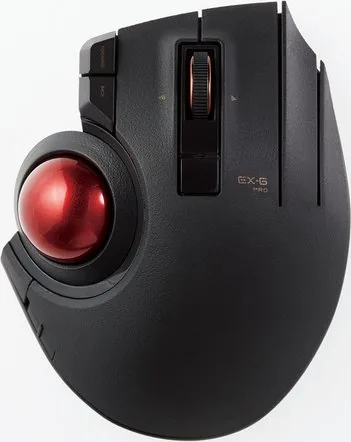
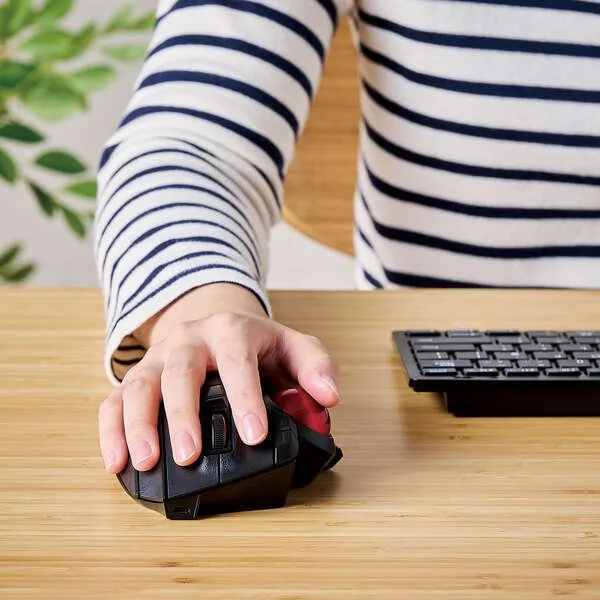
Das Elecom EX-G Pro M-XPT1MRXBK Trackball Modell Kugel schwarz/rot, für Rechtshänder, USB/Bluetooth ist ein leistungsstarkes Peripheriegerät, das auf Komfort und Präzision ausgelegt ist. Dieses Gerät richtet sich speziell an Benutzer, die eine verringerte Handgelenkbelastung während längeren Computersitzungen erfordern. Das Ergonomische Design unterstützt eine natürliche Handposition, die hilft, sich wiederholende Belastungsverletzungen über die Zeit zu verhindern. Es sticht als zuverlässiges Werkzeug für Büroarbeit und kreative Aufgaben gleichermaßen hervor.
Vielseitige Verbindungsoptionen
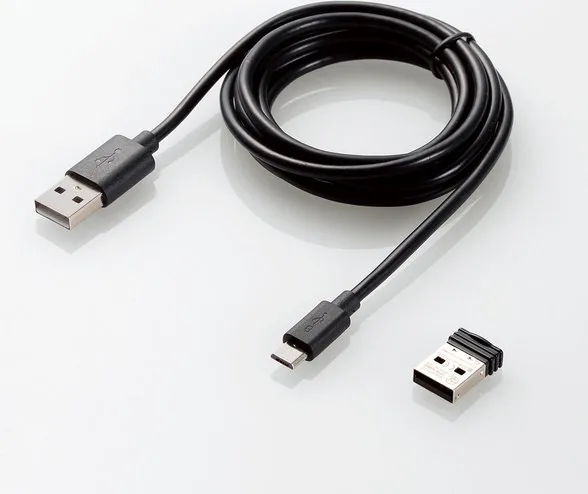
Das Betreiben dieser Einheit ist für alle Erfahrungslevel intuitiv. Sie können zwischen Hochgeschwindigkeitsmodus und Energiesparmodus über den dedizierten Schalter an der Seite wechseln. Dies ermöglicht es Ihnen, Reaktionsfähigkeit mit Akkulaufzeit je nach aktuellen Bedürfnissen auszubalancieren. Für diejenigen, die eine stabile Verbindung benötigen, funktioniert der USB-Kabelanschluss ohne Batterien im Gerät. Drahtlose Benutzer genießen 2.4 GHz oder Bluetooth-Kompatibilität für Flexibilität. Pairing beinhaltet das Halten des Knopfes auf der Unterseite für einige Sekunden, um sich mit Ihrem System zu synchronisieren. Die Empfänger-Einheit ist direkt im Hauptgehäuse zur Sicherheit untergebracht. Drahtlose Reichweite funktioniert gut bis zu 10 Metern auf nicht-magnetischen Oberflächen.
Anpassung und Steuerung
Die Hardware umfasst acht Tasten, einschließlich eines funktionalen Kippräds. Dies ermöglicht extensive Kontrollanpassung durch spezifische Software-Programme wie das Elecom Mouse Assistant. Sie können Makros für Produktivität oder Internet-Nutzungsaufgaben zuweisen. Makros können Mediensteuerungen für einfacheres Unterhaltungsmanagement enthalten. Die Zeiger-Geschwindigkeit ist über einen Schalter einstellbar, der zwischen 500, 1000 und 1500 DPI-Einstellungen umschaltet. Eine LED-Lampe bestätigt das aktuelle Empfindlichkeitslevel durch blinkende unterschiedliche Muster konstant. Dies stellt sicher, dass Sie Ihre Cursorgeschwindigkeit auf einen Blick kennen. Zurück- und Weitertasten streamlienen Ihr Surferlebnis im Web erheblich. Die Trackballoberfläche ist glatt und leicht zu greifen.
Batterie und Pflege
Leistung wird durch Standard-AA-Batterien geliefert, um lange Nutzungsdauern zu gewährleisten. Das Gerät verfügt über einen automatischen Energiesparmodus, um Strom während Inaktivität zu sparen. Eine rote LED-Lampe zeigt niedrige Batteriestände an, bevor das Gerät aufhört zu arbeiten. Reinigung beinhaltet das Entfernen der Kugel, um Staub aus den Kontaktflächen vorsichtig zu löschen. Sicherheitshinweise raten von Feuchtigkeitsbelastung und Fallenlassen des Geräts auf harten Böden ab. Lagerungsempfehlungen schlagen vor, es außerhalb direkter Sonnenschein zu halten, um Materialien zu schützen.
Systemanforderungen und Stabilität
Kompatibilität umfasst Windows 10, 8.1 und 7 sowie macOS High Sierra. Bluetooth 4.0 oder neuer ist für drahtlose Verbindungen auf älteren Systemen erforderlich, um Stabilität sicherzustellen. Treiber installieren sich automatisch für die meisten kabelgebundenen Funktionen ohne zusätzliche Software. Das Gerät unterstützt Standard-AA-alkalische oder wiederaufladbare Batterien für Strom. Diese Flexibilität stellt sicher, dass der Trackball für Jahre des täglichen Gebrauchs funktional bleibt. Der optische Sensor bietet genaues Tracking auf verschiedenen Schreibtisch-Oberflächen ohne Verzögerungsprobleme.
Abmessungen und physikalische Spezifikationen
Die physische Größe misst ungefähr 108 mal 135 mal 48 Millimeter. Es wiegt ungefähr 260 Gramm ohne mitbegriffene Batterien in der Gesamtmasse des Geräts. Der kompakte Empfänger ist sehr leicht bei ungefähr zwei Gramm. Es arbeitet in einem Temperaturbereich von 5 Grad bis 40 Grad Celsius. Luftfeuchtigkeitsniveaus müssen unter neunzig Prozent ohne Kondensation bleiben. Dies stellt sicher, dass die Produktivität hoch bleibt, während Sie sich den ganzen Tag bequem arbeiten. Das Gerät bietet Stabilität und Zuverlässigkeit für Berufsumgebungen.