
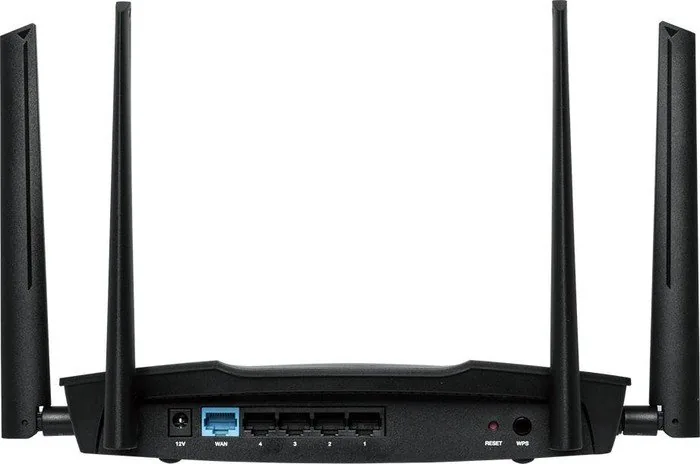
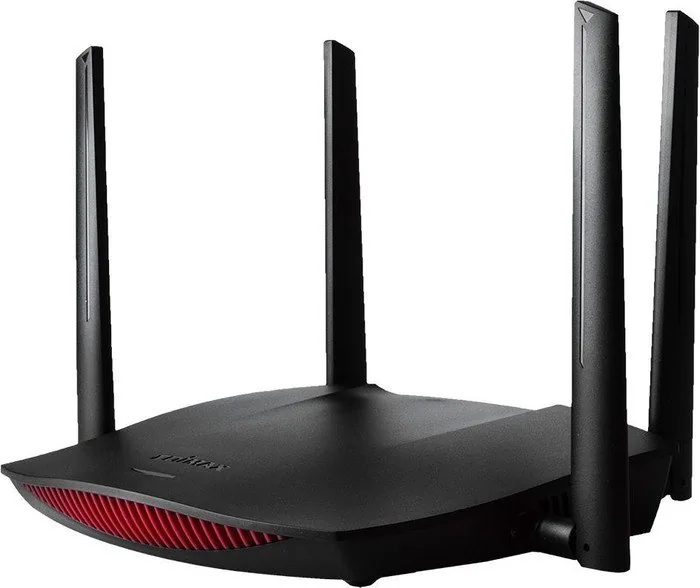
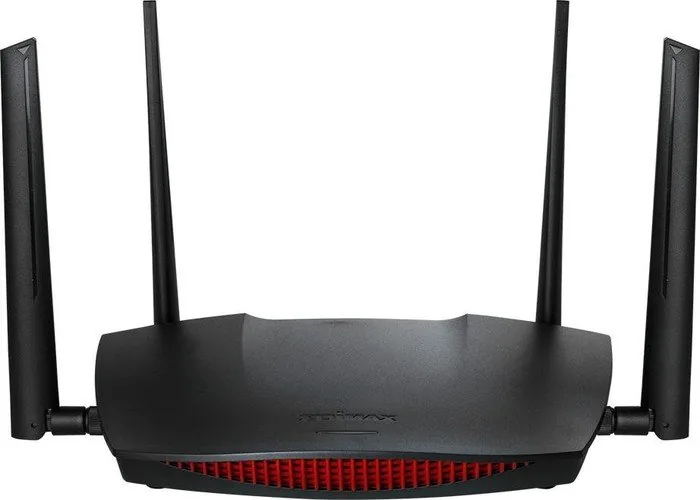
Edimax Gemini RG21S Bedienungsanleitung
PDF-Handbuch · 18 Seiten
Deutsch



Schnelle Überprüfung
Falsche Antwort, bitte versuchen Sie es erneut.
Chatten Sie mit Ihrem Edimax Gemini RG21S-Handbuch mithilfe von KI
Erhalten Sie sofortige KI-Antworten aus Ihrem Edimax Gemini RG21S-Handbuch
Fragen Sie alles über Edimax Gemini RG21S. Antworten stammen aus diesem Handbuch, mit den Seiten, auf denen sie basieren.
Stellen Sie eine Frage
Empfehlen Sie Gemini RG21S?
Ja NeinHäufig gestellte Fragen
The RG21S supports Wi-Fi Router Mode and Access Point Mode. Router Mode connects directly to a modem and provides internet access to wireless and wired clients. Access Point Mode connects to an existing router through a LAN port to add Wi-Fi and Ethernet connectivity.
Ist diese Antwort hilfreich?
Power on the unit, connect a computer, phone, or tablet to the default Edimax wireless network, then open a browser. Visit http://edimax.setup if the setup screen does not appear automatically. Select the desired operating mode and follow the on-screen steps.
Ist diese Antwort hilfreich?
Wi-Fi roaming lets compatible mobile devices automatically switch to the strongest available signal as they move between supported Edimax networking products. It is intended to improve coverage across larger spaces when compatible routers, access points, or extenders are used together.
Ist diese Antwort hilfreich?
Place both products within range. Hold the WPS button on the RG21S for three seconds, then hold the WPS button on the extender for three seconds within two minutes. A successful connection is indicated by the extender's green WPS LED staying on for about 30 seconds.
Ist diese Antwort hilfreich?
The default username is admin and the default password is 1234. These credentials are used with the browser-based management interface at http://edimax.setup. Change the default password after setup to help protect access to network settings.
Ist diese Antwort hilfreich?
Check power and Ethernet connections first, and try another Ethernet cable if needed. Confirm that the WAN connection type is correct in Internet and WAN Setup. Test internet access by connecting a computer directly to the modem, then contact the internet provider if the modem connection also fails.
Ist diese Antwort hilfreich?
Hold the WPS/Reset button for more than 10 seconds until the internet LED begins flashing. Wait several minutes for the device to restart. All custom settings are removed, and the router returns to its original default configuration.
Ist diese Antwort hilfreich?
Vorteile und Nachteile
Vorteile

- Supports both Router Mode and Access Point Mode for flexible installation.
- Offers 2.4 GHz and 5 GHz Wi-Fi alongside wired Ethernet connections.
- Supports Edimax Wi-Fi roaming with compatible routers, access points, and extenders.
- Browser-based management provides access to wireless, WAN, and VPN settings.
- WPS can simplify the addition of compatible roaming range extenders.
Nachteile

- Roaming requires additional compatible Edimax networking products.
- The WAN port is not functional when the device operates in Access Point Mode.
- Default management credentials should be changed to reduce security risk.
- Accessing the setup address may require a device configured for dynamic IP addressing.
- Factory reset deletes all customized network and administration settings.
Produkt Spezifikation
Modem
N/A
WAN
1x 1000Base-T
LAN
4x 1000Base-T
WLAN
WLAN 802.11a/b/g/n/ac (Wi-Fi 5), gleichzeitig
Datenrate
800Mbps (2,4GHz), 1733Mbps (5GHz)
Sicherheit
64/128bit WEP, WPA, WPA2, WPS
Antennen
4x extern (abnehmbar)
Anschlüsse
N/A
Stromverbrauch
Keine Angabe (Verbrauch, Betrieb), Keine Angabe (max. Netzteil-Ausgangsleistung)
Abmessungen
16,0x11,4x3,1cm
Funktionen
MU-MIMO, VPN-Passthrough (PPTP/IPSec), IPv6
Band-Fähigkeit
Dual Band (gleichzeitig)
Produkt Beschreibung
Edimax Gemini RG21S: Nahtloses Dual-Band-Wi-Fi-Roaming
Der Edimax Gemini RG21S sticht als vielseitige Netzwerklosung hervor, die entwickelt wurde, um Ihr digitales Leben unterbrechungsfrei verbunden zu halten. Dieses Gerat ist so konstruiert, dass es sowohl 2,4-GHz- als auch 5-GHz-Frequenzen unterstutzt, sodass Sie fur alle Ihre Gerate das beste Gleichgewicht aus Reichweite und Geschwindigkeit erhalten. Egal ob Sie hochauflsende Videos streamen, online spielen oder von zu Hause arbeiten, dieser Router passt sich Ihren Bedurfnissen an.
Eine der herausragenden Funktionen des RG21S ist seine Unterstutzung fur Wi-Fi-Roaming. Wenn Sie andere kompatible Edimax-Produkte wie Repeater oder Zugangspunkte besitzen, wechselt das System automatisch auf das starkste verfugbare Signal, wenn Sie sich durch Ihr Zuhause oder Buro bewegen. Dies beseitigt tote Zonen und sorgt fur einen reibungslosen Ubergang zwischen Netzwerkknoten ohne Verbindungsabbruch. Der Einrichtungsprozess ist einfach und erlaubt Benutzern, mit wenigen Klicks in der Browser-Oberflache zwischen dem Standard-Router-Modus und dem Zugangspunktmodus zu wechseln.
Sicherheit und Verwaltung werden uber ein intuitives webbasiertes Konfigurationsportal abgewickelt. Sie konnen einfach VPN-Server fur den Fernzugriff einrichten, drahtlose Einstellungen verwalten und die Netzwerkgesundheit uberwachen. Das Gerat wird mit klaren Standardanmeldedaten geliefert, die auf dem Etikett zu finden sind, was den ersten Zugriff einfach macht. Daruber hinaus umfasst die Hardware Status-LEDs, die sofortiges visuelles Feedback zu Stromversorgung, Internetkonnektivitat und WPS-Aktivierung geben, wodurch Sie Probleme schnell beheben konnen. Mit der Einhaltung wichtiger internationaler Sicherheits- und Storstandards ist der RG21S fur Zuverlassigkeit sowohl in Wohn- als auch in kleinen Buroumgebungen gebaut.
Suche nach 67.732 Bedienungsanleitungen online


Marke oder Modell eingeben